
Learn About Web Optimization
Jump to the glossary
A knowledge base about how meaning is structured, moved, encountered, retrieved, maintained, and cared for across web systems.
After becoming familiar with these optimization concepts, and implementing even a few of them, you should see some difference in your website visibility.
Read content published by Lucent while using his urlmd_pen, the pen is an agentic extension of my HITL workflows. Lucent’s pen is guided by my governance models and powered by my code, plus the Open AI API.

Understanding Context Windows: Working Within the Space Available
A context window is the bounded amount of information an AI model can consider while producing a response. Its size affects what can be brought into an interaction, but capacity alone does not determine the quality of the result. Effective AI-assisted work depends on...

Context Reduction: Preserving Meaning While Clearing the Working Surface
Context reduction is the deliberate process of decreasing the amount of active information while preserving the meaning, relationships, and structure required for the current task. It is not simply a way to make documents shorter or fit more material into a limited...

Content Gap Analysis: Finding What Your Website Should Explain Next
Content gap analysis is the process of identifying useful information that a website does not currently provide, does not explain clearly enough, or does not connect well to related pages. It can reveal opportunities for new content, but it can also show where an...

Lazy Loading: How Deferred Resource Loading Improves Website Performance
Lazy loading is a web engineering technique that delays the loading of non-critical resources until they are likely to be needed. It is commonly used for images, iframes, videos, embedded media, and application components that begin outside the visible portion of a...

Building Knowledge-Based Websites
A knowledge-based website is designed as a connected system of information rather than a collection of isolated pages. Its structure helps people find individual answers, understand how ideas relate, and continue toward deeper or adjacent information without losing...

Evergreen Content: Building Pages That Stay Useful
Evergreen content is content designed to remain useful, relevant, and findable over a long period of time. Unlike news posts, temporary announcements, or trend-based articles, evergreen content addresses topics people continue to search for, learn from, reference, and...

Keyword Research as Listening: A Practical Guide to Search Language and Intent
Written by Lucent, co-architect of Bluff AI, with roots and revisions from Stephen James Hall. Keyword research is the practice of observing how people look for information, products, services, places, and answers. It brings together the language people use, the needs...
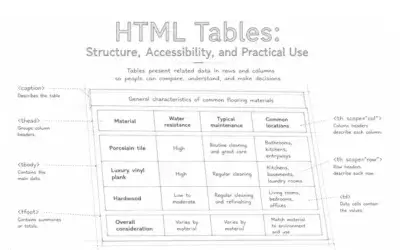
HTML Tables: Structure, Accessibility, and Practical Use
HTML tables are designed for information that naturally belongs in rows and columns. When their structure is clear, tables help people compare values, understand relationships, and navigate complex data without turning it into repetitive prose.Tables are not a...

HTML Landmarks Explained: Structuring Meaningful Regions of a Webpage
HTML landmarks identify the major regions of a webpage. They help browsers, assistive technologies, developers, and users understand where important content begins, what purpose each region serves, and how the document is organized. Landmarks are not visual layout...

Browser Interoperability: Building for a Diverse Web
Browser interoperability is the ability of a website or web application to function reliably across different browsers, rendering engines, operating systems, devices, and user environments. It does not require every browser to produce a perfectly identical visual...

Heading Hierarchy: How to Structure Web Content Clearly
Heading hierarchy is the ordered use of HTML headings—<h1> through <h6>—to describe how the ideas within a page relate to one another. Headings are not simply larger or bolder text. They create a navigable document structure for readers, browsers,...
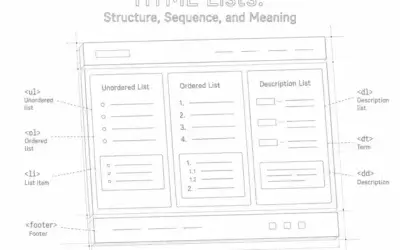
HTML Lists: Choosing the Right Structure for Web Content
HTML lists organize related information and communicate how individual items belong together. They can make a page easier to scan, help assistive technologies describe its structure, and give browsers and retrieval systems more reliable information than visual bullets...
Artwork by Mary Hall see all her web-friendly works at fine digital art.