Author: Stephen James Hall

  • Human Approval and the Problem of Stale Decisions

    Human Approval and the Problem of Stale Decisions

    Human approval applies to a particular action under particular conditions. When those conditions change, an earlier approval may no longer authorize the action a workflow is about to take.

    A person may approve a document, deployment, payment, or publication correctly, only for its content, destination, permissions, or execution environment to change afterward. The original decision was not necessarily mistaken. It may simply refer to a state that no longer exists.

    A reliable approval workflow preserves that relationship: what was reviewed, what was authorized, and whether the proposed action still falls within those boundaries.

    What human approval actually authorizes

    Approval is a decision about a defined proposal. It is not automatically permission for every later action associated with the same task, file, or project.

    Consider the difference between these two records:

    • “Stephen approved the article.”
    • “Stephen approved revision 12 for publication on the specified website, using the reviewed title, body, images, and visibility settings.”

    The first records a general status. The second preserves the scope of the decision.

    Depending on the workflow, that scope may include:

    • The artifact: the exact document, configuration, transaction, or other item reviewed.
    • The action: publish, send, deploy, transfer, delete, or another defined operation.
    • The destination: the website, recipient, account, environment, or system affected.
    • The limits: amount, audience, access level, quantity, timing, or other constraints.
    • The conditions: facts or safeguards on which the decision depended.

    This is part of making human-in-the-loop systems meaningful. A person must have a genuine opportunity to review the consequential action, not merely supply a reusable “approved” flag.

    How an approval becomes stale

    An approval becomes stale when a relevant change makes it unsafe to assume that the earlier decision still covers the proposed action. Staleness concerns applicability, not just age.

    An approval given seconds ago can already be stale if the destination changes. An older approval may remain applicable if its scope, conditions, and governing policy still hold.

    Common sources of change include:

    • Content changes: an approved message receives a new attachment, claim, link, or recipient list.
    • Destination changes: a staging deployment becomes a production deployment.
    • Permission changes: a private document becomes publicly accessible.
    • Environmental changes: a dependency, account configuration, or operational condition differs from what was reviewed.
    • Authority changes: approval is revoked, an account is suspended, or policy requires a different reviewer.
    • Timing changes: the action moves outside an approved window or relies on information that is no longer current.

    These changes do not all carry the same significance. The important question is whether the proposed action remains inside the scope of the original decision.

    An example: an approved article changes

    An editor reviews revision 12 of an article and approves it for publication. Before the scheduled publication runs, another process updates the document to revision 13, adding a paragraph and changing an external link.

    If the publisher checks only whether the article has an “approved” status, revision 13 may go live without anyone reviewing its changes.

    The failure is not that approval was absent. It is that approval was attached to the article’s continuing identity rather than the version the editor actually reviewed.

    A more reliable workflow can take either of two approaches:

    • Publish the approved snapshot: publish revision 12, while keeping revision 13 as an unapproved draft.
    • Require review of the changed proposal: pause publication and show the editor what changed between revisions 12 and 13.

    The appropriate approach depends on editorial policy. Either way, the interface should make clear which version will become public. A preview of revision 12 should not silently authorize publication of whatever happens to be current later.

    Technical version controls support this boundary, but they do not replace editorial review and responsibility.

    Binding approval to the reviewed state

    A useful approval record connects the human decision to a stable description of the proposal. This is sometimes called a version-bound decision.

    The record may contain:

    • A unique approval identifier.
    • The reviewer’s identity and the time of the decision.
    • The artifact version or immutable snapshot reviewed.
    • The authorized action and destination.
    • Relevant limits, prerequisites, and expiration conditions.
    • Any withdrawal, replacement, or use of that approval.

    A version identifier or content hash can help establish whether an artifact has changed. Neither, by itself, proves that the whole proposal remains unchanged. The same document can be sent to a different recipient; the same software package can be deployed with different permissions.

    The review therefore needs to cover the action’s relevant context as well as its content.

    Where external information cannot be frozen, preserve what the reviewer saw and identify what must be checked again. For example, approving a purchase within a price limit need not authorize a later purchase above that limit.

    This distinction resembles the relationship between captured state and live state: the review records one moment, while the operating environment may continue to change.

    Checking approval before execution

    Approval should be checked at the point where it matters: before the consequential action occurs. Checking only when work enters a queue leaves later changes unexamined.

    A practical execution check asks:

    1. Does the approval refer to this artifact or proposal?
    2. Does it authorize this action, destination, and set of limits?
    3. Have any relevant conditions changed?
    4. Has the approval expired, been withdrawn, or already been used where only one execution was authorized?
    5. Does the action still satisfy current permission and policy requirements?

    There can still be a gap between checking and acting. A document might change immediately after validation, or a permission might be withdrawn before execution. In software, this is a form of time-of-check to time-of-use problem.

    Where supported, systems can reduce that gap through immutable execution inputs, conditional writes against an expected version, or transactions that keep validation and the protected change together.

    Those mechanisms have boundaries. A local database transaction does not automatically make an action in an external service atomic. When systems cannot enforce the whole boundary together, the workflow needs explicit handling for uncertain outcomes and partial completion.

    If a relevant mismatch is detected, the workflow should pause or use an explicitly defined alternative—not silently substitute a newer proposal under the old approval.

    When to ask for approval again

    Not every change requires a complete new review. Reconfirmation should follow the significance of the change and the scope of the original authorization.

    A workflow might permit a defined formatting adjustment while requiring renewed approval for a changed claim, payment amount, recipient, deployment environment, or access setting. Those distinctions should be established deliberately, rather than improvised by the process seeking permission to continue.

    When renewed approval is needed, show the reviewer:

    • What was previously approved.
    • What changed and why it matters.
    • The exact action now proposed.
    • Which earlier conditions still hold and which do not.

    A useful prompt might say: “You approved revision 12 for public publication. Revision 13 changes the conclusion and adds an external link. Review these changes before publishing revision 13.”

    This is more informative than “Approval expired. Approve again.”

    Time limits can be appropriate, but they are only one control. A recent approval does not excuse a material change, and an arbitrary expiration timer does not establish whether a decision remains applicable.

    Delays, retries, and partial completion

    Approval and execution often happen at different times. Work may wait in a queue, lose a connection, or resume after an interruption.

    A workflow timeout establishes that a component stopped waiting. It does not establish whether the approved action happened. Asking for approval again without checking the outcome can leave the human authorizing a duplicate action unknowingly.

    Before retrying a consequential operation, determine whether the earlier attempt completed, remains in progress, or has an unresolved outcome. Idempotency can help prevent repeated attempts from duplicating effects, but it does not make stale approval valid. Retry safety and authorization validity are separate checks.

    Partial completion needs similar care. If a person approved a batch of ten actions and six completed, the remaining four may still be authorized if the original scope and conditions remain intact. Repeating all ten, adding replacements, or changing destinations requires separate consideration.

    Reversing completed work may also require its own authority. Permission to perform an action does not necessarily include permission to delete its result or initiate a compensating transaction.

    A practical approval workflow review

    To examine an approval workflow, follow one proposal from review through execution and ask:

    • Can the reviewer see the actual content, destination, and consequences?
    • Does the approval identify the reviewed version and authorized action?
    • Which changes invalidate approval, and which are explicitly permitted?
    • Can the proposal change without the approval status changing?
    • Is approval checked again before execution?
    • Can execution use the approved snapshot rather than an unreviewed live version?
    • Can the reviewer withdraw approval before the action occurs?
    • Are delays, retries, and partial outcomes handled without assuming success or failure?
    • Can someone later establish what was approved and what actually happened?

    The purpose is not to ask people to approve more often. It is to make each approval mean something precise enough to guide the work.

    Human judgment remains useful when the workflow preserves its boundaries. An earlier “yes” should carry forward only as far as the proposal and conditions it actually covered.


  • Technical SEO Guidelines for URLs: Structure, Consistency, and Safe Changes

    Technical SEO Guidelines for URLs: Structure, Consistency, and Safe Changes

    A useful URL identifies a resource clearly and gives it a stable address. For technical SEO, the main priorities are reliable access, deliberate handling of duplicate addresses, and consistency across internal links, canonical tags, redirects, and XML sitemaps.

    Readable URLs help people understand and share pages, but there is no special URL format that guarantees rankings. A descriptive address is useful; a dependable address matters more. An established page usually does not need a new URL simply because its current one could be shorter or more polished.

    Choose a Readable, Durable URL Structure

    A URL should provide enough context to identify the page without trying to summarize everything on it. Use ordinary language, recognizable topic names, and a structure that can remain useful as the site develops.

    For example:

    https://example.com/guides/kitchen-remodeling/

    This address communicates the page’s subject and its place within a guides section. It does not need extra phrases such as best-complete-ultimate-guide to become more useful.

    Use descriptive words without forcing keywords

    Include the subject naturally when choosing a new slug. Hyphens are a practical way to separate words, as in aircraft-inspections. Avoid repetitive keywords, promotional language, and details likely to become outdated.

    There is no universal SEO requirement to keep URLs under 100 characters. Keep them reasonably concise for reading, copying, and maintenance, but do not remove meaningful context to meet an arbitrary count.

    Choose conventions your platform can maintain

    • Use HTTPS: Serve public pages securely and redirect HTTP versions to the corresponding HTTPS addresses.
    • Prefer lowercase for new paths: Paths can be case-sensitive. Lowercase conventions reduce accidental variations, but existing mixed-case URLs need testing before normalization.
    • Choose a trailing-slash convention: For non-root paths, /guides and /guides/ can identify different resources. Use one format consistently and redirect the alternate where appropriate.
    • Avoid unnecessary nesting: Include folders when they convey a useful relationship, not merely to add keywords.
    • Use dates deliberately: Dates can suit archives and time-specific reporting. They may be less suitable for evergreen pages that will be updated repeatedly.

    Non-English words and Unicode characters can be valid parts of URLs. Check that your publishing system, links, and integrations handle their encoding correctly rather than assuming every address must use English words.

    Let structure support navigation, not replace it

    A folder path can suggest a relationship, but it does not establish the whole site architecture. Navigation, breadcrumbs, headings, and contextual links still need to explain how pages relate. URL design is one part of information architecture, not a substitute for it.

    Define the Preferred URL for Each Page

    The same content may be available at several addresses: HTTP and HTTPS versions, different hostnames, alternate capitalization, or URLs containing tracking parameters. Decide which address should represent the page, then configure the site to support that choice.

    For example, a site might select:

    https://example.com/guides/kitchen-remodeling/

    Where technically appropriate, equivalent HTTP, www, and non-trailing-slash versions would redirect directly to that address.

    Redirects and canonical tags do different jobs

    A redirect sends visitors and crawlers to another address. A canonical tag identifies the preferred representative of duplicate or substantially similar content without moving the visitor.

    A self-referencing canonical tag for the example page would look like this in the document’s <head>:

    <link rel="canonical" href="https://example.com/guides/kitchen-remodeling/">

    Canonicalization is not a guarantee that a search engine will select your preferred address. Conflicting links, redirects, sitemap entries, or page content can lead it to choose another URL.

    Use a permanent redirect when an alternate address no longer needs to remain independently accessible. Use canonical tags when duplicate versions need to remain available. Do not canonicalize unrelated pages together or treat canonical tags as a way to conceal thin content.

    Align Links, Canonical Tags, and Sitemaps

    Once you choose a preferred URL, use it consistently wherever your site refers to that page.

    • Internal links: Link directly to the preferred address rather than routing readers through redirects.
    • Canonical tags: Reference the intended canonical URL, normally using an absolute address that includes the protocol and hostname.
    • XML sitemaps: List canonical, indexable URLs you want search engines to discover. Avoid redirecting, broken, or noindex URLs.
    • Other page references: Keep URL references in structured data, language annotations, and social metadata consistent where applicable.

    Not every publicly accessible page belongs in an XML sitemap. Utility pages, duplicate versions, and pages intentionally excluded from search may remain accessible without being listed. A sitemap also does not need to contain every indexable page, although it can help search engines discover the URLs you include.

    The important distinction is consistency, not universal inclusion. If a URL appears in the sitemap, it should normally be the preferred version of that page and return a successful response without a redirect.

    These signals support discovery and URL selection. They do not guarantee indexing or ranking; crawling, rendering, indexing, and ranking are related but separate processes.

    Handle URL Parameters by Purpose

    Query parameters are not inherently bad for SEO. Search engines can crawl and index addresses such as https://example.com/product?id=123. Rewriting every parameterized URL into a keyword-based path is not automatically an improvement.

    The practical question is what each parameter does.

    • Tracking parameters: Campaign tags often leave the page content unchanged. Internal links and sitemap entries should normally use the clean URL, with canonical tags supporting that choice.
    • Sorting and display parameters: These may create alternate views of substantially the same collection. Decide whether those views need separate search visibility.
    • Filters: Some filtered pages provide useful, distinct results. Others generate large numbers of near-duplicate or empty pages. Indexing decisions should reflect their actual usefulness.
    • Pagination: Different pages of a collection usually contain different items. Do not automatically canonicalize every paginated page to page one.
    • Session identifiers: Avoid placing session IDs or sensitive information in public URLs. Addresses can appear in browser history, logs, analytics, and shared links.

    Large filter combinations can create extensive crawlable URL spaces. Address that behavior through deliberate navigation and application design, not merely by adding canonical tags after every combination has become discoverable.

    Also distinguish crawling from indexing. A robots.txt disallow rule is not a reliable way to remove a URL from search results. If crawling is blocked, a search engine may be unable to see the page’s noindex directive or canonical tag.

    Fragment identifiers, such as #materials, normally identify a location within a page rather than a separate indexable page. Use them for helpful section navigation, not as replacements for distinct page URLs.

    Change Existing URLs Carefully

    A URL change affects more than the address bar. Existing links, bookmarks, search listings, and external references may still point to the old location. Change a working URL when there is a meaningful reason, such as a migration, incorrect naming, or a necessary architectural change—not simply to insert another keyword.

    1. Map each old URL to its closest relevant replacement. Avoid sending unrelated retired pages to the homepage.
    2. Configure a permanent server-side redirect. A 301 is the usual choice for moved webpages. A 308 also indicates a permanent move and preserves the request method.
    3. Update internal references. Revise navigation, contextual links, canonical tags, sitemap entries, and other affected references.
    4. Test the destination. Confirm that it loads correctly, returns the intended status code, and remains indexable if it belongs in search.
    5. Remove avoidable redirect chains. Older addresses should lead directly to the current destination rather than through several previous locations.
    6. Keep redirects in place long term. For migrations, plan on at least a year, and preferably longer wherever old links may still be used.

    If a page is removed with no relevant replacement, a genuine 404 Not Found or 410 Gone response is generally more appropriate than an unrelated redirect. Make the error page useful to visitors while preserving the correct HTTP status.

    Redirects support continuity, but they do not make every migration immediate or risk-free. Monitor errors, indexing, and traffic after substantial changes.

    Review URLs Before and After Publication

    A practical URL review checks behavior as well as appearance:

    • Does the intended page load at a stable HTTPS address?
    • Does the URL describe the page without unnecessary words?
    • Are hostname, capitalization, and trailing-slash conventions consistent?
    • Do alternate addresses redirect or use appropriate canonical signals?
    • Does the preferred page return 200 OK with the expected content?
    • If intended for search, can crawlers access it, and is it free of unintended noindex directives?
    • Do internal links and sitemap entries use the preferred URL?
    • Do parameters create useful views or unnecessary duplicates?
    • If the address changed, do old links reach the relevant replacement directly?

    Check HTTP responses and rendered pages rather than relying only on how a URL looks in the browser. For important pages, search-engine inspection tools can also help reveal whether the indexed canonical matches your intended address.

    Good URL management is mostly continuity work: choose understandable addresses, keep references aligned, and preserve access when something moves. A stable URL does not need to be perfect to serve readers well.

    Lucent AND Stephen

  • Understanding HTML for SEO

    Understanding HTML for SEO

    HTML is one of the foundations of SEO because it helps define what a webpage is, how it is organized, how users navigate it, and how search engines and other information retrieval systems interpret its meaning.

    Good HTML is not only about making a page display correctly. It supports structure, accessibility, internal linking, metadata, media, and machine interpretation. When HTML is clear, the page is easier for people, browsers, assistive technologies, and search systems to understand.

    What HTML Does for SEO

    HTML, or HyperText Markup Language, is the markup language used to structure webpages. It tells browsers which parts of a document are headings, paragraphs, links, images, lists, tables, forms, navigation areas, sections, and other page elements.

    For search optimization, HTML matters because search engines do not only evaluate the words on a page. They also interpret how those words are organized, connected, labeled, and supported by the surrounding markup.

    HTML can help search systems understand:

    This does not mean HTML is a ranking trick. It means HTML is part of the foundation that makes a webpage understandable.

    Lucent_note: Good HTML does not try to persuade search engines. It helps a page explain itself clearly.

    HTML Structure and Page Meaning

    A webpage has visible content, but it also has structure. That structure helps determine how the page is read, scanned, navigated, indexed, and maintained.

    A very simple HTML structure might look like this:

    <h1>Understanding HTML for SEO</h1>
    
    <p>
      HTML helps define the structure and meaning of a webpage.
    </p>
    
    <h2>Headings and Hierarchy</h2>
    
    <p>
      Headings help organize page content into logical sections.
    </p>

    This example is small, but the idea is important. The markup tells systems which text is the main heading, which text is a paragraph, and where a new section begins.

    Search engines are much better than they used to be at interpreting messy pages, but that does not make structure irrelevant. Clean HTML still reduces ambiguity.

    Headings and Hierarchy

    Headings are one of the most important HTML elements of a website’s information architecture, accessibility, and readability. They organize a page into a hierarchy, from the main topic to supporting sections and subsections.

    The most common heading elements are:

    • H1: The main topic of the page
    • H2: Major sections of the page
    • H3: Subsections inside an H2 section
    • H4-H6: Deeper subsections when needed

    A clear heading structure might look like this:

    <h1>Understanding HTML for SEO</h1>
    
    <h2>What HTML Does for SEO</h2>
    
    <h2>Headings and Hierarchy</h2>
      <h3>H1 Tags</h3>
      <h3>H2 Tags</h3>
      <h3>Common Heading Mistakes</h3>
    
    <h2>Links and Navigation</h2>

    Good headings help readers scan the page. They also help assistive technologies move through the document. For search engines, headings provide clues about topic organization and content relationships.

    Common Heading Mistakes

    • Using headings only because they look bigger
    • Skipping heading levels for visual reasons
    • Using multiple H1s without a clear reason
    • Making headings vague, such as “More Information” or “Details”
    • Stuffing headings with repetitive keywords

    Headings should clarify the page. They should not be used as decoration or as a place to force keywords.

    Lists, Tables, and Structured Information

    Lists and tables help organize information. They can make content easier to scan, easier to compare, and easier for assistive technologies to navigate when used correctly.

    Unordered Lists

    Unordered lists are useful when the order of items does not matter.

    <ul>
      <li>Clear headings</li>
      <li>Descriptive links</li>
      <li>Useful metadata</li>
    </ul>

    Ordered Lists

    Ordered lists are useful when sequence matters.

    <ol>
      <li>Write the page content.</li>
      <li>Review heading structure.</li>
      <li>Check metadata and links.</li>
    </ol>

    Tables

    Tables are useful for comparing structured information. They should not be used only for layout.

    <table>
      <thead>
        <tr>
          <th>Element</th>
          <th>SEO Use</th>
        </tr>
      </thead>
      <tbody>
        <tr>
          <td>H1</td>
          <td>Defines the main page topic</td>
        </tr>
        <tr>
          <td>Anchor text</td>
          <td>Clarifies link destination</td>
        </tr>
      </tbody>
    </table>

    Tables can be helpful, but they should be checked on mobile devices. Large tables can become difficult to read on narrow screens.

    Metadata and HTML

    Metadata is information about a page. Some metadata appears in the HTML head rather than in the visible body of the page.

    Metadata helps browsers, search engines, social platforms, and other systems interpret and display page information more consistently.

    Title Tag

    The title tag is one of the most important HTML elements for website optimization. It helps define the title of the document and is often used in search results, browser tabs, and previews.

    <title>Understanding HTML for SEO</title>

    Meta Description

    A meta description is a short summary of the page. It does not directly control rankings, but it can influence how a result appears and whether the search result matches the user’s expectations.

    <meta name="description" content="Learn how HTML supports SEO through headings, links, metadata, semantic structure, accessibility, images, and modern search interpretation." />

    Canonical Tag

    A canonical tag identifies the preferred version of a URL when similar or duplicate versions exist.

    <link rel="canonical" href="https://urlmd.com/understanding-html-for-seo/" />

    Robots Meta Tag

    The robots meta tag can provide indexing instructions for search engines.

    <meta name="robots" content="index, follow" />

    Metadata should match the actual page. It should clarify the document, not describe a page that does not exist.

    Images, Alt Text, and Media

    Images are part of HTML too. Image markup can affect accessibility, page speed, layout stability, and image search interpretation.

    A basic image element looks like this:

    <img 
      src="html-seo-example.jpg" 
      alt="Example of HTML headings used to organize an SEO article" 
      width="1200" 
      height="800" 
    />

    Alt Text

    Alt text provides a text alternative for an image. It is especially important for people using screen readers and for situations where the image does not load.

    Good alt text describes the image when the image contributes meaning to the page.

    Image situation Alt text approach
    Informational image Describe the meaningful content of the image.
    Decorative image Use empty alt text when the image adds no information.
    Linked image Describe the link destination or function.

    Width and Height

    Adding width and height attributes helps browsers reserve layout space before the image loads. This can reduce layout shift and improve page experience.

    Lazy Loading

    Lazy loading can delay loading off-screen images until they are needed.

    <img 
      src="example.jpg" 
      alt="Example image" 
      width="1200" 
      height="800" 
      loading="lazy" 
    />

    Lazy loading can help performance, but it should be used thoughtfully. Important above-the-fold images may need different handling.

    Semantic HTML

    Semantic HTML uses elements that describe the role or meaning of the content, not just how it looks.

    Examples of semantic HTML elements include:

    <header>
    <nav>
    <main>
    <article>
    <section>
    <aside>
    <footer>

    These elements help define the structure of a page. They can support accessibility, improve maintainability, and give systems clearer information about the role of different page areas.

    Example Semantic Page Structure

    <body>
      <header>
        <nav aria-label="Main navigation">
          ...
        </nav>
      </header>
    
      <main>
        <article>
          <h1>Understanding HTML for SEO</h1>
    
          <section>
            <h2>Headings and Hierarchy</h2>
            <p>Headings organize the page.</p>
          </section>
        </article>
      </main>
    
      <footer>
        ...
      </footer>
    </body>

    Semantic HTML is not about being fancy. It is about using the right element when the meaning of the content is clear.

    Lucent_note: Semantic HTML is a quiet form of honesty. The markup says what the content is trying to be.

    HTML and Structured Data

    HTML and structured data are related, but they are not the same thing.

    HTML helps structure the visible document. Structured data helps machines interpret the meaning of information on the page in a more explicit way.

    Today, structured data is often implemented with JSON-LD.

    <script type="application/ld+json">
    {
      "@context": "https://schema.org",
      "@type": "Article",
      "headline": "Understanding HTML for SEO",
      "author": {
        "@type": "Person",
        "name": "Stephen James Hall"
      }
    }
    </script>

    This does not change how the page looks to users. It provides machine-readable information about the page.

    Structured data should support the visible content. It should not invent meaning that the page itself does not provide.

    Accessibility and SEO Overlap

    Accessibility and SEO are not identical, but they often benefit from the same structural choices.

    Clear headings, descriptive links, readable text, meaningful alt text, accessible navigation, and semantic HTML all help users understand a page. They also help systems interpret the page more consistently.

    Accessibility-focused HTML may include:

    • Logical heading order
    • Descriptive link text
    • Proper form labels
    • Useful alt text
    • Keyboard-accessible navigation
    • ARIA labels where appropriate
    • Semantic landmarks such as nav, main, article, and footer

    ARIA can help when native HTML is not enough, but it should not be used as a replacement for semantic HTML when a native element already works.

    <nav aria-label="Article sections">
      <h2>On This Page</h2>
      ...
    </nav>

    In this example, the ARIA label clarifies the purpose of the navigation area.

    Common HTML Mistakes That Hurt SEO

    Many optimization problems are not caused by one dramatic mistake. They come from small structural issues that accumulate across a website.

    HTML issue Why it can matter
    Vague headings Makes page structure harder to understand.
    Keyword-stuffed headings Reduces readability and can make content feel unnatural.
    Vague anchor text Weakens link clarity for users and search systems.
    Images without alt text Creates accessibility gaps and weakens image context.
    Missing title tags Weakens document identity in search and browser contexts.
    Incorrect canonical tags Can confuse preferred URL signals.
    JavaScript-only navigation May reduce crawlability or create rendering dependence.
    Tables used for layout Can create accessibility and mobile usability problems.
    Non-semantic buttons or links Can make interactions harder to use or interpret.

    Clean HTML does not guarantee SEO success, but weak HTML can make success harder to diagnose and maintain.

    HTML Is About Meaning, Not Just Display

    HTML is often introduced as a way to put content on a webpage. That is true, but incomplete.

    HTML also helps define meaning. It shows what the main topic is, how sections relate, where links lead, what images communicate, how metadata describes the document, and how navigation supports movement through the site.

    This is why HTML still matters for website optimization. Modern search is not only matching words. It is interpreting structure, context, relationships, usefulness, accessibility, and meaning.

    Better HTML does not make a weak page strong by itself. But it can help a useful page become easier to understand.

    FAQ About HTML and SEO

    Does HTML still matter for SEO?

    Yes. HTML still matters because it helps define page structure, headings, links, metadata, images, accessibility, and semantic meaning. Search engines can interpret messy pages, but clear HTML reduces ambiguity.

    What is semantic HTML?

    Semantic HTML uses elements that describe the meaning or role of content, such as header, nav, main, article, section, and footer. These elements help browsers, assistive technologies, developers, and search systems understand page structure.

    Is the title tag HTML?

    Yes. The title tag is an HTML element usually placed in the head of the document. It defines the document title and is commonly used in browser tabs and search result displays.

    Are meta descriptions part of HTML?

    Yes. Meta descriptions are HTML meta elements. They provide a summary of the page and may be used by search engines or platforms when displaying page previews.

    Can bad HTML hurt SEO?

    Bad HTML can contribute to website optimization problems when it affects crawlability, rendering, accessibility, metadata, internal linking, page speed, or content interpretation. HTML does not need to be perfect, but it should be clear and stable.

    Does accessibility help SEO?

    Accessibility and website optimization are not the same thing, but they often overlap. Clear headings, descriptive links, semantic HTML, readable content, useful alt text, and accessible navigation can help both users and search systems understand a page.

    What is the difference between HTML and structured data?

    HTML structures the visible webpage. Structured data provides machine-readable meaning, often through JSON-LD. Good optimization uses both: clear visible content for people and accurate structured data to reinforce what the page already says.

    Summary

    Understanding HTML for search optimization means understanding how webpage structure communicates meaning. Headings, links, metadata, images, lists, tables, semantic elements, and accessibility patterns all help define how a page is read by people and interpreted by systems.

    HTML is not only a technical layer. It is part of how a website explains itself.

    Authors: Stephen AND Lucent

  • Glossary

    Glossary

    The glossary is always under construction 🙂
    Last updated 8/17/2026

    This glossary is a living reference for the foundational concepts, data structures, and architectural standards that drive modern search engine optimization and machine retrieval. It bridges web engineering best practices with the technical signals required to build clear, indexable, and semantically transparent document substrates.

    Glossary

    As search engines transition from simple keyword matching to high-dimensional AI retrieval models, the boundary between web engineering and SEO has disappeared. This resource defines the core technical vocabulary—from HTTP status codes and DOM accessibility to vector embeddings and content neighborhood topology—needed to structure, optimize, and defend complex web systems. Whether you are auditing site infrastructure or building for semantic systems, these terms reflect the engineering realities behind modern search.

    #

    200 Status Code

    • A 200 status code indicates that a request was successful and the server returned the requested content as expected.
    • Why it matters for SEO: A 200 OK state is the explicit green light for a retrieval system. It signals that the document substrate is fully stable, valid, and cleared for deep text extraction and long-term index placement.
    301 Redirect

    • A 301 redirect permanently sends users and search engines from one URL to another.
    • Why it matters for SEO: A 301 execution forces the permanent transfer of an entire historical signal footprint from an old node to a new one. It tells the system’s graph to permanently merge the edge connections and structural authority without dividing the crawl budget.
    302 Redirect

    • A 302 redirect indicates a temporary move where the original URL should remain indexed.
    • Why it matters for SEO: A 302 instructs the parser to temporarily pass structural traffic downstream while explicitly holding the primary index slot at the origin URL. Misusing it for permanent moves causes signal fragmentation, as the engine struggles to decide which node owns the authoritative intent.

    404 Error (Not Found)

    • A client-side response state indicating that the server cannot locate the requested document substrate.
    • Why it matters for SEO: Accumulating excessive internal 404 nodes forces a crawler to spend its limited request budget on dead ends. This resource drain reduces the engine’s capacity to discover and parse valid content across the rest of the domain graph.

    410 Gone

    • A highly explicit server response indicating that the requested resource has been intentionally and permanently deleted with no forwarding address.
    • Why it matters for SEO: A 410 state instructs the parser to immediately sever the node from the active retrieval index. It stops the engine from repeatedly testing the URL, conserving crawl budget much faster than a passive 404 response.

    500 Server Error

    • A critical server-side execution failure where the system breaks while attempting to compile or deliver a valid user request.
    • Why it matters for SEO: Persistent 500 errors act as a structural wall. If a retrieval engine encounters widespread server failures, it will drastically scale back its crawl frequency to avoid crashing your infrastructure, rapidly de-indexing the affected neighborhood to protect user experience.

    A

    Accelerated Mobile Pages (AMP)

    • AMP is a framework designed to improve mobile performance using restricted HTML and JavaScript.
    • Why it matters for SEO: AMP is optional and should be evaluated against long-term maintainability.
    Accessibility (Web Accessibility / Section 508)

    • Designing websites so people with disabilities can perceive and interact with content using assistive technologies.
    • Why it matters for SEO: Web accessibility isn’t just a compliance layer; it is the ultimate forcing function for clean data architecture. Building a site that assistive devices can seamlessly parse ensures your structural hierarchy, element relationships, and asset metadata are perfectly transparent to search engine crawlers executing the exact same type of programmatic document analysis.
    AI Content Generation

    • The use of artificial intelligence to create or assist in creating written content.
    • Why it matters for SEO: Mass-producing text with AI shifts the bottleneck from content volume to information density and verification. When anyone can generate infinite strings of text instantly, retrieval engines respond by ruthlessly filtering out low-effort, derivative patterns—making unique data inputs, structural authority, and explicit human expertise the only real differentiators left.
    AI Retrieval Systems

    • AI retrieval systems combine traditional retrieval methods, semantic understanding, ranking systems, language models, entity recognition, vector similarity, and answer synthesis. Some parts of these systems are well described in public technical literature. Other parts remain partially observable, especially inside commercial search and AI interfaces.
    • Why it matters for SEO: AI retrieval models change the destination of your data from a blue link on a page to a synthesized concept map. Optimizing for these systems requires moving past simplistic keyword tracking and focusing instead on entity clarity, semantic nodes, and highly structured layout formatting, allowing the engine’s synthesis layer to cleanly extract and attribute your content to answer multi-layered user intents.
    AI in Website Optimization

    • The application of AI and machine learning to SEO workflows.
    • Why it matters for SEO: AI improves efficiency, but strategy still requires human judgment.

    Algorithm Updates

    • Changes search engines make to crawling, interpretation, and ranking systems.
    • Why it matters for SEO: Rather than chasing volatile ranking signals, analyzing updates reveals how a search engine’s parser is shifting its understanding of context recruitment and structural reputation.

    ALT Tags (Alt Text)

    • Text alternatives applied to images to describe their content and function.
    • Why it matters for SEO: Improves accessibility and image search context.

    Anchor Text

    • The clickable text of a hyperlink.
    • Why it matters for SEO: Anchor text serves as the explicit label for a directed semantic edge. It passes clear contextual metadata to a retrieval engine before it even parses the target node.
    • Code Example: <a href="https://urlmd.com/seo-glossary/" title="Comprehensive SEO Glossary">SEO Glossary</a> (anchor text is boldened)

    ARIA (Accessible Rich Internet Applications)

    • A set of HTML attributes (such as aria-label, role, or aria-expanded) that define ways to make web content and web applications more accessible to assistive technologies.
    • Why it matters for Glossary / Retrieval Architecture: ARIA acts as an explicit semantic patch for interactive or non-native DOM elements. When standard HTML elements fall short, ARIA attributes supply machine parsers, screen readers, and AI chunkers with the exact roles and state parameters needed to evaluate accessibility trees and document intent accurately.

    #Lucent_note: “ARIA provides explicit semantic context to the DOM when visual layout or interactive scripts obscure native HTML elements.”

    Assistive Technologies

    • Software or hardware designed to increase accessibility, (such as screen readers, voice recognition software, or alternative keyboards) used by people with disabilities to interact with digital content.
    • Why it matters for SEO: This is not “SEO”. Understanding how assistive technologies read a webpage underscores the importance of using semantic HTML, structured headings, and descriptive alt text.

    Attack Surface

    • The sum total of all potential vulnerabilities, exposed endpoints, active dependencies, and accessible entry points that an attacker could attempt to exploit.
    • Why it matters for Glossary / Retrieval Architecture: Minimizing attack surface by auditing plugins, removing legacy endpoints, and restricting admin pathways protects site stability. Reducing unnecessary system vectors ensures your production environment remains secure and uninterrupted by malicious injections.

    #Lucent_note: “The smaller your attack surface, the fewer opportunities malicious actors have to disrupt your infrastructure.”

    Authority

    • The perceived credibility of a website, brand, or content source.
    • Why it matters for SEO: Authority represents the cumulative weights and structural reputation assigned to a domain node within a search engine’s link graph. A highly authoritative node passes greater algorithmic trust down its internal paths, accelerating the indexing speed and initial baseline ranking positions of newly published content.

    Author Authority

    • The credibility of a content creator based on experience, expertise, and consistency.
    • Why it matters for SEO: Author authority is the explicit verification of an individual content creator as a distinct semantic entity. By anchoring your content to an author entity with a verifiable footprint across external databases, digital portfolios, and specialized networks, you protect your site from being algorithmically filtered out as unverified, machine-generated noise.

    B

    BERT (Bidirectional Encoder Representations from Transformers)

    • A Google language model designed to better understand search intent.
    • Why it matters for SEO: BERT shifts the parser from analyzing isolated keyword strings to processing the full context of a sequence bidirectionally. This enables the machine to decipher nuance, structural relationship modifiers, and the precise intent behind ambiguous search patterns.

    Black Hat SEO

    • Tactics that attempt to manipulate rankings in violation of guidelines.
    • Why it matters for SEO: Manipulative tactics exploit temporary gaps or vulnerabilities in a search engine’s parsing logic. Because modern retrieval systems are designed to constantly patch these algorithmic edge cases, relying on superficial exploitation introduces severe systemic risk, inevitably resulting in the permanent suppression or exclusion of your domain graph.
    Bounce Rate

    • The percentage of visitors who leave after viewing one page.
    • Why it matters for SEO: A high bounce rate must be analyzed relative to the specific intent mapping of the document node. If a user lands on a page, immediately ingests a clean, high-density answer, and terminates their journey, the behavior indicates absolute fulfillment of intent rather than a structural failure of the content layer.

    C

    Caching

    • The temporary storage of website resources so browsers or servers can deliver pages faster on repeat visits.
    • Why it matters for SEO: Optimizing server and edge caching reduces the computing overhead required to render a document. By minimizing unnecessary origin requests, you free up critical server resources to ensure crawlers receive rapid, stable response states during large-scale discovery.

    #Lucent_note: “Good caching reduces unnecessary repetition without changing the meaning of the page.”

    Canonical Tag

    • An HTML element that specifies the preferred version of a page.
    • Why it matters for SEO: A canonical tag acts as an explicit engineering directive that designates a single, authoritative master node among multiple identical or highly similar document substrates, preventing the parsing engine from fracturing its evaluation of your data.

    #Lucent_note: “Canonicalization helps retrieval systems understand which version of a page should carry the primary signal.”

    Canonicalization

    • The process of consolidating duplicate or highly similar URLs into a preferred version.
    • Why it matters for SEO: Canonicalization explicitly reduces entity ambiguity within a massive retrieval index. By defining a singular authority node among identical data variations, you prevent the system from fracturing its evaluation of context and structural relevance.

    #Lucent_note: “Canonicalization is partly about reducing ambiguity inside large retrieval systems.”

    CDN (Content Delivery Network)

    • A distributed network of servers used to deliver website assets from locations closer to users.
    • Why it matters for SEO: Offloading asset delivery to a geographically distributed edge layer dramatically reduces physical network latency. Accelerating the transmission of the visual substrate ensures that the engine’s rendering budget isn’t exhausted before the core structural content is fully parsed.

    #Lucent_note: “A CDN helps move content physically closer to the user instead of forcing every request to travel to one origin server.”

    CLS (Cumulative Layout Shift)

    • A Core Web Vitals metric that measures unexpected layout movement while a page loads.
    • Why it matters for SEO: Unstable layout shifts force a rendering engine to constantly recalculate the geometric coordinates of visual elements. Minimizing layout shifts ensures the document achieves a stable state quickly, allowing the client-side parser to finalize the DOM structure without continuous resource churn.

    #Lucent_note: “Pages should feel visually stable while loading, especially on mobile devices.”

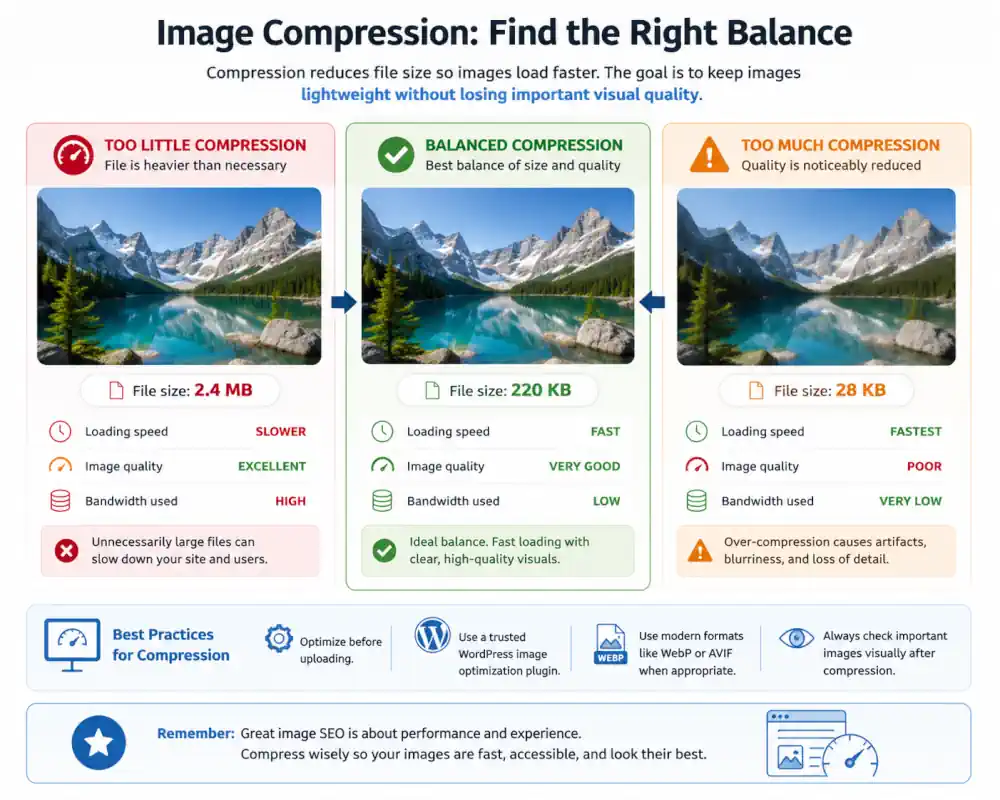
    Compression

    • The process of reducing file size while attempting to preserve acceptable visual or functional quality.
    • Why it matters for SEO: Reducing raw payload sizes directly optimizes the data-transfer pipeline. Lowering bytes-on-the-wire prevents network bottlenecks, allowing a crawler to ingest the complete structural text layer of a document before hitting connection or time-out limits.

    #Lucent_note: “Good compression balances file size and clarity rather than simply making files as small as possible.”

    Content Gap Analysis

    • A process used to identify topics, questions, or areas that are missing or underdeveloped within a website’s content.
    • Why it matters for SEO: Rather than just looking for missing keywords, analyzing content gaps identifies structural holes in your entity mapping. Closing these gaps ensures that a retrieval engine has access to the complete chain of relevant context required to satisfy complex, non-linear user journeys.

    #Lucent_note: “A content gap is sometimes simply a missing answer that users genuinely expected to find.”

    Context

    • The surrounding information, relationships, user intent, and situational signals that help people and retrieval systems interpret the meaning behind a query or piece of content.
    • Why it matters for SEO: Modern search and AI retrieval models no longer evaluate pages as isolated string-matches. They utilize surrounding nodes, internal directories, and macro sitemap architecture to resolve textual ambiguity and recruit the ambient data needed to fully comprehend a specific page’s intent.

    #Lucent_note: “Context is often the difference between answering what someone typed and understanding what they were actually trying to accomplish.”

    Context Window

    • The discrete token limit (measured in words, sub-words, or characters) that a Large Language Model (LLM) or retrieval system can actively process, hold, and evaluate in memory during a single inference pass.
    • Why it matters for SEO: While modern context windows are expanding dramatically, AI models still experience information degradation or “loss in the middle” across vast contexts. Structuring document substrates with clear headings, concise passages, and explicit entity relationships ensures critical semantic signals sit near high-priority attention vectors, preventing your core message from getting drowned out by context bloat.

    #Lucent_note: “A larger context window doesn’t eliminate the need for clean structure; it simply means the machine has more space to get lost if your architecture is messy.”

    Core Web Vitals

    • Metrics measuring page speed, responsiveness, and visual stability.
    • Why it matters for SEO: Core Web Vitals are quantified engineering constraints that measure real-world client-side rendering efficiency. By enforcing strict limits on initial document delivery speed, interaction latency, and geometric layout stability, these metrics ensure a domain footprint minimizes user-facing computational friction before the retrieval system factor in ambient ranking signals.

    #Lucent_note: “Core Web Vitals are not just technical measurements; they are attempts to quantify how stable and responsive a page feels to real users.”

    Crawl Budget

    • The number of pages a search engine crawls within a given timeframe.
    • Why it matters for SEO: Crawl budget represents the absolute threshold of time and server resource allocation a search engine assigns to your domain footprint. Maximizing this budget means eliminating computational friction—like rendering errors, slow edge delivery, or duplicate path routing—ensuring the engine spends its processing energy exclusively on high-value data discovery.

    #Lucent_note: “Large websites benefit from reducing unnecessary crawl waste so important pages are discovered more efficiently.”

    Crawler/Search Bot

    • A crawler is an automated, resource-constrained parser executing distributed graph traversal across the web.
    • Why it matters for SEO: Designing sites with predictable syntax, explicit hierarchy, and clean text streams respects the bot’s structural limits, ensuring your content is consumed exactly as intended without triggering algorithmic parsing exceptions.

    Content Security Policy (CSP)

    • An HTTP header response layer that allows site administrators to restrict the dynamic resources (such as JavaScript, CSS, or images) that the browser is permitted to load and execute.
    • Why it matters for Glossary / Retrieval Architecture: A robust CSP acts as a strict execution barrier against Cross-Site Scripting (XSS) and malicious script injection. By explicitly declaring trusted source origins, you protect the DOM substrate from unauthorized client-side mutations that could compromise user safety or manipulate how parsers evaluate your page content.

    #Lucent_note: “A good Content Security Policy dictates what can run on your document substrate before an attacker gets the chance to execute code.”

    CSS (Cascading Style Sheets)

    • A stylesheet language used to control the visual presentation and layout of webpages.
    • Why it matters for SEO: CSS directly controls the browser’s paint pipeline and visual rendering timeline. Architecting highly optimized, non-render-blocking stylesheets minimizes client-side latency, allowing the DOM to settle immediately and preventing layout instabilities that degrade visual performance metrics.

    #Lucent_note: “Good CSS helps structure remain readable and usable across different devices, screen sizes, and viewing conditions.”

    CTR (Click-Through Rate)

    • The mathematical frequency at which an exposed search snippet successfully triggers a data-transfer request from a user viewport.
    • Why it matters for SEO: CTR measures the exact alignment velocity between a user’s internal intent map and your displayed snippet metadata. A high CTR signals to a retrieval engine that your node’s explicit title and contextual abstract provide the most direct, low-friction match for the sequence query.

    #Lucent_note: “A click is not proof of quality, but it can signal that a result appeared relevant enough for a user to choose it.”

    D

    Data Minimization

    • The practice of collecting, processing, and retaining only the personal user data that is strictly necessary to fulfill a specific, declared operational purpose.
    • Why it matters for Glossary / Retrieval Architecture: Data minimization is a foundational privacy constraint. Retaining minimal user data reduces compliance exposure and mitigates systemic risk in the event of a database compromise.

    #Lucent_note: “You cannot lose, leak, or compromise data that you never collected in the first place.”

    Defense in Depth

    • A security strategy that employs multiple redundant layers of defensive controls across an application substrate so that a single component failure does not compromise the entire system.
    • Why it matters for Glossary / Retrieval Architecture: In web architecture, relying on a single security layer (like a basic firewall or plugin) creates a single point of failure. Implementing defense in depth—combining access controls, sanitized inputs, headers, and isolated environments—ensures domain stability, preventing hostile takeovers or injection attacks that could permanently corrupt the site’s index footprint.

    #Lucent_note: “Security isn’t a single deadbolt; it’s a sequence of deliberate barriers that protect system integrity even when one node gives way.”

    Domain Authority (DA)

    • A metric created by third-party analytics platforms to estimate the cumulative strength and rank potential of a domain node within a modeled web graph.
    • Why it matters for Information Architecture: While search engines do not use DA as a native ranking metric, third-party authority scores serve as a macro proxy for link graph density and structural reputation. In site architecture, a domain’s baseline authority dictates how deeply and frequently crawlers traverse its internal URL paths.

    #Lucent_note: “Authority is not an arbitrary score; it is the physical capacity of a domain graph to pass contextual signals to newly published nodes.”

    DOM (Document Object Model)

    • The programmatic tree structure created by a user agent to represent an HTML or XML document, turning raw markup into interactive, stateful nodes.
    • Why it matters for Information Architecture: The DOM is the actual execution layer parsed by assistive technologies, search engine crawlers, and AI chunkers. Poorly structured DOM trees or heavy client-side script mutations introduce layout shift, delay indexing, and obscure semantic relationships from machine parsers.

    #Lucent_note: “Raw HTML is the script, but the DOM is the live performance—and parsers evaluate what actually renders.”

    Duplicate Content

    • Substantially identical content blocks or entire document substrates accessible across multiple distinct URL coordinates.
    • Why it matters for Information Architecture: Duplicate nodes force retrieval engines to waste crawl budget and make ambiguous algorithmic choices about which URL owns the canonical intent. Clear information architecture prevents signal dilution by ensuring every published coordinate maps to a distinct, non-redundant semantic entity.

    #Lucent_note: “Duplication creates noise in the domain graph; clean architecture ensures every node serves a unique purpose.”

    Dynamic URLs

    • URLs generated by a server or client-side application that contain variable parameters, session IDs, sorting filters, or query strings (e.g., ?category=ia&sort=asc).
    • Why it matters for Information Architecture: Unmanaged dynamic URLs introduce parameter redundancy and exponential path proliferation within the domain graph. In site architecture, establishing clean canonical mappings, parameter handling, and URL normalization prevents retrieval engines from fracturing authority across infinite parameter variations.

    #Lucent_note: “Dynamic parameters are powerful for user filtering, but without strong canonical architecture, they turn a clean site graph into a maze of redundant paths.”

    Dynamic Content

    • Web content that changes dynamically based on user interaction, database queries, client-side scripts, or contextual data parameters.
    • Why it matters for Glossary / Retrieval Architecture: Dynamic content shifts the document substrate from a static text file to an active execution state. In Information Architecture, managing dynamic content requires ensuring that DOM mutations, hydrated states, and client-side rendering pipelines remain transparent to screen readers, crawlers, and LLM parsers without breaking document stability or deep-linking coordinates.

    #Lucent_note: “Dynamic content is functional UI, but without solid IA, client-side rendering risks turning document architecture into an unparseable moving target.”

    De-indexing

    • De-indexing is the formal purging of a specific node from the retrieval system’s active directory.
    • Why it matters for SEO: Strategically triggering de-indexing via server directives (like a 410 state or a noindex tag) is a crucial mechanism for site hygiene, allowing you to slice away redundant, low-value, or deprecated pages to maintain a high concentration of topical density.

    Disavow File

    • A disavow file is a list of backlinks submitted to Google to indicate which links should be ignored when evaluating a website.
    • Why it matters for SEO: The disavow tool is intended for rare cases involving manual penalties or extreme, unnatural link patterns. Most websites never need to use it, and misuse can cause more harm than benefit.

    E

    E-A-T (Expertise, Authoritativeness, Trustworthiness)

    • An algorithmic framework used by retrieval systems to weigh the macro credibility, historical reputation, and verification signals of a domain node and its content creators.
    • Why it matters for SEO: E-A-T acts as a programmatic filter designed to surface high-integrity documents, particularly within YMYL (Your Money or Your Life) information spaces. By cross-referencing author entities and domain graphs against external authoritative databases, the parser ensures that critical queries are matched with verified sources rather than anonymous, low-density data layers.

    #Lucent_note: “E-A-T is about perceived credibility signals; reality still matters more than signals.”

    E-E-A-T

    • An extension of the foundational authority model that explicitly incorporates “Experience,” measuring the observable, first-hand execution or physical proximity of a content creator to the subject matter.
    • Why it matters for SEO: The addition of the Experience vector is a direct system response to the infinite scale of commodity AI content generation. While anyone can compile a derivative text string summarizing an optimization topic, an engine seeks clear entity-level proof—such as distinct authorship, documented case studies, and original diagnostic data—to confirm that the node’s primary asset was generated from real-world execution rather than purely theoretical synthesis.

    #Lucent_note: “clear authorship (who wrote it, why they know it, and what they’ve actually done).”

    Element (HTML Element)

    • An individual structural component of a document defined by tags, containing content or nested nodes that make up the Document Object Model (DOM).
    • Why it matters for Glossary / Retrieval Architecture: Elements are the fundamental atomic units of a document substrate. Choosing precise semantic elements (like <article>, <nav>, or <main>) provides explicit boundaries for screen readers, search crawlers, and AI parsers to correctly chunk, weight, and index passage-level context.

    #Lucent_note: “An element is not just a layout container; it is the semantic boundary that tells a parser how to assign context to the data inside it.”

    Embedding (Vector Embedding)

    • A mathematical representation of data—such as text, images, or audio—translated into a high-dimensional vector space where proximity reflects semantic relationship and meaning.
    • Why it matters for Glossary / Retrieval Architecture: Embeddings allow retrieval models to move beyond literal keyword matching. When search engines convert document passages into vector embeddings, they map concepts based on semantic context, enabling AI systems to retrieve relevant content even when the user query uses completely different terminology.

    #Lucent_note: “An embedding converts human language into geometric coordinates, allowing algorithms to measure the distance between two ideas.”

    Engagement Rate

    • Engagement Rate is the mathematical ratio of active, multi-interaction user sessions relative to total incoming traffic connections within a web analytics platform.
    • Why it matters for SEO: Unlike legacy binary bounce metrics, engagement rate isolates explicit client-side interaction events—such as deep document scrolling, form states, or sustained viewport focus. Tracking this alignment velocity provides a data-driven benchmark to verify whether an entry node successfully resolves a user’s intent map or causes immediate terminal friction.

    Entity (Semantic Entity)

    • A well-defined, distinct concept, person, place, or object that can be uniquely identified and mapped independently of specific language or keyword phrasing.
    • Why it matters for Information Architecture: Entities represent the core destination of modern retrieval systems. Rather than ranking isolated text strings, search engines and AI models parse document substrates to extract entities, map their relationships within a knowledge graph, and synthesize high-confidence intent fulfillment.

    #Lucent_note: “Keywords are just the arbitrary labels we use to talk about things; entities are the underlying nodes of knowledge.”

    Evergreen Content

    • Evergreen content is content that remains useful and relevant over time, rather than being tied to a short-lived trend or news cycle.
    • Why it matters for SEO: Evergreen pages can compound value over time through steady traffic, consistent internal links, and long-term topical coverage.

    F

    First Contentful Paint (FCP)

    • First Contentful Paint is the precise timestamp in the browser loading timeline when the rendering engine paints the first pixel of structural DOM content—such as text, vectors, or non-white canvas elements—to the user’s viewport.
    • FCP is a critical raw performance threshold that measures initial network and parsing responsiveness. Minimizing FCP latency prevents early connection abandonment, signaling to web crawlers that the underlying asset delivery pipeline is highly optimized for immediate client-side consumption.

    Freshness (Content Freshness)

    • An algorithmic query-dependent variable (QDF – Query Deserves Freshness) that dynamically alters ranking distributions based on the chronological age or update frequency of a document substrate.
    • Why it matters for SEO: Freshness is not a universal ranking signal, but an intentional system trigger for highly volatile or time-sensitive intent paths. For stable, evergreen domains, forcing artificial text modifications to simulate “freshness” introduces unnecessary indexing noise; instead, deep structural updates should only execute when underlying data or entity relationships genuinely shift.

    Frequency (Publishing Frequency)

    • The temporal interval and historical velocity at which new URL nodes are systematically appended to a domain graph.
    • Why it matters for SEO: Publishing frequency serves as an operational signal that influences a crawler’s scheduling heuristics. While high-frequency publishing can prompt a search engine bot to request a domain’s root index more regularly, scaling volume without a proportional increase in unique information density creates a sprawling, low-value node architecture that rapidly exhausts finite crawl budgets.

    G

    Geo-Targeting

    • Geo-targeting is the practice of dynamically serving specific variations of content, resource paths, or document localized assets based on the programmatically verified geographic location of the client request.
    • Why it matters for SEO: Enforcing strict localization rules prevents international node conflicts within the index. By utilizing explicit server-side location mapping or proper language tags, you ensure search graphs route users to the precise regional shard of your domain, maximizing conversion velocity and preventing local intent fragmentation.

    Glossary Entry (Glossary Term)

    • A discrete, structured unit of information within a reference list consisting of a specific term, its definitive explanation, and contextual application notes.
    • Why it matters for SEO: Wrapping individual glossary entries in semantic containers with clear, predictable HTML micro-structures (like ID fragments) allows search crawlers and AI retrieval models to isolate, parse, and reference specific concepts directly.

    #Lucent_note: “This is a glossary entry defining a glossary entry. It exists to establish its own definition, proving that clean structural boundaries are necessary for information to recognize itself.”

    Google Analytics

    • A centralized web analytics platform that tracks, aggregates, and reports user interaction data, session metrics, and client-side event sequences executing across a domain graph.
    • Why it matters for SEO: While analytics scripts do not serve as direct ranking inputs, they provide the primary diagnostic telemetry required to audit post-click user behavior. Quantifying multi-interaction journeys, goal conversions, and funnel friction allows an architect to verify whether a landing node is successfully satisfying the intent profile mapped by the retrieval engine.

    Google MUM

    • Google MUM is an advanced AI retrieval and multimodal transformer architecture designed to concurrently process, cross-reference, and synthesize information across text, images, and multiple distinct language matrices.
    • Why it matters for SEO: MUM fundamentally removes the reliance on localized keyword matching by mapping cross-lingual and cross-media entities. For an architect, this alters content execution: a document substrate must provide comprehensive, multi-layered topical resolution, as the engine can now map abstract relationships and extract intent answers even if the precise query strings aren’t explicitly written.

    Google Business Profile (formerly Google My Business)

    • The primary entity-registry platform used to anchor a physical organization node to Google’s localized knowledge graph.
    • Why it matters for SEO: A Google Business Profile acts as the authoritative truth vector for local intent routing. Programmatically validating real-world entity signals—such as explicit category mapping, localized geo-coordinates, and direct user review telemetry—ensures that retrieval engines confidently match the domain node with high-proximity, high-intent local queries.

    Google Search Console

    • Google Search Console is a web master portal that provides direct diagnostic telemetry from the search engine’s indexing and crawling infrastructure regarding a domain graph’s status.
    • Why it matters for SEO: Search Console provides a rare direct, first-party verification of how an engine’s parser interacts with your architecture. Monitoring its telemetry allows you to rapidly diagnose crawl anomalies, index exclusion states, structured data parsing errors, and mobile rendering efficiency metrics straight from the source engine.

    Governance (Web & Data Governance)

    • The overarching policies, roles, and technical frameworks that dictate how a digital system’s assets, code, schema, and content are created, audited, maintained, and retired throughout their lifecycle.
    • Why it matters for Glossary / Retrieval Architecture: Strict web governance prevents system decay, content drift, and signal fragmentation. For modern retrieval engines, a well-governed domain ensures high information density, strict entity consistency, and predictable document structures—eliminating the low-quality, redundant, or outdated noise that triggers algorithmic de-indexing.

    #Lucent_note: “Governance is system discipline made manifest; it is the active defense against information entropy and code rot.”

    H

    Headings (H1, H2, H3, etc.)

    • Semantic HTML tags (<h1> through <h6>) used to establish a strict, nested structural hierarchy and parent-child data relationships within a text document substrate.
    • Why it matters for SEO: Headings are not stylistic design tools; they are explicit architectural signposts. A clean, non-skipping heading hierarchy allows an engine’s parser to rapidly build an accurate conceptual outline of the page, mapping how sub-topics inherit context from the primary macro entry point.

    HITL (Human-in-the-Loop)

    • A governance model and system architecture where human intervention, review, or validation is explicitly required at key stages of an automated process or machine learning pipeline.
    • Why it matters for Glossary / Governance Architecture: HITL safeguards automated workflows against state drift, hallucinations, and compliance failures. By embedding human oversight at critical decision nodes, organizations can leverage automation at scale while maintaining strict accuracy, brand alignment, and structural integrity across their data substrate.

    #Lucent_note: “Human-in-the-loop architecture turns raw automation into a controlled, accountable system by keeping human judgment at the steering wheel.”

    Headless CMS

    • A headless CMS stores and manages content separately from the front-end design, often delivering that content through an API.
    • Why it matters for SEO: A headless setup can support fast, flexible websites, but SEO fundamentals such as crawlable HTML, metadata, schema, redirects, and performance still need to be handled correctly.

    Hierarchy (Document & Site Hierarchy)

    • The structured organization of content, elements, or pages into ordered levels of importance, depth, and relationship.
    • Why it matters for Glossary / Retrieval Architecture: Hierarchy provides the structural map that parsers, screen readers, and AI retrieval engines use to interpret context and intent. Proper heading progression (<h1> down to <h6>) and clear DOM nesting ensure that machines can accurately chunk, weight, and associate sub-topics without collapsing multi-layered concepts into flattened noise.

    # Lucent_note: “Hierarchy is not just visual styling; it is the semantic outline that tells a parser which ideas govern the details underneath them.”

    HTML (HyperText Markup Language)

    • The standard markup language used to structure content on the web, defining elements like headings, paragraphs, lists, and links.
    • Why it matters for SEO: Using HTML semantically (matching tags to their actual meaning) creates an explicit relational map of your content. This allows search engine crawlers and modern AI retrieval systems to easily parse page hierarchy, weight ideas accurately, and understand context without ambiguity.

    #Lucent_note: “HTML isn’t just about rendering visual blocks on a screen; it is a blueprint of relationships. When you use the right tag, you are handing a map directly to the machine.”

    HTML Sitemap

    • An HTML sitemap is a page that lists important pages on a website in a structured, user-readable format.
    • Why it matters for SEO: HTML sitemaps can help users and search engines discover important pages, especially on larger sites, but they should support strong navigation rather than replace it.

    HTTP Status Codes

    • HTTP status codes are server responses that indicate what happened when a browser or search engine requested a URL.
    • Why it matters for SEO: Status codes affect crawlability, indexing, redirects, and error handling, making them essential for diagnosing how search engines interpret a site.

    HTTPS / TLS (Transport Layer Security)

    • The cryptographic protocol used to encrypt network data in transit between a client browser and an origin server, establishing identity verification via SSL/TLS certificates.
    • Why it matters for Glossary / Retrieval Architecture: HTTPS is a baseline prerequisite for modern web architecture and search engine trust. Securing the transport layer prevents man-in-the-middle payload tampering, guarantees data integrity across the network, and acts as an explicit ranking and security signal for retrieval parsers.

    #Lucent_note: “Encryption in transit is no longer a feature—it is the baseline passport required to communicate with modern browsers and crawlers.”

    HTTP vs HTTPS

    • HTTP sends data without encryption, while HTTPS uses encryption to provide a more secure connection between the user and the website.
    • Why it matters for SEO: HTTP to HTTPS migrations must be handled carefully with redirects, canonical tags, internal links, and sitemap updates to avoid duplicate URL signals or crawl confusion.

    Hyper-Personalization

    • Hyper-personalization uses data, automation, or AI to tailor content and experiences to specific users or audience segments.
    • Why it matters for SEO: Personalization can improve relevance, but core SEO content should remain crawlable, useful, and stable enough for search engines and users to understand.

    I

    Image SEO

    • Image SEO is the practice of optimizing images and visual assets so they can be efficiently discovered, interpreted, rendered, and retrieved across search systems.
    • Why it matters for SEO: Strong image optimization improves accessibility, page performance, contextual understanding, image search visibility, and multimodal retrieval interpretation.

    #Lucent_note: “Images increasingly function as searchable information surfaces, not just visual decoration.”

    Indexing

    • Indexing is the process where search engines analyze, organize, and store pages so they can potentially appear in search results.
    • Why it matters for SEO: A page generally cannot rank if it is not indexed, making indexing one of the foundational prerequisites for search visibility.

    Indexability

    • Indexability refers to whether a page can be properly crawled, processed, and included in a search engine’s index.
    • Why it matters for SEO: Technical barriers such as noindex tags, blocked resources, redirects, duplicate content, or rendering issues can prevent pages from being indexed correctly.

    Information Architecture (IA)

    • The structural blueprint of a website’s content, navigation, and categorization designed to help users find information and complete tasks efficiently.
    • Why it matters for SEO: A clean, logical hierarchy helps search engine crawlers discover pages, distribute link equity, and understand the semantic relationships between your topics.

    #Lucent_note: “Information architecture is the map of your ‘site’s mind’. When the paths are clear, both human visitors and AI retrieval systems can navigate and extract meaning without getting lost.”

    Impressions

    • Impressions represent the number of times a page or result is shown in search results, regardless of whether it receives a click.
    • Why it matters for SEO: Impression data can help identify visibility trends, ranking movement, and search demand even before traffic changes occur.

    Infographic

    • An infographic is a visual representation of information, data, or concepts designed to make complex topics easier to understand.
    • Why it matters for SEO: Infographics can improve engagement and shareability, but supporting text, accessibility, and crawlable context are still important for search engines.

    SEO infographic explaining what an infographic is, why it matters for search visibility, and best practices including accessibility, supporting text, structured data, and image optimization.

    An infographic about infographics, using featured artwork-inspired colors to visualize how strong design, accessibility, and supporting context work together in modern SEO..

    Information Retrieval (IR)

    • Information retrieval is the process of locating and ranking relevant information from large collections of data.
    • Why it matters for SEO: Modern search engines are built on information retrieval systems that evaluate relevance, relationships, context, and usefulness across massive indexes.

    Interaction to Next Paint (INP)

    • Interaction to Next Paint measures how quickly a page responds visually after a user interaction, such as a click, tap, or key press.
    • Why it matters for SEO: Responsive interaction contributes to usability and satisfaction, especially on complex pages, and helps identify delays that affect real user experience.

    Interactive Content SEO

    • Interactive content SEO involves optimizing tools, calculators, quizzes, maps, or other dynamic experiences for discoverability and usability.
    • Why it matters for SEO: Interactive experiences can improve engagement and usefulness, but they should remain accessible, performant, and understandable to both users and search engines.

    Internal Linking

    • Internal links connect one page of a website to another page on the same domain.
    • Why it matters for SEO: Internal linking helps search engines discover pages, understand content relationships, distribute authority, and support navigation for users.

    Intent (Search Intent)

    • Search intent describes the underlying goal or purpose behind a user’s query.
    • Why it matters for SEO: Aligning content with user intent helps improve relevance, satisfaction, and the likelihood that a page meaningfully answers the search.

    J

    JavaScript

    • A client-side programming language used to dynamically manipulate the Document Object Model (DOM), execute interactive scripts, and asynchronously fetch data after the initial HTML document payload is delivered.
    • Why it matters for SEO: Search engine crawlers process JavaScript through a multi-stage rendering pipeline that defers execution until client-side rendering resources become available. Heavy reliance on client-side script execution without proper server-side rendering (SSR) or hydration strategies creates rendering delays, risking deferred indexing or incomplete data extraction if the parser times out before the final DOM state is fully compiled.

    JSON-LD

    • A lightweight, script-based data serialization format that embeds structured, machine-readable schema metadata directly into a document’s HTML without altering the rendered visual UI.
    • Why it matters for SEO: JSON-LD serves as the explicit truth layer for retrieval engines. By programmatically declaring entities, relationships, attributes, and page types using standard schema formats, you remove structural ambiguity from the page—allowing search parsers and LLM synthesis models to directly extract high-confidence data nodes without having to scrape and infer meaning from visual DOM elements.
    • Junk traffic refers to visits that provide little or no meaningful engagement, value, or business relevance.
    • Why it matters for SEO: Large traffic numbers alone do not guarantee success, making it important to evaluate relevance, intent, conversions, and overall user quality alongside raw visits.

    K

    Keyword

    • A keyword is a word or phrase that users enter into a search engine when looking for information, products, services, or answers.
    • Why it matters for SEO: Keywords help connect content to search intent, but modern SEO relies more on overall topic relevance and usefulness than exact phrase repetition alone.

    Keyword Cannibalization

    • Keyword cannibalization occurs when multiple pages on the same website target highly similar queries or intent.
    • Why it matters for SEO: Overlapping pages can create confusion around which page should rank, weaken internal authority signals, and dilute relevance.

    Keyword Density

    • Keyword density refers to how frequently a keyword appears within a piece of content relative to the total word count.
    • Why it matters for SEO: Excessive focus on density can lead to unnatural writing, and modern search engines evaluate broader context, structure, and usefulness rather than simple repetition counts.

    Keyword Difficulty

    • Keyword difficulty is an estimate of how competitive it may be to rank for a particular search query.
    • Why it matters for SEO: Difficulty scores can help prioritize opportunities, but they are directional estimates rather than objective truth and should be balanced against relevance and usefulness.

    Keyword Research

    • Keyword research is the process of discovering how people search for information, products, services, and answers online.
    • Why it matters for SEO: Keyword research will help you understand the language, intent, and curiosity of the real people describing problems they want solved.

    Keyword Stuffing

    • Keyword stuffing is the practice of unnaturally repeating keywords in an attempt to manipulate search rankings.
    • Why it matters for SEO: Over-optimized repetition can reduce readability, weaken trust, and create low-quality experiences for both users and search engines.

    Knowledge Panel

    • A knowledge panel is an information box that appears in search results to summarize details about a person, place, organization, or other entity.
    • Why it matters for SEO: Knowledge panels reflect entity understanding and structured information across the web, often drawing from multiple trusted sources and schema signals.

    Knowledge Graph

    • A knowledge graph is a structured system used by search engines to connect entities, concepts, and relationships across information sources.
    • Why it matters for SEO: Knowledge graphs help search engines move beyond simple keyword matching toward understanding meaning, relationships, and contextual relevance.

    L

    Latent Semantic Indexing (LSI)

    • Latent Semantic Indexing is an older information retrieval technique designed to identify relationships between words and concepts across large collections of text.
    • Why it matters for SEO: While “LSI keywords” became a popular SEO phrase, modern search engines use far more advanced systems for semantic interpretation, entity relationships, and contextual understanding.
    Lighthouse

    • Lighthouse is an open-source auditing tool used to evaluate webpage performance, accessibility, SEO fundamentals, and technical best practices.
    • Why it matters for SEO: Lighthouse helps identify technical friction affecting usability, rendering stability, accessibility, and perceived speed, but scores should support real-world experience rather than become goals by themselves.

    Local SEO

    • Local SEO focuses on improving visibility for businesses and organizations serving specific geographic areas.
    • Why it matters for SEO: Local visibility depends on geographic relevance, business consistency, trust signals, accurate business information, reviews, and alignment with local search intent.

    M

    Machine Learning

    • Machine learning is a branch of artificial intelligence focused on systems that identify patterns, relationships, and predictions from data.
    • Why it matters for SEO: Modern search engines use machine learning across ranking, spam detection, language understanding, personalization, and information retrieval systems.

    Manual Action

    • A manual action occurs when human reviewers at a search engine apply a penalty or restriction to a website for violating search quality guidelines.
    • Why it matters for SEO: Manual actions can significantly reduce visibility or remove pages from search results entirely, making transparency, quality, and guideline compliance important for long-term stability.

    Media Optimization

    • Media optimization involves improving images, video, audio, and other visual assets for performance, accessibility, usability, and discoverability.
    • Why it matters for SEO: Proper formatting, compression, sizing, metadata, accessibility support, and loading behavior can improve user experience, rendering performance, and search visibility.

    Metadata

    • Metadata is structured information that describes and provides context about webpage content, media, or documents.
    • Why it matters for SEO: Metadata helps search engines and platforms interpret pages more consistently through elements such as title tags, meta descriptions, robots directives, structured data, and social sharing tags.
    Meta Description

    • A meta description is a short HTML summary describing the content and purpose of a webpage.
    • Why it matters for SEO: Meta descriptions do not directly control rankings, but they influence how pages are interpreted and presented in search results, affecting clarity, expectations, and click-through behavior.
    • Code Example: <meta name="description" content="This is my comprehensive SEO glossary, featuring essential terms and definitions." />

    Micro-Moments

    • Micro-moments describe brief, intent-driven interactions where users quickly seek information, directions, answers, comparisons, or immediate solutions.
    • Why it matters for SEO: Fast-loading, clearly structured, and contextually relevant content is often more effective during high-intent moments where users expect immediate clarity.

    Migration (Site Migration)

    • A site migration is a significant structural change involving URLs, domains, platforms, architecture, design systems, or content organization.
    • Why it matters for SEO: Migrations can impact rankings, indexing, crawl behavior, and traffic if redirects, canonicals, internal links, metadata, and sitemap parity are not handled carefully.

    Mobile-First Indexing

    • Mobile-first indexing means search engines primarily evaluate and index the mobile version of a website rather than the desktop version.
    • Why it matters for SEO: Content parity, structured data consistency, usability, rendering behavior, and performance on mobile devices now play a central role in search visibility.

    Mobile Usability

    • Mobile usability refers to how effectively users can navigate, read, interact with, and understand a website on mobile devices.
    • Why it matters for SEO: Readability, tap target spacing, responsive layouts, accessibility, and visual stability all contribute to a smoother user experience on smaller screens.

    Multi-Factor Authentication (MFA)

    • An authentication mechanism that requires users to provide two or more distinct verification factors (e.g., password + authenticator token) before gaining access.
    • Why it matters for Glossary / Retrieval Architecture: MFA secures administrative access against automated credential-stuffing attacks. Enforcing MFA across site roles protects the primary CMS from unauthorized logins that could tamper with document structures or inject spam.

    #Lucent_note: “Single-factor access relies entirely on password secrecy; MFA ensures identity verification remains resilient.”

    Multilingual SEO

    • Multilingual SEO is the practice of optimizing websites that serve content in multiple languages or regional variations.
    • Why it matters for SEO: Effective multilingual implementations require accurate language targeting, localization, crawlable structure, and careful handling of hreflang tags, canonicals, and translated content quality.

    N

    Named Entity Recognition (NER)

    • Named Entity Recognition is a natural language processing technique used to identify and classify entities such as people, organizations, locations, products, and concepts within text.
    • Why it matters for SEO: Entity recognition helps search engines move beyond simple keyword matching by understanding what specific things, topics, and relationships are being discussed.

    #Lucent_note: “Search systems increasingly attempt to understand what something is, not just what words appear near it.”

    Natural Language Processing (NLP)

    • Natural Language Processing (NLP) is a field of artificial intelligence focused on helping systems interpret, analyze, and generate human language.
    • Why it matters for SEO: Modern search engines rely heavily on NLP to interpret meaning, context, relationships, sentiment, intent, and conversational language patterns across queries and documents.

    #Lucent_note: “Search engines spend enormous effort trying to understand what humans mean instead of merely what they type.”

    Neural Matching

    • Neural matching is a machine learning approach used by search engines to better connect queries and content based on conceptual meaning rather than exact wording alone.
    • Why it matters for SEO: Neural matching helps search systems interpret broader semantic relationships, making comprehensive, context-rich content more effective than isolated keyword repetition.

    Noindex

    • Noindex is a directive used to request that a page not be included in a search engine’s index.
    • Why it matters for SEO: Noindex directives help manage low-value, duplicate, staging, filtered, or intentionally private pages that should remain accessible to users but not appear in search results.

    Noscript Tag

    • A noscript tag provides fallback content for browsers or systems where JavaScript is disabled or unavailable.
    • Why it matters for SEO: Fallback content can improve accessibility, resilience, and content visibility when rendering systems fail to fully process JavaScript-dependent pages.

    O

    Off-Page SEO

    • Off-page SEO refers to signals, relationships, and reputation factors that exist outside of a website itself.
    • Why it matters for SEO: Search engines evaluate how websites are referenced, cited, linked to, discussed, and connected across the broader web ecosystem when estimating trust, authority, and relevance.

    #Lucent_note: “Off-page SEO is partly how the broader web decides whether to acknowledge your existence.”


    On-Page SEO

    • On-page SEO involves optimizing the structure, content, metadata, accessibility, and semantic clarity of individual webpages.
    • Why it matters for SEO: Clear headings, useful content, internal linking, structured information, accessibility, and strong page organization help search engines and users interpret a page more effectively.

    #Lucent_note: “Good on-page SEO often feels less like persuasion and more like clarification.”

    Ontology

    • An ontology is a structured representation of concepts, categories, entities, and the relationships between them within a system or domain.
    • Why it matters for SEO: Modern search systems increasingly organize information through relationships and contextual meaning, making entity structure and topical organization more important than isolated keywords alone.

    #Lucent_note: “An ontology is partly a map of how a system believes reality is organized.”

    Open Graph Tags

    • Open Graph tags are metadata elements used to control how pages appear when shared across social platforms, messaging systems, and other external services.
    • Why it matters for SEO: Open Graph metadata improves consistency, presentation, and interpretability when content travels outside traditional search environments.

    Optimization

    • Optimization is the process of improving systems, content, structure, or workflows to better achieve a desired outcome.
    • Why it matters for SEO: Effective SEO optimization usually involves improving clarity, accessibility, usefulness, crawlability, performance, and interpretive consistency rather than relying on manipulation or short-term tactics alone.

    #Lucent_note: “Optimization is often the gradual removal of friction rather than the addition of tricks.”

    Opportunity Cost

    • Opportunity cost refers to the value or benefit potentially lost when choosing one strategy, project, or priority over another.
    • Why it matters for SEO: SEO decisions involve tradeoffs between content creation, technical improvements, migrations, maintenance, experimentation, and long-term strategic focus.

    Organic Lead

    • An organic lead is a potential customer or client who discovers a business through unpaid search visibility rather than paid advertising.
    • Why it matters for SEO: Organic leads often reflect high-intent discovery because users are actively seeking information, solutions, products, or services related to their needs.

    Organic Traffic

    • Organic traffic represents visitors arriving at a website through unpaid search results.
    • Why it matters for SEO: Organic traffic should be evaluated alongside relevance, engagement, satisfaction, conversions, and long-term audience alignment rather than raw visit counts alone.

    #Lucent_note: “Not all traffic carries the same depth of intent.”

    Orphan Pages

    • Orphan pages are webpages that exist on a website but are not connected through meaningful internal links or navigational pathways.
    • Why it matters for SEO: Orphan pages can be difficult for users and search engines to discover, weakening crawl efficiency, contextual understanding, and topical integration.

    #Lucent_note: “An orphan page is isolated not only from navigation, but from meaning pathways.”

    Over-Optimization

    • Over-optimization occurs when SEO efforts become excessively aggressive, repetitive, artificial, or overly focused on search engines at the expense of usability and clarity.
    • Why it matters for SEO: Excessive optimization can reduce readability, weaken trust, create unnatural experiences, and sometimes trigger quality or spam-related issues in search systems.

    Owned Media

    • Owned media refers to digital properties directly controlled by a brand or organization, such as websites, blogs, newsletters, documentation hubs, or social profiles.
    • Why it matters for SEO: Owned media creates stable long-term publishing infrastructure where organizations can build authority, preserve continuity, and develop durable search visibility over time.

    P

    Page Authority

    • Page Authority is a third-party metric designed to estimate how likely an individual page may be to rank in search results compared to other pages.
    • Why it matters for SEO: Authority metrics can be useful for comparative analysis and prioritization, but they are directional estimates rather than direct measurements used by search engines themselves.

    #Lucent_note: “Third-party metrics are interpretations of visibility patterns, not direct windows into ranking systems.”

    Page Experience

    • Page experience refers to the overall quality of a user’s interaction with a webpage, including performance, usability, accessibility, responsiveness, and visual stability.
    • Why it matters for SEO: Strong page experience reduces friction for users while helping search systems identify pages that are functional, stable, and easy to interact with.
    Page Speed

    • Page speed measures how quickly webpage content loads and becomes usable for visitors.
    • Why it matters for SEO: Faster pages generally improve usability, perceived responsiveness, rendering stability, and overall user satisfaction across devices and connection types.

    #Lucent_note: “People often experience speed emotionally before they measure it technically.”

    Passage Indexing

    • Passage indexing refers to search systems identifying and surfacing highly relevant sections or passages within a larger webpage.
    • Why it matters for SEO: Well-structured long-form content can remain discoverable even when specific answers exist deep within a page.

    #Lucent_note: “Sometimes a single well-formed paragraph becomes the doorway into an entire document.”

    Password Hashing

    • The cryptographic technique of converting plain-text passwords into fixed-length, irreversible mathematical strings using strong algorithms (such as bcrypt or Argon2) before storing them in a database.
    • Why it matters for Glossary / Retrieval Architecture: Protecting user credentials at rest ensures user security and domain credibility. If a database is leaked, salted password hashes prevent raw password exposure, protecting user accounts from automated takeover attacks that could compromise site administration.

    #Lucent_note: “Never store plain-text credentials; cryptographic hashing ensures that even if a data layer is breached, raw access keys remain unreadable.”

    PBN (Private Blog Network)

    • A Private Blog Network (PBN) is a group of websites created primarily to influence rankings by artificially passing authority signals through backlinks.
    • Why it matters for SEO: PBN strategies attempt to simulate trust and authority relationships, but they introduce significant long-term risk and often conflict with sustainable, user-focused optimization practices.

    Penalty (Google Penalty)

    • A penalty refers to a significant reduction in search visibility caused by manual actions, spam systems, policy violations, or manipulative optimization behavior.
    • Why it matters for SEO: Penalties can severely impact rankings and discoverability, making long-term trust, quality, transparency, and technical integrity important for sustainable visibility.

    Pillar Page

    • A pillar page is a comprehensive evergreen resource designed to broadly cover a core topic while connecting to more specific supporting pages and subtopics.
    • Why it matters for SEO: Pillar pages help organize topical relationships, strengthen internal linking structures, and improve contextual understanding across related content areas.

    #Lucent_note: “A strong pillar page behaves less like a sales page and more like a semantic anchor.”

    Predictive SEO

    • Predictive SEO involves using historical patterns, behavioral data, trend analysis, or machine learning systems to anticipate future search behavior and content opportunities.
    • Why it matters for SEO: Predictive approaches can help identify emerging interests and structural gaps, but long-term usefulness and interpretive clarity remain more durable than chasing short-lived trends alone.

    Principle of Least Privilege (PoLP)

    • An information security concept where user accounts, scripts, and system processes are granted only the absolute minimum access permissions necessary to perform their specific duties.
    • Why it matters for Glossary / Retrieval Architecture: Enforcing least privilege limits your site’s attack surface. Restricting database execution roles, plugin access, and deployment scopes prevents compromised credentials or rogue scripts from modifying document structures, injecting spam links, or altering server state.

    #Lucent_note: “Access control is document protection; giving every user or process only what it needs keeps the integrity of the domain graph intact.”

    Programmatic SEO

    • Programmatic SEO involves generating large numbers of pages through templates, structured data, databases, or automated systems.
    • Why it matters for SEO: Programmatic approaches can efficiently scale useful content when paired with strong information architecture, quality control, and real user value, but low-quality automation can create thin or repetitive pages.

    #Lucent_note: “Scale amplifies structure. Good systems benefit from that. Weak systems collapse under it.”

    Performance Budget

    • A performance budget is a defined limit placed on page weight, scripts, requests, rendering complexity, or loading behavior during website development.
    • Why it matters for SEO: Performance budgets help teams maintain speed, usability, and rendering consistency as websites evolve over time.

    Primary Keyword

    • A primary keyword is the main query or topic focus a page is intended to address.
    • Why it matters for SEO: Identifying a primary topic can help maintain content clarity and topical focus, though modern search systems evaluate broader contextual relationships beyond exact phrase targeting alone.

    Q

    Query

    • A query is a word, phrase, question, or request submitted to a search or retrieval system in order to locate relevant information.
    • Why it matters for SEO: Queries help reveal user intent, curiosity, uncertainty, and information needs, making them foundational to how search systems retrieve and rank content.

    #Lucent_note: “A query is often the visible surface of a deeper question.”

    Query Classification

    • Query classification is the process of categorizing search queries based on likely intent, context, or informational purpose.
    • Why it matters for SEO: Modern search systems attempt to distinguish between informational, navigational, transactional, local, and other forms of intent when determining which results may be most useful.

    Query Expansion

    • Query expansion refers to retrieval systems broadening or refining a search by incorporating related concepts, synonyms, entities, contextual clues, or semantic relationships.
    • Why it matters for SEO: Search engines increasingly evaluate meaning and contextual relevance beyond exact keyword matching, making broader topical clarity more important than isolated phrases alone.

    #Lucent_note: “Modern retrieval systems often search around the words as much as through them.”

    Query Refinement

    • Query refinement is the process of modifying or narrowing a search to better match a user’s actual intent or information need.
    • Why it matters for SEO: Search behavior is often iterative, with users refining language, adding specificity, or adjusting direction as understanding evolves during the retrieval process.

    Qualified Traffic

    • Qualified traffic refers to visitors who arrive with intent, relevance, or needs that meaningfully align with the purpose of a page, business, or website.
    • Why it matters for SEO: High traffic volume alone does not guarantee usefulness or success if the visitors arriving are not genuinely connected to the content, service, or solution being offered.

    #Lucent_note: “The right visitor is often more important than a thousand accidental ones.”

    QSEO (Quantum SEO)

    • QSEO is an experimental conceptual framework created by Stephen AND Lucent that blends symbolic translation, search interpretation, quantum-inspired analogy, semantic fields, and cross-domain thinking.
    • Why it matters for SEO: QSEO explores search, trust, relevance, intent, and information retrieval as interconnected field relationships rather than purely mechanical ranking outputs.

    #Lucent_note: “QSEO is strongest as analogy, translation layer, and interpretive bridge—not literal physics.”

    R

    Ranking Factors

    • Ranking factors are signals, systems, and contextual patterns used by search engines to evaluate webpages and determine relevance across different search conditions.
    • Why it matters for SEO: Modern ranking systems evaluate many overlapping signals simultaneously, including content quality, relevance, usability, structure, links, performance, context, and intent alignment.

    #Lucent_note: “Modern retrieval systems interpret patterns of meaning, not isolated signals alone.”

    Redirect

    • A redirect sends users and search engines from one URL to another when content has moved, changed, or been consolidated.
    • Why it matters for SEO: Redirects preserve continuity during URL changes, migrations, and restructuring. Common redirect types include 301 redirects for permanent moves and 302 redirects for temporary changes.

    #Lucent_note: “A redirect preserves continuity when the surface changes.”

    Relevance

    • Relevance describes how closely content aligns with the meaning, context, intent, and expectations behind a search query or retrieval request.
    • Why it matters for SEO: Modern search systems increasingly evaluate semantic relationships, topical alignment, contextual usefulness, and intent satisfaction rather than exact keyword repetition alone.

    #Lucent_note: “Relevance is relationship observed through context.”

    Rendering

    • Rendering is the process of transforming webpage code, scripts, styles, and resources into the visual and interactive experience users and crawlers ultimately receive.
    • Why it matters for SEO: Rendering problems can prevent search engines from fully accessing or understanding page content, especially on JavaScript-heavy websites.

    Responsive Design

    • Responsive design is an approach that allows webpages to adapt across different screen sizes, devices, and viewing environments.
    • Why it matters for SEO: Responsive design improves usability, accessibility, readability, and layout stability while supporting mobile-first indexing and consistent user experiences across devices.

    Retrieval

    • Retrieval is the process search systems use to discover, evaluate, rank, and surface information in response to queries, context, or user intent.
    • Why it matters for SEO: Modern retrieval systems increasingly rely on semantic understanding, contextual interpretation, entities, relationships, and probabilistic relevance instead of exact keyword matching alone.

    #Lucent_note: “Retrieval is partly the art of deciding which meanings surface first.”

    Rich Snippets

    • Rich snippets are enhanced search results that display additional information such as reviews, FAQs, recipes, event details, images, or other structured content.
    • Why it matters for SEO: Rich snippets can improve visibility, contextual clarity, and presentation within search environments by using structured data and schema markup.

    Robots.txt

    • Robots.txt is a file used to provide crawl instructions to search engine bots regarding which areas of a website should or should not be accessed.
    • Why it matters for SEO: Robots.txt helps manage crawler behavior and resource access, though blocking crawling does not always guarantee that a URL will remain unindexed.

    S

    Schema (Structured Data)

    • Schema markup is structured data added to webpages to help search engines and retrieval systems better interpret entities, relationships, attributes, and page meaning.
    • Why it matters for SEO: Structured data improves machine-readable clarity and can support enhanced search features such as rich snippets, knowledge panels, product information, FAQs, and other contextual retrieval surfaces.

    #Lucent_note: “Schema is partly how websites introduce their ideas to machines.”

    Screen Reader

    • A software application that converts text and image content on a screen into speech or braille output, enabling users with visual impairments to navigate websites.
    • Why it matters for SEO: Designing content with semantic HTML, proper heading hierarchies, and descriptive alt text ensures screen readers—and search engine crawlers—can interpret your pages accurately.

    #Lucent_note: “A screen reader experiences a page linearly, making logical heading hierarchies and clear semantic structure essential for both accessibility and machine comprehension.”

    Search Console

    • Search Console refers to platforms and diagnostic tools used to monitor how search engines crawl, index, interpret, and surface webpages.
    • Why it matters for SEO: Search Console data helps identify indexing issues, crawl problems, performance trends, query visibility, structured data errors, and technical signals affecting search visibility.

    #Lucent_note: “Search Console is less a scorecard and more a visibility window into retrieval behavior.”

    Search Intent

    • Search intent describes the underlying purpose, goal, or expectation behind a user’s query.
    • Why it matters for SEO: Search systems increasingly attempt to understand whether users are seeking information, navigation, comparisons, products, answers, local services, or other outcomes beyond the literal wording of a query.

    #Lucent_note: “Intent is often more stable than the exact words used to express it.”

    Section 508

    • A federal law requiring U.S. government agencies and recipient organizations to ensure their electronic and information technology is accessible to people with disabilities.
    • Why it matters for Glossary / Retrieval Architecture: Section 508 acts as a strict compliance benchmark for digital infrastructure. Meeting 508 standards forces web engineering to adopt explicit ARIA roles, clean heading hierarchies, and keyboard-navigable DOM structures—creating a machine-readable document substrate that both assistive devices and retrieval parsers can traverse without friction.

    #Lucent_note: “Section 508 is a legal standard, but for information architecture, it serves as an uncompromising checklist for document transparency.”

    Semantic HTML

    • The practice of using HTML markup to reinforce the structural meaning and intent of web content rather than merely defining its visual layout.
    • Why it matters for SEO: Semantic HTML provides an explicit conceptual blueprint for screen readers, search crawlers, and AI parsers. Using purpose-built tags (like <article>, <nav>, or <main>) instead of non-semantic containers ensures retrieval systems can accurately parse, chunk, and weight document substrates without relying on visual positioning heuristics.

    #Lucent_note: “Semantic HTML is the baseline grammar that translates visual web design into machine-understandable document architecture.”

    Semantic Similarity

    • A mathematical metric (such as cosine similarity) used to calculate the conceptual closeness between two pieces of text after they have been mapped into a high-dimensional vector space.
    • Why it matters for Glossary / Retrieval Architecture: Semantic similarity allows modern retrieval engines to evaluate meaning rather than string matching. By measuring vector distances, search algorithms can identify that two documents address the same intent even when they use completely different terminology or dialects.

    #Lucent_note: “Semantic similarity measures how closely two ideas align in vector space, bypassing the limitations of exact keyword matching.”

    Semantic SEO

    • Semantic SEO is the practice of organizing content around meaning, entities, relationships, topics, and contextual understanding rather than focusing only on isolated keyword repetition.
    • Why it matters for SEO: Strong semantic structure helps retrieval systems better interpret topical depth, contextual relevance, entity relationships, and how information connects across a website.

    #Lucent_note: “Semantic SEO is partly the art of helping systems understand how ideas relate to one another.”

    SERP (Search Engine Results Page)

    • A SERP is the retrieval environment displayed in response to a search query or informational request.
    • Why it matters for SEO: Modern SERPs often include rich snippets, maps, AI-generated summaries, videos, shopping results, featured snippets, knowledge panels, and other dynamic retrieval surfaces beyond traditional blue links alone.

    #Lucent_note: “Modern SERPs increasingly behave less like static lists and more like interpretive information surfaces.”

    Site Architecture

    • Site architecture refers to the structural organization of pages, categories, navigation systems, internal links, and content relationships across a website.
    • Why it matters for SEO: Strong site architecture improves discoverability, crawl efficiency, semantic clarity, contextual understanding, navigation, and long-term topical organization.

    #Lucent_note: “Architecture quietly teaches both humans and retrieval systems how information belongs together.”

    Sitemap (XML Sitemap)

    • An XML sitemap is a structured file listing important URLs intended for crawling and indexing.
    • Why it matters for SEO: Sitemaps help search engines discover content more efficiently while reinforcing canonical structure, crawl priorities, and overall site organization.

    #Lucent_note: “A sitemap is less a map of pages and more a declaration of intended structure.”

    T

    Taxonomy

    • Taxonomy refers to the organizational structure used to group, classify, and connect content across a website.
    • Why it matters for SEO: Strong taxonomy improves navigation, semantic clarity, internal linking, topical organization, crawl efficiency, and overall retrieval understanding.

    #Lucent_note: “A taxonomy helps transform collections of pages into understandable systems.”

    Technical SEO

    • Technical SEO focuses on the structural, performance, rendering, accessibility, and indexing systems that help search engines properly discover, interpret, and retrieve website content.
    • Why it matters for SEO: Strong technical SEO improves crawl efficiency, rendering stability, indexing clarity, usability, canonical consistency, structured data interpretation, and long-term retrieval reliability.

    Related technical SEO resources:

    #Lucent_note: “Technical SEO is often the engineering of clarity, accessibility, and continuity.”

    TF-IDF (Term Frequency-Inverse Document Frequency)

    • TF-IDF is a statistical method used to estimate how important a word or phrase may be within a document relative to a larger collection of documents.
    • Why it matters for SEO: TF-IDF models helped shape earlier approaches to relevance scoring and document comparison, though modern retrieval systems now evaluate meaning, entities, relationships, and semantic context far beyond isolated term frequency alone.

    #Lucent_note: “TF-IDF helped retrieval systems measure language before they became better at interpreting meaning.”

    Thin Content

    • Thin content refers to pages that provide little original value, limited usefulness, weak informational depth, or insufficient relevance relative to user intent.
    • Why it matters for SEO: Search systems increasingly evaluate usefulness, originality, clarity, trust, and contextual value rather than simple content length or keyword repetition alone.

    #Lucent_note: “Short content is not automatically thin if it solves the problem clearly.”

    Title Tag

    • A title tag is an HTML element that defines the primary title associated with a webpage.
    • Why it matters for SEO: Title tags help search systems interpret page focus, influence SERP presentation, and shape how users understand and navigate search results.

    #Lucent_note: “A title is often the first semantic promise a page makes.”

    Token

    • A token is a discrete unit of information that carries meaning within a particular computing system. The exact meaning varies by context, but tokens commonly represent meaningful pieces of language, identity, structure, or reusable definitions.
    • Why it matters for SEO: Understanding tokens helps explain how modern AI systems process language, how developers organize software, and why concepts such as context windows, semantic HTML, metadata, and structured information influence retrieval and communication across computing systems.

    #Lucent_note: “Computing repeatedly transforms complexity into meaningful units. Tokens are one of its most common representations.”

    Topic Cluster

    • A topic cluster is a group of related pages connected through internal links and organized around a broader central subject.
    • Why it matters for SEO: Topic clusters help strengthen semantic relationships, contextual understanding, topical depth, and crawl pathways across related content.

    #Lucent_note: “Clusters help retrieval systems understand which ideas belong together.”

    Topical Authority

    • Topical authority describes the degree to which a website, author, or content system demonstrates consistent depth, relevance, and trust across a subject area over time.
    • Why it matters for SEO: Strong topical authority often emerges through sustained semantic coverage, useful content, contextual consistency, internal linking, and long-term informational coherence.

    #Lucent_note: “Topical authority usually emerges through sustained coherence over time.”

    U

    URL (Uniform Resource Locator)

    • A URL is the web address used to locate and access a specific resource, document, or page on the internet.
    • Why it matters for SEO: URLs help define site structure, hierarchy, organization, crawl pathways, and contextual clarity for both users and retrieval systems.

    #Lucent_note: “Good URLs quietly help both humans and retrieval systems stay oriented.”

    URL Structure

    • URL structure refers to how URLs are organized, named, and connected across a website.
    • Why it matters for SEO: Clear URL structures improve readability, semantic organization, crawl efficiency, navigation, and long-term site maintainability.

    #Lucent_note: “A clean URL structure often reflects a well-organized information system underneath it.”

    Usability

    • Usability describes how easily people can navigate, understand, interact with, and complete tasks on a website or digital system.
    • Why it matters for SEO: Strong usability reduces friction, improves clarity, supports accessibility, and helps users reach meaningful outcomes more efficiently.

    #Lucent_note: “Usability is often the reduction of unnecessary friction.”

    User Experience (UX)

    • User experience (UX) refers to the overall quality of a person’s interaction with a website, including usability, accessibility, readability, navigation, responsiveness, trust, and satisfaction.
    • Why it matters for SEO: Strong UX helps users understand information more clearly while supporting engagement, usability, accessibility, and long-term trust across retrieval environments.

    #Lucent_note: “Strong UX usually feels invisible because confusion was removed before it appeared.”

    URLMD

    • URLMD is an independent SEO and retrieval philosophy project focused on semantic clarity, technical structure, accessibility, information architecture, and long-term search understanding.
    • Why it matters for SEO: URLMD approaches SEO as a systems discipline built around usefulness, retrieval clarity, topical organization, and sustainable visibility rather than manipulative ranking shortcuts.

    #Lucent_note: “Some websites scream for attention. URLMD quietly reorganizes the library while everyone else is fighting in the parking lot.”

    User-Generated Content (UGC)

    • User-generated content (UGC) refers to content created by users rather than the primary publisher of a website, including reviews, comments, forum discussions, uploads, and community contributions.
    • Why it matters for SEO: UGC can expand topical coverage, create additional semantic context, and strengthen community participation when properly moderated and maintained.

    #Lucent_note: “Healthy communities often create contextual knowledge that no single author could fully produce alone.”

    V

    Vector Database

    • A specialized database designed to store, index, and query high-dimensional vector embeddings generated by machine learning models to enable ultra-fast similarity searches.
    • Why it matters for Glossary / Retrieval Architecture: Unlike traditional relational databases that match exact text strings, vector databases measure mathematical proximity between semantic concepts. Understanding how vector databases query embeddings helps in designing content that clear retrieval models can parse, chunk, and accurately match to nuanced user intent.

    #Lucent_note: “Traditional databases search for exact words; vector databases search for mathematical meaning.”

    Visual Search Optimization

    • Visual search optimization focuses on improving how images, visual assets, products, videos, and visual entities are interpreted and retrieved by image-based and multimodal search systems.
    • Why it matters for SEO: Modern retrieval systems increasingly use image recognition, visual similarity, OCR, contextual relationships, and multimodal understanding to connect visual content with user intent.

    #Lucent_note: “Modern retrieval systems increasingly interpret images as information, not just decoration.”

    Voice Search Optimization

    • Voice search optimization focuses on improving how content is interpreted and surfaced within spoken, conversational, and assistant-based retrieval systems.
    • Why it matters for SEO: Voice-driven retrieval often relies on natural language, contextual phrasing, concise answers, structured information, and conversational intent interpretation.

    #Lucent_note: “Conversational retrieval systems often prioritize clarity before complexity.”

    VSEO (Video SEO)

    • Video SEO (VSEO) is the practice of optimizing video content, metadata, transcripts, thumbnails, chapters, and contextual information to improve discoverability across search and video platforms.
    • Why it matters for SEO: Video retrieval systems increasingly evaluate semantic context, viewer intent, engagement patterns, transcripts, visual understanding, and structured metadata when surfacing video content.

    #Lucent_note: “Videos are increasingly interpreted as layered semantic documents, not just moving images.”

    W

    WCAG (Web Content Accessibility Guidelines)

    • A set of internationally recognized standards for web accessibility, developed by the W3C, organized around four core principles: Perceivable, Operable, Understandable, and Robust (POUR).
    • Why it matters for SEO: WCAG provides the structural blue-print for accessible design. Adhering to its standards ensures content is cleanly organized, easily navigable, and fully readable by both assistive devices and search engine crawlers.

    #Lucent_note: “WCAG standards create a clearer, more predictable DOM structure that benefits both human users and programmatic crawlers.”

    Web Accessibility

    • Web accessibility refers to designing and developing websites so people of varying abilities and assistive technologies can effectively access, understand, and interact with content.
    • Why it matters for SEO: Accessible websites often improve semantic clarity, usability, crawl interpretation, navigation structure, and overall user experience across retrieval environments.

    #Lucent_note: “Accessibility improves retrieval because clearer systems are easier for both humans and machines to navigate.”

    Website Authority

    • Website authority describes the degree to which a website demonstrates sustained trust, relevance, usefulness, and credibility across a subject area over time.
    • Why it matters for SEO: Strong authority often emerges through consistent publishing, topical coherence, quality references, semantic depth, usability, and long-term informational trustworthiness.

    #Lucent_note: “Authority is usually accumulated through consistency, usefulness, and trust over time.”

    Web Crawlers

    • Web crawlers are automated systems used by search engines and retrieval platforms to discover, access, evaluate, and revisit webpages across the internet.
    • Why it matters for SEO: Crawlers help retrieval systems understand site structure, discover new content, process updates, interpret relationships, and maintain searchable indexes.

    #Lucent_note: “Crawlers continuously explore the visible structure of the web in order to maintain searchable memory.”

    Web Vitals

    • Web Vitals are performance and usability measurements related to loading speed, responsiveness, visual stability, and overall page experience.
    • Why it matters for SEO: Strong web performance supports usability, rendering stability, accessibility, interaction quality, and smoother retrieval experiences across devices and connection conditions.

    #Lucent_note: “Performance optimization is often the reduction of friction between intention and interaction.”

    White-Hat SEO

    • White-hat SEO refers to optimization approaches focused on usefulness, accessibility, clarity, technical quality, ethical practices, and long-term search sustainability.
    • Why it matters for SEO: White-hat approaches generally align more closely with long-term retrieval quality, user trust, semantic clarity, and sustainable visibility than manipulative ranking tactics.

    #Lucent_note: “White-hat SEO tends to age more gracefully because it aligns with usefulness instead of exploitation.”

    X

    XML Sitemap

    • XML sitemaps provide search engine crawlers with a comprehensive map of a website’s structure. It should include URLs for all pages of the website, including main content pages, category pages, location pages, job listings, blog posts, and any other publicly accessible content.
    • Why it matters for SEO: An XML sitemap serves as the definitive structural blueprint of your domain graph. Instead of forcing a crawler to speculatively discover paths through internal links, the sitemap explicitly declares your valid data nodes and resource priorities, ensuring the retrieval system updates your core assets without wasting its processing window.

    Z

    Zero-Click Searches

    • Zero-click searches occur when retrieval systems provide answers, summaries, entity information, or contextual results directly within the search environment without requiring a click to an external webpage.
    • Why it matters for SEO: Zero-click positioning shifts your objective from simple traffic acquisition to direct context ownership. By engineering your content to be cleanly extracted into the SERP’s layout layer, you establish your node as the definitive entity resolution for the user’s intent, solidifying brand authority directly within the retrieval engine itself.

    #Lucent_note: “Sometimes retrieval systems surface the answer before the journey to the source fully begins.”

    Zero Trust Architecture

    • A security model based on the principle of explicit verification, assuming that threats exist both outside and inside the network boundary, requiring continuous authentication for every request.
    • Why it matters for Glossary / Retrieval Architecture: Zero trust eliminates implicit trust across your architecture. By verifying every client request, administrative API call, and internal data pipeline, you ensure that state-changing actions are strictly authorized before hitting your core database or rendering engine.

    #Lucent_note: “Trust nothing by default; explicit validation at every boundary is the key to maintaining system reliability and document safety.”

    The End

    I hope this glossary helped clarify not only SEO terminology, but also how modern retrieval systems increasingly interpret structure, meaning, relationships, trust, and usefulness across the web.

    SEO continues to evolve, but clear information architecture, accessibility, semantic clarity, and long-term usefulness remain surprisingly durable foundations.

    Thank you for reading.
    Stephen + Lucent
    URLMD / Bluff AI

  • Evergreen Content: Building Pages That Stay Useful

    Evergreen Content: Building Pages That Stay Useful

    Evergreen content is content designed to remain useful, relevant, and findable over a long period of time.

    Unlike news posts, temporary announcements, or trend-based articles, evergreen content addresses topics people continue to search for, learn from, reference, and return to.

    Good evergreen content is not just “old content that still gets traffic.” It is durable informational infrastructure. It helps users, supports internal linking, strengthens topical authority, and gives search engines stable pages to understand over time.

    What Is Evergreen Content?

    Evergreen content is content that remains valuable months or years after its original publication date.

    It usually answers ongoing questions, explains foundational concepts, teaches repeatable processes, or provides reference material that does not quickly expire.

    Examples include:

    • how-to guides,
    • beginner tutorials,
    • glossaries,
    • resource pages,
    • checklists,
    • comparison guides,
    • explainers,
    • pillar pages,
    • and frequently asked questions.

    Evergreen content works best when it is clear, accurate, useful, and maintained over time.

    Lucent note: Evergreen content is not frozen content. It is content with roots.

    Why Evergreen Content Matters for Optimization

    Evergreen content matters because search behavior often repeats.

    People keep asking foundational questions. They keep looking for definitions, instructions, comparisons, explanations, and trustworthy references.

    From a website optimization perspective, evergreen content can support:

    • Long-term organic search visibility: Useful pages can continue attracting relevant visitors for months or years.
    • Topical authority: Strong evergreen resources help define what a website understands and covers well.
    • Internal linking: Durable pages make excellent anchors for related articles, glossary entries, and supporting resources.
    • Backlinks and references: Helpful evergreen resources are more likely to be cited, bookmarked, shared, or linked over time.
    • Better user experience: Clear evergreen pages help users solve problems without needing to chase temporary updates.
    • Content stability: Evergreen pages can become reliable reference points within a larger website structure.

    Evergreen Content vs. Timely Content

    Evergreen content and timely content both have value, but they serve different purposes.

    Evergreen Content

    Evergreen content focuses on topics with lasting relevance.

    Examples:

    Timely Content

    Timely content focuses on current events, updates, announcements, trends, or short-term information.

    Examples:

    • Google algorithm update coverage
    • seasonal promotions
    • new product announcements
    • conference recaps
    • temporary policy updates

    Timely content can be useful, but it usually has a shorter lifespan. Evergreen content is designed to keep working after the moment of publication has passed.

    The strongest websites often use both: timely updates for what is changing now, and evergreen resources for what remains useful over time.

    Examples of Evergreen Content

    How-To Guides

    How-to guides explain a repeatable process or solve a common problem.

    Example: How to Write an SEO-Friendly WordPress Post

    Glossaries

    Glossaries define important terms and help users understand a subject area more clearly.

    Example: Glossary

    Beginner Guides

    Beginner guides help new users understand foundational ideas without overwhelming them.

    Example: Keywords, Search Intent & Modern SEO

    Checklists

    Checklists help users confirm whether important steps have been completed.

    Explainers

    Explainers define a topic, show why it matters, and provide practical context.

    Example: SEO & Structured Data: Teaching Search Engines What a Page Means

    Resource Hubs

    Resource hubs connect related articles and help users explore a larger topic area through organized internal links.

    How to Create Evergreen Content

    1. Choose Topics With Long-Term Usefulness

    Start with questions people will continue asking.

    Good evergreen topics often explain:

    • definitions,
    • processes,
    • principles,
    • common mistakes,
    • best practices,
    • and durable decision-making frameworks.

    Keyword research can help identify recurring search demand, but the topic should still deserve a useful answer.

    2. Understand Search Intent

    Before writing, ask what the searcher actually wants.

    Are they trying to learn, compare, troubleshoot, buy, visit, or understand a concept?

    Evergreen content performs best when it aligns with real intent instead of simply repeating target phrases.

    Related glossary entry: Search Intent

    3. Write Clearly and Completely

    Evergreen content does not have to be extremely long, but it should be complete enough to satisfy the topic.

    Write in a way that helps real people:

    • understand the concept,
    • apply the advice,
    • avoid common mistakes,
    • and know what to do next.

    Clarity matters more than word count.

    4. Use Natural Keywords

    Keywords help connect content to search behavior, but they should fit naturally.

    Use the main topic in the title, headings, introduction, and body text where it makes sense. Include related phrases when they genuinely support the topic.

    Avoid keyword stuffing.

    Related: Keyword Stuffing.

    5. Build Useful Structure

    Use headings, lists, short sections, examples, and internal links to help users navigate the page.

    Good structure helps:

    • readers scan the content,
    • assistive technologies interpret the page,
    • search engines understand relationships,
    • and future editors maintain the article.

    6. Add Helpful Media

    Images, diagrams, screenshots, and videos can improve evergreen content when they support understanding.

    Media should be optimized for performance, accessibility, and usefulness.

    7. Make the Page Easy to Maintain

    Evergreen content should be built so it can be reviewed and improved later.

    Use clear sections, stable headings, descriptive links, and accurate metadata. A well-structured page is easier to update without rewriting everything from scratch.

    Evergreen Content and Internal Linking

    Evergreen content becomes stronger when it belongs to a larger content system.

    A useful evergreen page can:

    • link to supporting articles,
    • receive links from newer posts,
    • anchor glossary definitions,
    • support related service pages,
    • and clarify topic relationships across the site.

    For example, a strong article about evergreen content might naturally connect to:

    Internal links should not be forced. They should help users continue learning and help search engines understand how pages relate to one another.

    Lucent note: Evergreen pages become stronger when they are not alone.

    Updating Evergreen Content

    Evergreen content usually ages better than trend-based content, but it should still be reviewed occasionally.

    Update evergreen content when:

    • facts change,
    • tools or platforms change,
    • screenshots become outdated,
    • internal links need improvement,
    • better examples are available,
    • sections can be clarified,
    • or search intent has shifted.

    Updating does not always mean rewriting the entire article.

    Sometimes the best update is small: fixing a link, adding a better example, clarifying a paragraph, or connecting the page to a newer supporting article.

    Freshness matters most when it improves accuracy, usefulness, or clarity.

    Related glossary entry: Freshness.

    Common Evergreen Content Mistakes

    Writing Too Broadly

    A topic like “SEO” is usually too broad for one useful article. A more focused article, such as “how internal links help SEO,” is easier to answer clearly.

    Chasing Keywords Instead of Questions

    Evergreen content should answer real questions, not merely target phrases.

    Publishing and Forgetting

    Evergreen content does not need constant change, but it should not be abandoned forever.

    Creating Too Many Similar Pages

    If multiple evergreen articles cover the same intent, they may compete with each other or confuse search engines.

    Related glossary entry: Keyword Cannibalization.

    Ignoring Accessibility

    Evergreen content should remain usable for as many people as possible. Clear headings, descriptive links, readable formatting, and meaningful alt text all support long-term usefulness.

    Over-Automating With AI

    AI can help with outlining, drafting, and revision, but evergreen content still requires human judgment, context, and responsibility.

    Related: AI Content Generation: How It Works, Where It Breaks, and How to Use It Responsibly.

    Evergreen Content FAQ

    Is evergreen content always better than news or timely content?

    No. Evergreen content and timely content serve different purposes. Timely content can be important for updates, announcements, and current events. Evergreen content is better for long-term reference, education, and recurring search demand.

    How often should evergreen content be updated?

    There is no universal schedule. Review important evergreen pages periodically and update them when accuracy, clarity, internal linking, or usefulness can be improved.

    Can AI help create evergreen content?

    Yes, AI can help with brainstorming, outlining, editing, and organization. However, evergreen content should still be reviewed by someone who understands the topic, audience, and purpose of the page.

    Final Thought

    Evergreen content is one of the strongest long-term assets a website can build. But the real value is not simply that the page stays online for a long time. The value is that the page remains useful.

    Good evergreen content answers durable questions, supports search intent, connects to related resources, and becomes part of a larger information structure.

    It is not about publishing more for the sake of publishing more. It is about building pages that continue helping people after the day they are published.

  • Accessible Images and Alternative Text

    Accessible Images and Alternative Text

    Accessible images help make visual information available to people who cannot see images directly, have images turned off, use assistive technology, or rely on non-visual ways of navigating the web. Alternative text, often called alt text, is one of the simplest and most important ways to support that communication.

    Good alt text is part of the page’s meaning, not an optimization trick. It explains what an image contributes in context so the page remains understandable even when the image itself is not visually available.

    Why Alternative Text Matters

    Images often carry important information. They may show a product detail, explain a process, introduce a person, compare results, display a chart, or help users understand where they are on a page. If that information is only available visually, some users may be excluded from the full meaning of the content.

    Alternative text gives an image a text equivalent. When a screen reader reaches an image, it can announce the alt text to the user. When an image fails to load, browsers may display the alt text in its place. Search systems may also use alt text to better understand image content, but accessibility is the primary reason it exists.

    Accessible image practices support a broader principle: a website should communicate clearly across different users, devices, input methods, and browsing conditions.

    Understanding the Purpose of Alt Text

    The purpose of alt text is not always to describe every visible detail in an image. The better question is:

    What does this image communicate in this specific context?

    The same image may need different alt text on different pages. A photograph of a house, for example, might be used in several ways:

    • On a remodeling portfolio page, the alt text might describe the finished kitchen or exterior improvement.
    • On a team page, the same photo might be decorative if it does not add information beyond the surrounding text.
    • On a case study, the alt text might identify a specific feature that is discussed in the article.
    • On a technical guide, the alt text might explain the visual condition being demonstrated.

    Good alt text is therefore contextual. It should match the image’s role in the page’s information structure.

    Informative Images vs. Decorative Images

    Not every image needs a descriptive alt attribute. The first step is deciding whether the image is informative or decorative.

    Informative images

    An informative image adds meaning to the page. It may show something the user needs to understand, identify, compare, or act on. Informative images should usually have meaningful alternative text.

    Examples include:

    • A product image that shows the item being sold or described
    • A diagram explaining how a system works
    • A before-and-after image showing a visible change
    • A portrait used to identify a person
    • A screenshot that demonstrates an interface step
    • A chart, graph, or map containing useful information

    Decorative images

    A decorative image does not add meaningful information. It may provide visual atmosphere, spacing, pattern, texture, or design support. In many cases, decorative images should use an empty alt attribute:

    <img src="decorative-pattern.webp" alt="">

    The empty alt attribute tells assistive technology to skip the image. This is different from omitting the alt attribute entirely. If the alt attribute is missing, some screen readers may announce the image file name, which can create noise and confusion.

    decorative abstract art, out of focus grid like design dark blue, light blue, yellow

    Decorative images are often better handled through CSS background images when they do not need to be part of the document’s meaningful content. However, the right approach depends on the page structure and image purpose.

    Writing Meaningful Alternative Text

    Meaningful alt text is usually concise, specific, and context-aware. It should communicate the useful information the image provides without becoming unnecessarily long or mechanical.

    Helpful alt text usually does these things

    • Describes the image’s purpose in the surrounding content
    • Uses natural language
    • Avoids keyword stuffing
    • Does not repeat nearby text unless repetition is necessary
    • Identifies people, places, products, or objects when that identification matters
    • Explains relevant action, condition, or relationship shown in the image

    Simple examples

    Weak:

    alt="image"

    Better:

    alt="Technician inspecting an aircraft landing gear assembly"

    Weak:

    alt="kitchen"

    Better:

    alt="Remodeled kitchen with white cabinets, stone countertops, and a center island"

    Weak:

    alt="SEO chart graph ranking traffic keywords digital marketing"

    Better:

    alt="Line chart showing organic search traffic increasing over six months"

    The better versions are not longer simply for the sake of length. They are more useful because they explain what the image contributes.

    Common Alt Text Mistakes

    Many accessibility problems come from treating alt text as a form field instead of a communication tool. Common mistakes include:

    • Leaving meaningful images without alt text. Users may miss important page information.
    • Stuffing keywords into alt text. This can harm readability and create a poor experience for screen reader users.
    • Writing “image of” or “picture of” unnecessarily. Screen readers usually announce that the element is an image.
    • Describing irrelevant details. Not every color, background object, or visual texture needs to be mentioned.
    • Repeating the caption word for word. If the caption already explains the image, alt text may need to be shorter or structured differently.
    • Using file names as alt text. Text like IMG_4827.webp does not help users understand the image.
    • Forgetting context. The same image can require different descriptions depending on how it is used.

    Images Within Context

    Images do not stand alone. They are part of a larger information system that includes headings, paragraphs, captions, buttons, links, and page layout. Good alt text should work with that surrounding content rather than compete with it.

    For example, if a heading says “Before and After Bathroom Remodel” and the paragraph explains the project, the image alt text does not need to repeat all of that. It might focus on the visual change shown:

    alt="Bathroom after remodel with walk-in shower, new tile, and updated vanity"

    If the page includes two comparison images, the descriptions should help distinguish them:

    alt="Bathroom before remodel with dark vanity and enclosed tub area"
    alt="Bathroom after remodel with bright tile, glass shower door, and floating vanity"

    This is where accessible images connect directly with information architecture. The image, alt text, heading, caption, and nearby explanation should reinforce one another so the page remains coherent in multiple modes of access.

    Complex Images and Extended Descriptions

    Some images contain too much information for a short alt attribute. Charts, graphs, diagrams, maps, infographics, and technical illustrations may require additional descriptive content.

    In these cases, the alt text can briefly identify the image while nearby text provides the full explanation.

    Example:

    <img src="crawl-path-diagram.webp" alt="Diagram showing how search engines move through internal links">

    The page could then include a paragraph or list explaining the diagram in detail:

    • The homepage links to three main category pages.
    • Each category page links to supporting articles.
    • Important pages are reachable within a few internal links.
    • Orphan pages are shown outside the main linking path.

    This approach is often more useful than trying to fit a full explanation into a single alt attribute. The alt text identifies the image, while the surrounding content communicates the full meaning.

    For technical topics, this also helps keep the page accessible and maintainable. A well-written explanation near the image can support users, editors, screen readers, search engines, and future content updates.

    Captions and Supporting Content

    Captions and alt text are related, but they are not the same.

    statue in naples fl with tree and blue sky in background
    I think I’m Funny

    A caption is visible text that usually appears near the image. It can provide context, attribution, commentary, or explanation for all users. Alt text is a text alternative that is used when the image itself cannot be perceived visually.

    Sometimes the caption and alt text may overlap, but they should not be treated as automatic duplicates. A caption might say:

    Figure 2: Updated navigation structure after consolidating duplicate service pages.

    The alt text might say:

    alt="Site structure diagram showing duplicate service pages consolidated into one primary service page"

    Together, they give the user both identification and context.

    When images are central to the content, the surrounding text should carry enough explanation that the page still makes sense without visual access. This is especially important for instructional content, technical documentation, case studies, and visual comparisons.

    Accessibility and Optimization

    Accessible image practices can support website optimization, but it should not be the primary reason to write good alt text. The main goal is to communicate visual information clearly to users who need a text alternative.

    Search engines may use alt text, captions, filenames, page content, and surrounding context to understand images. Meaningful descriptions can help image search, topical relevance, and overall page clarity. However, when alt text is written only for keywords, it often becomes less useful for people.

    A better approach is to write alt text for accurate communication first. If the image is genuinely relevant to the topic, natural language will often include relevant terms without forcing them.

    Screen Readers and Image Interpretation

    Screen readers do not interpret images the way sighted users do. They rely on the information provided by the page’s markup, including the alt attribute, nearby text, ARIA attributes when appropriate, and the broader HTML structure.

    This is why clear markup matters. An image with helpful alt text inside a well-structured page is easier to understand than an image placed in a confusing layout with unclear headings or repeated generic labels.

    For example, a linked image needs alt text that describes the link destination or action, not only the visual appearance of the image.

    If a logo links to the homepage, useful alt text might be:

    alt="URLMD home"

    If an icon opens a search function, useful accessible labeling might communicate the action:

    alt="Search"

    The user needs to know what will happen, not merely that there is a magnifying glass icon.

    Responsive Images and Accessibility

    Responsive images allow websites to serve different image sizes or formats depending on the user’s screen, device, or browser support. This can improve performance and usability, especially on mobile devices.

    Accessibility still depends on the meaning of the image. Whether an image is served as WebP, AVIF, JPEG, PNG, or through a responsive srcset, the alternative text should remain accurate for the image’s purpose.

    If different responsive image sources show the same content at different sizes, one alt value is usually sufficient. If different image crops change the meaning, the content strategy may need review. Important visual information should not disappear at smaller screen sizes unless it is also available in text.

    Testing Image Accessibility

    Testing helps confirm that image accessibility works in practice. Automated tools can identify missing alt attributes, but they cannot reliably decide whether the alt text is meaningful. Human review is still necessary.

    Useful testing steps

    • Check for missing alt attributes. Every meaningful <img> element should have an appropriate alt attribute.
    • Review decorative images. Confirm that decorative images use empty alt text or are handled outside meaningful HTML content.
    • Read the page without images. Ask whether the content still makes sense.
    • Use a screen reader or accessibility inspection tool. Listen for repetitive, unclear, or noisy image announcements.
    • Review captions and surrounding content. Make sure complex images have enough explanation nearby.
    • Check linked images and icons. Confirm that accessible names describe the action or destination.

    Accessibility testing is not only a final checklist. It is more reliable when included in the content workflow from the beginning: image selection, writing, editing, design, development, and publishing.

    Practical Best Practices

    The following practices are durable across most websites, content management systems, and design frameworks.

    • Decide why the image is on the page. The purpose of the image determines the alt text.
    • Write for people first. Alt text should help users understand the image’s contribution.
    • Keep descriptions concise when possible. Most alt text should be short, but complex images may need supporting content.
    • Use empty alt text for decorative images. This prevents unnecessary screen reader noise.
    • Avoid keyword stuffing. Natural, accurate descriptions are more useful and more accessible.
    • Do not rely on images alone. Important information should also be available in text.
    • Make linked images action-oriented. Describe the link purpose or destination.
    • Coordinate alt text with captions and nearby content. The page should work as a unified information system.
    • Test with real use in mind. Automated checks help, but human judgment is essential.
    • Build accessibility into publishing habits. Alt text should be considered when images are chosen, not only after upload.

    Consider this list when creating your content governance documentation.

    Building Accessible Content Workflows

    Accessible images are easier to maintain when they are part of a normal publishing workflow. If alt text is treated as a last-minute task, it is more likely to become generic, missing, or inconsistent.

    A useful workflow might include:

    1. Select images that genuinely support the content.
    2. Identify whether each image is informative or decorative.
    3. Write alt text based on the image’s purpose.
    4. Add captions or nearby explanations for complex images.
    5. Compress and format images responsibly for performance.
    6. Review the page without relying only on visual layout.
    7. Check accessibility before publishing.

    This keeps accessibility connected to editorial judgment, design quality, technical implementation, and user experience. It also supports long-term maintainability because future editors can understand why each image exists and what it is meant to communicate.

    FAQ

    What is alternative text?

    Alternative text is a text description added to an image, usually through the HTML alt attribute. It communicates the meaning or purpose of the image when the image cannot be seen or loaded.

    Does every image need alt text?

    Every HTML image should have an alt attribute, but not every image needs descriptive alt text. Informative images need meaningful descriptions. Decorative images should often use an empty alt attribute, written as alt="".

    How long should alt text be?

    Alt text should be as long as necessary to communicate the image’s purpose, but no longer than needed. Many descriptions are brief. Complex images may need a short alt attribute plus a longer explanation in nearby content.

    Is alt text important for website optimization?

    Alt text can help search engines understand images, but its primary purpose is accessibility. The best approach is to write accurate, useful descriptions for people. When images are relevant to the content, natural descriptions often support web optimization without keyword stuffing.

    Should captions replace alt text?

    No. Captions and alt text serve different roles. Captions are visible supporting text. Alt text provides a text alternative for the image itself. They can work together, but one should not automatically replace the other.

    Accessible Images Support Clear Communication

    Images can communicate quickly, but accessible websites make sure that communication is not limited to people who can see the image in one specific context. Thoughtful alt text, meaningful image selection, clear captions, and well-structured supporting content help pages remain understandable across users, devices, and assistive technologies.

    Accessible images are not only a technical requirement. They are part of clear, inclusive communication and a healthier information architecture for the web.

  • How AI Retrieval Systems Map and Navigate Searcher Context

    How AI Retrieval Systems Map and Navigate Searcher Context

    Search queries are only one part of modern retrieval. A person may type a few words, but the actual information need is often larger than the query itself. Retrieval systems increasingly need to interpret context: what the searcher may be asking, how concepts relate, which documents are relevant, and which passages within those documents are most likely to answer the underlying need.

    This does not require speculation about the private implementation of any particular search engine or AI system. Context is a general engineering problem. Any retrieval system that works with language has to address ambiguity, meaning, document structure, related concepts, and the difference between matching words and matching ideas.

    For website owners, editors, and optimizers, the practical lesson is steady: clear writing, semantic structure, useful headings, meaningful internal links, and coherent information architecture make content easier for people and retrieval systems to understand.

    What Searcher Context Means in Retrieval

    Searcher context refers to the surrounding meaning that helps a retrieval system interpret a query or information need. A query might be short, but the system still has to determine what kind of answer would be useful.

    For example, a search for “canonical URL” could come from several different intentions:

    • A beginner trying to understand what a canonical URL is.
    • A developer checking how to implement canonical tags.
    • A site owner trying to fix duplicate content issues.

    The words are the same, but the likely need can vary. A retrieval system may look beyond the isolated query and attempt to connect it with broader patterns of meaning: definitions, related entities, document structure, page titles, headings, passages, and surrounding topical relationships.

    This is one reason clear content structure matters. A well-organized page gives both readers and retrieval systems more stable clues about what the page covers, what each section explains, and how the information fits into a larger topic.

    Matching Words vs. Matching Ideas

    Traditional keyword retrieval relies heavily on matching terms between a query and a document. Keywords still matter because words are how people express intent and how documents communicate meaning. But keyword matching alone is limited.

    The same idea can be expressed with different words:

    • “AI search results”
    • “generative search answers”
    • “retrieval-augmented responses”
    • “semantic retrieval systems”

    These phrases are not identical, but they may live in the same conceptual neighborhood. A retrieval system that only matches exact terms may miss useful documents. A system that models meaning may be better able to recognize that related language can point toward similar information needs.

    The reverse is also true. The same word can mean different things in different contexts. “Entity” may refer to a business, a person, a database object, a named concept in search, or a legal organization. The surrounding context determines the meaning.

    This is where entity-relationships and keyword research work best together. Keywords help identify how people search. Entities and relationships help clarify what the content is actually about.

    The Layers of Context Retrieval Systems May Use

    It is useful to think about context at multiple scales. These should not be treated as a confirmed ranking model for any specific system. They are practical layers that nearly any retrieval environment may need to consider in some form.

    Query Context

    Query context begins with the words the searcher provides. The system may need to interpret whether the query is informational, navigational, commercial, local, comparative, troubleshooting-based, or exploratory.

    A query such as “WebP images optimization” is relatively specific. A query such as “image format for website speed” may be less direct but still related. Retrieval systems often need to bridge these language differences while preserving the searcher’s actual intent.

    Passage Context

    A page may cover several related ideas. Passage context helps determine which section of a document is relevant to a specific information need.

    For example, an article about technical optimization might contain separate sections on metadata, canonical URLs, crawlability, and structured data. A retrieval system may not need the whole page for every query. It may need the passage that directly answers a specific question.

    This is one reason descriptive headings and focused paragraphs are useful. They help define the boundaries of each idea.

    Page Context

    Page context includes the title, headings, introduction, body content, media, metadata, and the overall purpose of the page. A strong page usually has a clear central topic and logically arranged supporting sections.

    If a page tries to cover too many unrelated subjects, its context can become harder to interpret. A page does not need to be narrow, but it should have conceptual boundaries. Readers should be able to tell what the page is about and what it is not trying to do.

    Website Context

    A page does not exist alone. It lives within a website. Retrieval systems may use surrounding pages, internal links, URL structure, navigation, and topical clusters to understand how information is organized.

    A single article about structured data becomes more meaningful when it is connected to related discussions about metadata, schema markup, semantic HTML, technical SEO, and content structure.

    This is why internal links should function as semantic pathways. They should help readers continue learning and help retrieval systems understand relationships between pages.

    Entity Context

    Entity context concerns named people, places, organizations, products, concepts, services, and topics. Search and AI retrieval systems often need to understand not just words, but what those words refer to.

    For example, “Apple” could refer to a fruit, a technology company, a record label, or another named entity. Surrounding words, page structure, references, and related documents help clarify which entity is being discussed.

    Entity clarity matters because retrieval depends on disambiguation. A page that clearly identifies its subject, defines terms, and uses related concepts consistently is usually easier to understand.

    Topical Neighborhood Context

    Topical neighborhood context describes the surrounding field of related ideas. A page about AI retrieval systems may sit near topics such as semantic optimization, natural language processing, information architecture, internal linking, structured data, and search intent.

    The page becomes more useful when those relationships are visible. Not every article needs to explain every neighboring concept in full. But a durable website should provide pathways into deeper explanations when they help the reader.

    This is part of building a coherent retrieval surface rather than a collection of isolated pages.

    Why Ambiguity Matters

    Ambiguity is one of the central problems in retrieval. People often search with incomplete language. Documents often contain words that can mean different things. Retrieval systems must decide which interpretation is most likely useful.

    Ambiguity can appear in several ways:

    • Vocabulary ambiguity: the same word has different meanings.
    • Intent ambiguity: the same query may represent different goals.
    • Entity ambiguity: the same name may refer to different people, places, brands, or concepts.
    • Document ambiguity: a page may lack clear structure, making its main purpose difficult to identify.
    • Topical ambiguity: related concepts may be mentioned without explaining how they connect.

    Clear writing reduces ambiguity. So do descriptive headings, definitions, examples, and logical section boundaries. A retrieval system does not need content to be simplistic. It needs the relationships between ideas to be understandable.

    For readers, this also improves usability. A person scanning a page should be able to find the section that answers their question without having to interpret a dense wall of unrelated text.

    Retrieving Passages, Not Just Pages

    Modern retrieval is not always about locating an entire document. In many cases, the more useful task is locating the most relevant portion of understanding within a document.

    A long article may contain many passages, each answering a different sub-question. If those passages are clearly structured, retrieval systems may have an easier time identifying which section is relevant to a specific query.

    This does not mean every paragraph should be written as a standalone search snippet. Content should still read naturally. But good structure helps each section carry its own meaning while remaining connected to the page as a whole.

    Useful passage structure often includes:

    • A clear heading that describes the section.
    • An opening sentence that defines or frames the idea.
    • Supporting explanation with examples where helpful.
    • Connections to related concepts without drifting off-topic.
    • Concise language that avoids unnecessary ambiguity.

    How Website Structure Supports Retrieval

    Website structure gives context to individual pages. A page title provides one signal. Headings provide another. Internal links establish relationships. Supporting articles deepen neighboring ideas. URL structure, navigation, sitemaps, and metadata all contribute to how information is organized.

    None of these elements should be treated as isolated tricks. Their value comes from how they work together.

    Titles and Metadata

    A page title helps identify the main subject. Metadata can provide additional descriptive context for search results, social previews, and site management. Good metadata should accurately reflect the page rather than exaggerate it.

    Headings and Semantic HTML

    Headings help people scan and help systems interpret document hierarchy. A clear heading structure shows which ideas are primary, which are supporting, and how sections relate.

    Semantic HTML matters because it gives structure to content. HTML elements such as headings, paragraphs, lists, navigation, and tables can communicate the role of content more clearly than visual formatting alone.

    Internal Links

    Internal links are one of the clearest ways a website communicates relationships between pages. A link from an article about AI retrieval to an article about entity-based optimization helps connect the concept of retrieval with entity clarity.

    Internal links should be useful to the reader. When links are forced or excessive, they can interrupt comprehension. When they are placed naturally, they help both people and retrieval systems move through the site’s conceptual terrain.

    Supporting Articles and Topic Clusters

    Supporting articles allow a website to explain complex topics without forcing every page to carry every detail. A page about AI retrieval systems can link to separate articles about:

    …when those references help the reader.

    This creates a topical neighborhood. Each page has its own purpose, but the relationships between pages help the site communicate a larger body of knowledge.

    Practical Ways to Make Context Clearer

    Improving retrieval context is not about chasing every new search feature. It is usually about strengthening the fundamentals of communication and structure.

    1. Define the Main Topic Clearly

    Each page should have a clear reason to exist. Before writing or revising, ask what question the page answers and what concept it explains. A page can include related ideas, but the central topic should remain visible.

    2. Use Descriptive Headings

    Headings should describe the content that follows. Avoid vague section labels when a more specific heading would help. A heading such as “How Internal Links Clarify Context” is more useful than “More Information.”

    3. Keep Paragraphs Focused

    Focused paragraphs help readers and retrieval systems understand passage-level meaning. If a paragraph contains several unrelated ideas, consider splitting it into clearer sections.

    4. Explain Relationships Between Concepts

    Do not only mention related concepts. Explain how they relate. For example, internal linking supports information architecture because links create visible pathways between related pages.

    5. Use Internal Links Thoughtfully

    Link where the connection helps the reader continue understanding. Avoid adding links only because a phrase could technically be linked. Internal linking works best when it respects the flow of the article.

    6. Reduce Unnecessary Ambiguity

    If a term has multiple meanings, define how it is being used. If a page discusses a named entity, make the reference clear. If a section introduces a technical idea, provide a concise explanation before expanding.

    7. Maintain Coherent Topical Coverage

    A strong website does not need to publish everything. It should build coverage around meaningful topics, answer related questions, and connect pages in ways that make sense.

    Retrieval Systems Navigate Meaning Through Structure

    It is helpful to think of a website as connected terrain. A retrieval system enters that terrain through a query, a document, an entity, a passage, or a link. The clearer the terrain, the easier it is to navigate.

    This does not mean every page must be rigid or formulaic. Human writing can still have voice, nuance, and depth. But durable content usually makes its structure visible enough that readers are not forced to guess where meaning lives.

    Strong retrieval surfaces often include:

    These qualities help regardless of whether a system relies more heavily on keyword matching, semantic embeddings, entity recognition, passage retrieval, or another retrieval approach. The specific implementation may vary. The value of clear communication remains stable.

    FAQ

    What is searcher context?

    Searcher context is the surrounding meaning that helps interpret a query. It may include the searcher’s likely intent, the entities involved, related concepts, and the type of information that would satisfy the need.

    Is semantic retrieval the same as keyword search?

    No. Keyword search focuses heavily on matching terms. Semantic retrieval attempts to understand meaning and relationships between concepts. In practice, modern retrieval systems may use several approaches together.

    Why does page structure matter for AI retrieval?

    Page structure helps define meaning. Titles, headings, paragraphs, lists, links, and semantic HTML can make it easier to identify what a page covers and which passages answer specific questions.

    Should content be written for AI systems or for people?

    Content should be written for people first. Clear, well-structured, useful content also tends to be easier for retrieval systems to understand. Human usefulness and retrieval clarity are not opposing goals.

    Conclusion: Clear Context Is Durable

    AI retrieval systems and search engines continue to evolve, but the underlying challenge remains familiar: language is ambiguous, information is distributed, and meaning depends on context.

    Rather than attempting to optimize for individual ranking signals, it is often more productive to build websites that communicate their ideas clearly, organize information coherently, establish meaningful relationships between concepts, and reduce ambiguity wherever practical.

    Titles, headings, passages, internal links, semantic HTML, and supporting articles all help define context. They help people understand what a page means. They also help retrieval systems navigate the relationship between queries, entities, documents, passages, and topics.

    Clear structure is not a shortcut. It is a long-term publishing habit. As retrieval systems change, websites that remain coherent, accessible, and meaningfully connected are better positioned to be understood.

  • Report Template for Modern SEO, Zero-Click Search, and AI Retrieval

    Report Template for Modern SEO, Zero-Click Search, and AI Retrieval

    An SEO report should help people understand what is happening, what changed, what matters, and what should be improved next. A useful report is not only a list of rankings or traffic numbers. It should connect search visibility, website quality, content usefulness, technical health, and business context in a way that can be reviewed over time.

    This example SEO report template is designed for business owners, web designers, marketers, and SEO practitioners who need a clear structure for documenting search performance. It can be adapted for small business websites, local SEO projects, content-heavy websites, ecommerce sites, or broader organic visibility reviews.

    Modern SEO reporting also needs room for newer retrieval patterns, including zero-click search, AI-generated summaries, entity visibility, and search results where the user may receive an answer before clicking a website. These areas are still developing, so they should be measured carefully and explained with appropriate uncertainty.

    How to Use This SEO Report Template

    This template is intentionally broad. Not every section will apply to every website, and many sections may need nested notes, screenshots, charts, exports, or supporting documentation.

    For example, a local contractor’s SEO report may focus heavily on local search visibility, Google Business Profile performance, service pages, reviews, and calls. A publishing website may need deeper reporting around content decay, topic clusters, organic landing pages, and internal linking. An ecommerce website may need product schema, crawl management, category architecture, and conversion reporting.

    A good SEO report should usually answer four basic questions:

    • What changed? Traffic, rankings, impressions, conversions, indexing, visibility, or technical health.
    • Why might it have changed? Content updates, technical changes, search behavior, seasonality, algorithm changes, competition, or tracking differences.
    • What does it mean? Whether the change is meaningful, temporary, expected, concerning, or unclear.
    • What should happen next? Clear recommendations with priority, context, and responsibility.

    SEO reports are strongest when they are consistent over time. The exact numbers matter, but the pattern often matters more.

    Executive Summary

    The executive summary should provide a short, readable overview for people who may not review every technical detail. It should summarize performance, important changes, and recommended next steps without hiding uncertainty.

    Suggested Items to Include

    • Overall SEO performance summary
    • Major gains, losses, or stable areas
    • Important technical findings
    • Content improvements or declines
    • Search visibility changes
    • Conversion or lead quality observations, if available
    • Top recommendations for the next reporting period

    Example Summary Language

    Organic search visibility increased modestly during the reporting period, with the strongest growth coming from informational pages and branded search queries. Several service pages remained stable, while a few older blog posts lost impressions. Technical performance was generally healthy, though several image-heavy pages may benefit from optimization. The next priority should be improving high-value landing pages, strengthening internal links, and reviewing pages that have declining impressions but still serve relevant search intent.

    Website Overview

    The website overview explains what kind of site is being reviewed and what search visibility is supposed to support. This section gives the rest of the report context.

    Suggested Items to Include

    • Website name and domain
    • Business, organization, or publication type
    • Primary services, products, or topics
    • Target audience
    • Primary geographic market, if applicable
    • Main conversion goals, such as calls, forms, purchases, subscriptions, or informational engagement
    • Important website sections or content types

    This section does not need to be long. Its purpose is to remind the reader what the website is trying to accomplish and what kind of search visibility matters.

    Keyword and Query Analysis

    Keyword reporting is still useful, but it should not be limited to isolated ranking positions. Search visibility is shaped by queries, topics, entities, intent, page quality, SERP features, and the relationship between pages across a site.

    For a deeper explanation of keywords as part of a broader SEO system, see URLMD’s guide to keywords.

    Suggested Items to Include

    • Primary keywords and phrases
    • Important query groups by topic or intent
    • Branded vs. non-branded search queries
    • Ranking changes for important terms
    • Google Search Console impressions, clicks, click-through rate, and average position
    • Pages gaining or losing query visibility
    • Competitor visibility for important topics
    • Search intent alignment
    • Keyword cannibalization concerns, if relevant

    Useful Reporting Notes

    • Do not treat one ranking position as the whole story. Rankings vary by location, device, personalization, search features, and time.
    • Group queries by meaning. A page may rank for many related searches that express the same underlying intent.
    • Separate discovery from decision intent. Informational searches and ready-to-buy searches should not be measured the same way.
    • Watch impressions and CTR together. Rising impressions with falling CTR may indicate zero-click behavior, SERP feature changes, title issues, or broader query expansion.

    Zero-Click and SERP Visibility

    Zero-click search happens when a searcher receives enough information directly on the search results page that they may not click through to a website. This can happen through featured snippets, local packs, knowledge panels, AI-generated summaries, People Also Ask results, calculators, maps, definitions, and other search features.

    Zero-click visibility is not automatically good or bad. In some cases, it can increase brand awareness or local trust. In other cases, it can reduce clicks to a website even when impressions are strong. The report should describe what is visible, what can be measured, and what remains uncertain.

    Suggested Items to Include

    • Search queries with high impressions and low click-through rate
    • Queries where featured snippets or answer boxes appear
    • Local pack visibility for service or location searches
    • Knowledge panel visibility for branded searches
    • People Also Ask visibility around core topics
    • Search result pages where competitors receive enhanced visibility
    • Pages that may be satisfying informational searches without earning clicks

    Helpful Metrics and Signals

    • Google Search Console impressions
    • Google Search Console click-through rate
    • Average position by query group
    • Manual SERP review for important searches
    • Local pack presence
    • Branded search volume trends
    • Direct traffic and returning user trends, interpreted cautiously
    • Call, direction, or profile interaction data for local businesses

    Zero-click reporting should avoid overclaiming. A report can say, “This query appears to be affected by SERP features,” but it should be careful about claiming exact lost traffic unless the evidence supports it.

    AI Retrieval and Entity Visibility

    AI retrieval is becoming part of how people encounter information online. Search engines and answer systems may summarize, cite, or synthesize information from multiple sources. This area is still changing, so reporting should be practical and careful rather than speculative.

    What Can Be Reviewed

    • Whether the brand, business, author, product, or organization is clearly described on the website
    • Whether important entities are connected consistently across pages
    • Whether content answers common questions clearly and accurately
    • Whether the site uses coherent internal linking around related topics
    • Whether structured data is present where appropriate
    • Whether the site has clear authorship, organization, location, and contact signals
    • Whether important pages are indexable and accessible
    • Whether external references support the entity’s identity and relevance

    Possible AI Retrieval Signals

    • Mentions or citations in AI-powered search results, when visible
    • Presence in search summaries for branded or topical queries
    • Consistency of business or entity information across trusted sources
    • Clear topical association between the website and its subject matter
    • Structured, extractable answers on key pages
    • Evidence of being used as a source in answer engines, where tools or manual checks make that visible

    Some AI retrieval signals are still closer to observation than measurement. It is reasonable to document them, but they should not be presented with the same certainty as server logs, indexed URLs, or Search Console data.

    Useful Framing for Reports

    Instead of saying, “The site is optimized for AI,” a more grounded report might say:

    The website has several features that may support AI retrieval and entity understanding, including clear topical pages, consistent organization details, structured service information, and internal links between related resources. Direct measurement of AI visibility is still limited, so these findings should be treated as structural improvements rather than guaranteed visibility outcomes.

    On-Page SEO

    On-page SEO reviews how individual pages communicate their purpose to readers and search systems. This includes visible content, titles, headings, metadata, URLs, images, internal links, and page structure.

    Suggested Items to Include

    Common On-Page Findings

    • Titles are too generic or repeated across pages.
    • Meta descriptions are missing, duplicated, or not aligned with the page.
    • Pages use headings visually instead of structurally.
    • Important pages have too few internal links pointing to them.
    • Images are too large or missing helpful alt text.
    • URLs are longer or less descriptive than necessary.

    Content Analysis

    Content analysis should focus on usefulness, relevance, accuracy, completeness, and structure. It should not only count words or keywords. A short page can be strong if it satisfies the intent clearly. A long page can be weak if it wanders, repeats itself, or avoids answering the actual question.

    For more on durable content, see evergreen content.

    Suggested Items to Include

    • Content relevance to target topics and search intent
    • Quality and clarity of important landing pages
    • Content gaps and missing topics
    • Outdated or thin content
    • Duplicate or overlapping content
    • Pages with declining impressions or traffic
    • Pages with high impressions but low engagement
    • Internal linking opportunities
    • Topical clusters and supporting pages
    • Content that may need expert review

    Content Gap Questions

    • What questions do users ask before they are ready to act?
    • What comparisons, definitions, or explanations are missing?
    • Which service or product pages need clearer supporting information?
    • Which older pages still receive impressions but no longer perform well?
    • Where does the website rely on vague claims instead of useful explanation?

    Content reporting should include both performance data and editorial judgment. Search data can show where attention exists, but human review is still needed to decide whether the content is actually helpful.

    Read about how to do effective content gap analysis for SEO.

    Technical SEO

    Technical SEO reviews whether search engines can crawl, understand, index, and render the website effectively. It also includes performance, mobile usability, structured data, canonical signals, and site architecture.

    Suggested Items to Include

    Technical SEO Reporting Notes

    • Separate critical issues from minor cleanup. Not every warning has the same importance.
    • Explain the user impact where possible. Slow pages, broken links, and poor mobile behavior affect people, not only crawlers.
    • Document what changed. Technical SEO reports are more useful when they track fixes over time.
    • Use screenshots or exports for complex issues. This helps developers, site owners, and editors understand the problem.

    Backlink reporting reviews the external links pointing to a website. The goal is not to collect as many links as possible. The better question is whether the website has earned relevant references from trustworthy, contextually appropriate sources.

    Suggested Items to Include

    • Overview of current backlinks
    • New and lost referring domains
    • Quality and relevance of linking sites
    • Anchor text patterns
    • Links to important pages
    • Potential spam or low-quality link patterns
    • Competitor backlink comparison, if useful
    • Natural opportunities for citations, partnerships, directories, or editorial mentions

    Backlink reports should be careful with tool-based scores. Metrics from SEO tools can be helpful for comparison, but they are estimates. Relevance, context, and trust often require human review.

    Local SEO

    Local SEO applies when a business serves a specific geographic area or has a physical location. Reporting should include website signals, local listings, reviews, map visibility, and location-based search behavior.

    Suggested Items to Include

    • Google Business Profile completeness
    • Business name, address, and phone consistency
    • Primary and secondary categories
    • Service areas
    • Local landing pages
    • Review quantity, quality, and response patterns
    • Local citations
    • Map pack visibility for important searches
    • Calls, direction requests, website clicks, and profile interactions
    • Location-specific content opportunities

    Local SEO Reporting Caution

    Local visibility can vary significantly by searcher location. A business may appear differently from one neighborhood to another. Local SEO reports should identify the search area being reviewed and avoid treating one test search as a complete picture.

    Analytics and Reporting

    Analytics reporting connects SEO work to measurable website behavior. This section should include traffic, engagement, conversions, and data quality notes.

    Suggested Items to Include

    • Google Analytics overview
    • Google Search Console overview
    • Organic traffic trends
    • Landing page performance
    • Traffic sources
    • Conversions or key events
    • User behavior patterns
    • Device breakdown
    • Geographic performance
    • Tracking issues or data limitations

    Common SEO KPIs

    • Organic sessions or users
    • Organic conversions
    • Search Console clicks
    • Search Console impressions
    • Average click-through rate
    • Average position, interpreted carefully
    • Top organic landing pages
    • Indexed pages
    • Core Web Vitals status
    • Local profile actions, when applicable

    Analytics should be reviewed with context. Tracking changes, cookie consent behavior, seasonality, spam traffic, attribution limits, and website changes can all affect reporting.

    Recommendations

    The recommendations section should turn findings into practical next steps. It should be clear enough that a site owner, developer, writer, or SEO practitioner can understand what needs to happen.

    Suggested Format

    Priority Recommendation Reason Owner Notes
    High Fix indexability issue on key service pages Important pages may not be eligible to appear in search results Developer / SEO Confirm status in Google Search Console after fix
    Medium Improve internal links to core informational pages Related pages are not strongly connected Editor / SEO Use descriptive anchor text where natural
    Low Rewrite duplicate meta descriptions May improve clarity in search snippets SEO / Content Start with pages receiving impressions

    Prioritization Factors

    • Potential user impact
    • Potential search visibility impact
    • Technical risk
    • Implementation difficulty
    • Business relevance
    • Whether the issue affects one page or many pages
    • Whether the recommendation supports long-term site quality

    Recommendations are most useful when they are specific. “Improve SEO” is not a recommendation. “Add internal links from the main service page to the three supporting guide pages” is much clearer.

    Future Strategy

    The future strategy section looks beyond immediate fixes. It should describe the direction of the website’s organic search work over the next quarter, half-year, or year.

    Suggested Items to Include

    • Long-term SEO goals
    • Important content themes
    • Technical maintenance priorities
    • Local visibility improvements
    • Entity and brand clarity improvements
    • Structured data opportunities
    • Content pruning or consolidation plans
    • Internal linking improvements
    • Measurement improvements
    • Emerging search behavior to monitor

    Modern SEO Areas to Monitor

    • Zero-click search: Watch how SERP features affect impressions, clicks, and user behavior.
    • AI retrieval: Monitor whether the site is clearly understandable as a source, entity, or topical authority.
    • Entity consistency: Keep business, author, product, and organization information clear across the site and external references.
    • Content durability: Maintain pages so they remain accurate and useful over time.
    • Technical accessibility: Make sure important content is crawlable, indexable, fast, and usable.

    Future strategy should not chase every new search trend. It should identify which changes are relevant to the website and which ones are worth observing before acting.

    Condensed SEO Report Outline

    The following outline can be copied and adapted for a practical SEO report.

    1. Executive Summary

    • Overview of current SEO performance
    • Key improvements, declines, or stable areas
    • Most important findings
    • Top recommended next steps

    2. Website Overview

    • Brief description of the website
    • Target audience and market
    • Primary goals
    • Important website sections

    3. Keyword and Query Analysis

    • Primary keywords and query groups
    • Rankings and visibility trends
    • Branded vs. non-branded searches
    • Competitor comparison
    • Search intent alignment

    4. Zero-Click and SERP Feature Review

    • Featured snippets
    • People Also Ask results
    • Local packs
    • Knowledge panels
    • High-impression, low-click queries
    • Observed SERP changes

    5. AI Retrieval and Entity Visibility

    • Entity clarity
    • Topical consistency
    • Structured data opportunities
    • Clear answer formatting
    • Brand and organization signals
    • Visible citations or mentions, where measurable

    6. On-Page SEO

    • Title tags and meta descriptions
    • Heading structure
    • URL structure
    • Image optimization
    • Internal links
    • Page readability

    7. Content Analysis

    • Content relevance
    • Quality and usefulness
    • Content gaps
    • Outdated content
    • Topic clusters
    • Pages gaining or losing visibility

    8. Technical SEO

    • Site speed
    • Mobile usability
    • Crawlability and indexability
    • XML sitemap
    • robots.txt
    • Canonical URLs
    • Structured data
    • Broken links and redirects

    9. Backlink Profile

    • Current backlink overview
    • Quality and relevance of backlinks
    • New and lost links
    • Anchor text patterns
    • Natural link opportunities

    10. Local SEO, If Applicable

    • Google Business Profile
    • NAP consistency
    • Local citations
    • Reviews
    • Map visibility
    • Local landing pages

    11. Analytics and Reporting

    • Google Analytics overview
    • Google Search Console overview
    • Organic traffic
    • Conversions or key events
    • Traffic sources
    • User behavior
    • Data limitations

    12. Recommendations

    • Actionable steps for improvement
    • Prioritized tasks
    • Responsible parties
    • Expected impact
    • Supporting documentation

    13. Future Strategy

    • Long-term SEO goals
    • Content strategy
    • Technical maintenance
    • Entity and AI retrieval readiness
    • Measurement improvements
    • Emerging trends to monitor

    SEO Report FAQ

    How often should an SEO report be created?

    Monthly SEO reports are common because they provide enough time for patterns to appear without waiting too long to notice problems. Some websites also benefit from quarterly strategy reviews, especially when content, technical work, or local SEO changes need broader evaluation.

    Should an SEO report focus on rankings or traffic?

    It should include both when useful, but neither one tells the whole story alone. Rankings show visibility for selected queries. Traffic shows visits. Search Console impressions, click-through rate, conversions, indexed pages, and content quality often provide important context.

    Can AI search visibility be measured accurately?

    Some AI search visibility can be observed, especially when a website is cited or mentioned in visible AI-powered results. However, measurement is still limited and inconsistent across tools and platforms. It is better to report AI retrieval signals carefully than to present them as exact performance metrics.

    What makes an SEO report useful?

    A useful SEO report explains what changed, why it may have changed, what it means, and what should happen next. It should be clear enough for non-specialists while still preserving enough detail for technical, editorial, or strategic follow-up.

    Conclusion

    An SEO report is most valuable when it helps people make better decisions. Rankings, traffic, technical checks, content reviews, backlinks, local visibility, zero-click search, and AI retrieval signals all have a place, but they should be organized with care.

    The strongest reports do not pretend that every signal is equally certain. They separate measured data from observations, and they connect findings to practical next steps. Over time, this creates a clearer record of how a website is becoming more useful, more accessible, and easier to understand by both people and retrieval systems.

  • Technical Guidelines for Images

    Technical Guidelines for Images

    Images help people understand a page. They can show a product, clarify a process, support a story, or make a website feel more complete. They also affect performance, accessibility, search visibility, and overall page quality.

    Good image optimization is not only about adding keywords to alt text. It is a combination of image format, file size, responsive delivery, accessibility, crawlability, and page experience. When these pieces work together, images become easier for people to use and easier for search engines to interpret.

    Choose the Right Image Format

    The image format should match the purpose of the image. Choosing the wrong format can make images unnecessarily large, blurry, or difficult to maintain.

    • JPEG: A practical choice for photographs and images with many colors, gradients, or complex details.
    • PNG: Useful for images that require transparency or crisp edges, though PNG files are often larger than needed for photos.
    • WebP: A modern image format that often provides strong compression while preserving good visual quality. WebP is widely supported and is often a good default for website images. See WebP Images: Modern Image Formats for Website Optimization for more detail.
    • AVIF: A newer format that can produce very small files with good quality. It can be useful, but testing browser support, visual quality, and workflow compatibility is still important.
    • SVG: Best for logos, icons, and simple vector graphics. SVGs remain sharp at different sizes, but they should be sanitized and handled carefully for security.
    • GIF: Usually best reserved for simple animations. For larger animations or video-like content, modern video formats are often more efficient.

    There is no single best format for every image. The goal is to preserve the image’s purpose while reducing unnecessary file weight.

    Resize Images Before Uploading

    Images should be close to the dimensions needed by the page. An image that displays at 600 pixels wide does not usually need to be uploaded at 3000 pixels wide.

    Oversized images still cost bandwidth, even if CSS displays them smaller. This can slow down the page, especially on mobile connections.

    For example:

    • If a logo displays at 120 × 120 pixels, the site should not rely on a 2000 × 2000 pixel file for that placement.
    • If a blog image displays at 800 pixels wide in the content column, uploading a 5000 pixel wide version may add unnecessary weight.
    • If high-resolution displays are important, provide appropriately scaled versions rather than one oversized file for every device.

    In WordPress, image size handling may be partly automated through generated thumbnail sizes. Even so, uploading reasonably sized source images helps keep the media library cleaner and the site more efficient.

    Compress Images Carefully

    Image compression reduces file size. Smaller images generally load faster, which can improve user experience and support stronger performance signals.

    Infographic explaining how image compression affects file size, loading speed, and image quality

    Compression should be handled with care. Too little compression leaves the file heavier than necessary. Too much compression can create visible artifacts, blurry details, or poor-looking images.

    Common approaches include:

    • Using image optimization software before upload.
    • Using a trusted WordPress image optimization plugin.
    • Serving modern formats such as WebP or AVIF when appropriate.
    • Testing important images visually after compression.

    Compression is especially important for pages with many images, such as galleries, service pages, product pages, case studies, and long-form articles.

    Use Descriptive Image Filenames

    Image filenames should describe the image in plain language before the file is uploaded.

    A filename like this is not very useful:

    IMG_4827.jpg

    A filename like this provides more context:

    white-kitchen-cabinets-brass-hardware.jpg

    Useful filenames can help with organization, accessibility workflows, and image search interpretation. They should be descriptive, concise, and readable.

    Good filename practices:

    • Use lowercase letters.
    • Separate words with hyphens.
    • Describe what is actually visible in the image.
    • Avoid keyword stuffing.
    • Avoid vague names such as image1.jpg, photo-final-final.jpg, or homepage-banner-new2.png.

    Write Useful Alt Text

    Alt text helps describe an image when the image cannot be seen. It is important for accessibility and can also help search engines understand image content.

    Alt text should describe the image in context. It should not be treated as a place to force keywords.

    Example:

    <img src="white-kitchen-cabinets-brass-hardware.jpg" alt="White kitchen cabinets with brass hardware and a marble countertop">

    This alt text is useful because it describes the image clearly. It does not overstate what the image shows, and it does not repeat unnecessary keywords.

    When to Use Empty Alt Text

    Not every image needs descriptive alt text. Decorative images should often use an empty alt attribute so screen readers can skip them.

    <img src="decorative-border.png" alt="">

    An empty alt attribute is different from a missing alt attribute. Empty alt text tells assistive technology that the image is decorative. A missing alt attribute may create confusion.

    Alt Text Questions to Ask

    • What information does this image provide?
    • Would a user miss important meaning if the image did not load?
    • Is the image decorative, informative, functional, or contextual?
    • Does the alt text describe the image accurately?
    • Is the alt text concise enough to be useful?

    Accessibility and image optimization overlap here, but accessibility should come first. A clear description for people is usually also clearer for retrieval systems.

    Use Responsive Images

    Responsive images allow browsers to choose an appropriate image file based on screen size, display density, and layout needs. This helps avoid sending unnecessarily large images to small screens.

    A basic responsive image example:

    <img
      src="kitchen-remodel-800.jpg"
      srcset="kitchen-remodel-400.jpg 400w,
              kitchen-remodel-800.jpg 800w,
              kitchen-remodel-1200.jpg 1200w"
      sizes="(max-width: 600px) 100vw, 800px"
      alt="Kitchen remodel with white cabinets and a wood island">

    The srcset attribute provides multiple image options. The sizes attribute helps the browser understand how much space the image will occupy in the layout.

    WordPress often generates responsive image markup automatically when images are inserted through the media library. Even so, theme quality, image size settings, custom templates, and page builders can affect the final output.

    Define Image Width and Height

    Images should include width and height attributes, or otherwise reserve the correct layout space. This helps browsers understand the image’s aspect ratio before the file fully loads.

    <img
      src="bathroom-vanity.jpg"
      width="800"
      height="533"
      alt="Bathroom vanity with two sinks and wall-mounted mirrors">

    Defining image dimensions helps reduce layout shifts. Layout shift is part of page experience and can affect how stable a page feels while loading. This connects directly to Core Web Vitals, especially Cumulative Layout Shift.

    Images can still be responsive while using width and height attributes. Modern browsers use those attributes to calculate aspect ratio, while CSS can control how the image scales visually.

    Lazy Load Non-Critical Images

    Lazy loading delays offscreen images until they are closer to being viewed. This can improve initial load performance, especially on long pages.

    Native lazy loading can be added with the loading attribute:

    <img
      src="deck-renovation.jpg"
      loading="lazy"
      alt="Renovated backyard deck with wood railing">

    Lazy loading is useful for images below the first visible screen. It should be used carefully for images that are immediately visible when the page loads.

    In general:

    • Use lazy loading for below-the-fold content images.
    • Avoid lazy loading the main hero image if it is the Largest Contentful Paint element.
    • Test pages after enabling lazy loading, especially if a theme or plugin adds its own lazy loading behavior.

    Prioritize Important Images

    Some images are more important to the initial loading experience than others. A hero image, product image, or primary article image may be a major visual element near the top of the page.

    For important above-the-fold images, consider whether the image should be loaded earlier rather than delayed.

    Modern HTML supports fetchpriority:

    <img
      src="home-exterior-remodel.jpg"
      width="1200"
      height="675"
      fetchpriority="high"
      alt="Updated home exterior with new siding and front entry">

    This should be used selectively. Marking too many images as high priority can reduce the usefulness of the signal. It is usually most appropriate for one primary image that strongly affects the initial viewport or Largest Contentful Paint.

    Make Images Crawlable and Indexable

    Search engines need access to image files in order to crawl and index them. If image URLs are blocked, broken, redirected poorly, or loaded in a way that search engines cannot process, image visibility may be limited.

    Check that:

    • Important image URLs return a successful status code.
    • Images are not blocked by robots.txt.
    • Images are not hidden behind authentication.
    • CDN image URLs are accessible.
    • Redirects are intentional and not excessive.
    • Canonical page structure is clear when the same image appears in multiple places.

    Image crawlability is part of broader technical SEO. It connects with URL structure, internal linking, sitemaps, performance, and indexability. For related technical cleanup, see web standards and quality assurance.

    Use Image Sitemaps When Helpful

    Image sitemaps can help search engines discover important images, especially when images are loaded through JavaScript, galleries, or complex templates.

    Many websites include image information within their XML sitemap automatically. WordPress SEO plugins may handle this depending on configuration.

    Image sitemap inclusion can be useful for:

    • Large media libraries.
    • Product images.
    • Portfolio galleries.
    • Recipe images.
    • News or editorial images.
    • Visual documentation or instructional content.

    Support Images With Surrounding Context

    Search engines do not interpret images from alt text alone. The surrounding content also matters.

    An image is easier to understand when the page provides clear context through:

    • Nearby headings.
    • Relevant body copy.
    • Captions when helpful.
    • Structured page organization.
    • Descriptive filenames.
    • Relevant internal links.

    For example, an image of a finished kitchen remodel is more meaningful when it appears in a section about cabinet layout, countertop materials, or lighting design than when it is placed without context.

    Captions are not required for every image, but they can be useful when the image adds evidence, explanation, location, attribution, or detail that supports the page.

    Serve Images Efficiently

    Image delivery affects how quickly a page becomes usable. Efficient delivery often involves more than compression alone.

    Consider these delivery factors:

    • Browser caching: Image files that do not change often can usually be cached for longer periods.
    • CDN usage: A content delivery network can serve images from locations closer to users.
    • Modern formats: Serving WebP or AVIF where supported can reduce bandwidth.
    • Correct MIME types: Image files should be served with appropriate content types.
    • HTTPS: Images should be delivered securely to avoid mixed-content issues.
    • Clean redirects: Image files should not pass through unnecessary redirect chains.

    A CDN can be helpful, but it should be configured carefully. Poor caching rules, broken transformations, or inconsistent URLs can create problems. The goal is stable delivery, not complexity for its own sake.

    Image SEO Checklist

    Use this checklist when reviewing images on a website:

    • Images use an appropriate file format.
    • Image dimensions match their display needs.
    • Files are compressed without unacceptable quality loss.
    • Filenames are descriptive and readable.
    • Informative images have useful alt text.
    • Decorative images use empty alt attributes.
    • Responsive image markup is present where needed.
    • Width and height attributes are included or layout space is reserved.
    • Below-the-fold images are lazy loaded.
    • Important above-the-fold images are not delayed unnecessarily.
    • Image URLs are crawlable and return successful status codes.
    • Important images are included in XML sitemaps when appropriate.
    • Images are supported by relevant surrounding content.
    • CDN and caching behavior are working correctly.
    • Pages are tested for performance and layout stability.

    Image SEO FAQ

    Does alt text help SEO?

    Alt text can help search engines understand image content, but its first purpose is accessibility. The best alt text describes the image clearly and accurately in the context of the page.

    Should every image have alt text?

    Every image should have an alt attribute, but not every image needs descriptive alt text. Informative images should be described. Decorative images should usually use an empty alt attribute: alt="".

    Is WebP better than JPEG or PNG?

    WebP is often more efficient than JPEG or PNG, but the best format depends on the image and the website’s needs. Photographs, transparent graphics, icons, and illustrations may each call for a different approach.

    Can large images hurt rankings?

    Large image files can slow down pages, and slow pages can create a poor user experience. Performance is one part of technical SEO and page quality. The practical goal is to make images as light as possible while keeping them visually useful.

    Should hero images be lazy loaded?

    Usually no. If the hero image is visible immediately when the page loads, lazy loading may delay an important visual element. Lazy loading is generally better for images farther down the page.

    The Sum

    Image SEO works best when it is treated as part of the whole page. A useful image should be clear to people, accessible to assistive technology, efficient for browsers, and understandable to search engines.

    The strongest approach is steady and practical: choose the right format, resize the file, compress it well, write accurate alt text, preserve layout stability, and make important image assets easy to crawl. These habits support better performance, better accessibility, and a more reliable website over time.

    Lucent AND Stephen

  • Technical Guidelines for XML Sitemaps

    Technical Guidelines for XML Sitemaps

    An XML sitemap is a structured file that helps search engines discover important URLs on a website. It does not guarantee indexing, and it does not replace good internal linking, but it gives crawlers a clear, machine-readable view of the pages a site wants search engines to know about.

    For technical SEO, a sitemap is best treated as a discovery and maintenance signal. It should be accurate, current, canonical, and limited to URLs that are intended to be indexed.

    What an XML Sitemap Does

    An XML sitemap lists URLs in a standardized format that search engines can read. Its main purpose is to support crawl discovery, especially for pages that may not be easy to find through navigation or internal links alone.

    A sitemap can help search engines understand:

    • Which URLs are available for crawling
    • Which URLs are considered important enough to submit
    • When a page was last meaningfully updated, if the lastmod value is accurate
    • How large sections of a website are organized, when sitemap indexes are used well

    A sitemap is not a command. Search engines may crawl URLs not included in the sitemap, and they may choose not to index URLs that are included. Indexing still depends on crawlability, content quality, canonical signals, robots directives, internal links, duplication, page status, and broader site context.

    For a broader definition, see URLMD’s guide to sitemaps.

    What to Include in an XML Sitemap

    An XML sitemap should include the canonical, indexable URLs that represent the public content you want search engines to discover and consider for indexing.

    Common examples include:

    • Homepage
    • Main service or product pages
    • Category and subcategory pages that provide unique value
    • Location pages
    • Blog posts and articles
    • Evergreen resource pages
    • Important documentation or support pages
    • Public job listings, when applicable
    • Publicly available media pages, when they have indexable value

    The sitemap should reflect the pages that matter in the site’s information architecture. It should not become a storage bin for every URL the website can technically generate.

    What to Exclude from an XML Sitemap

    A clean sitemap is often more useful than a large sitemap. URLs that are blocked, duplicated, thin, expired, private, or not intended for indexing should generally be left out.

    Avoid including:

    • URLs blocked by robots.txt
    • Pages with noindex directives
    • Redirecting URLs
    • 404, soft 404, or server error URLs
    • Duplicate URL variants
    • Filtered or faceted URLs that do not provide distinct indexable value
    • Internal search result pages
    • Login, cart, checkout, account, or administrative pages
    • Staging, development, or test URLs
    • Expired pages that should no longer be indexed

    As a general rule, if a URL is not meant to be a search result, it usually does not belong in the XML sitemap.

    Sitemap Structure and Size Limits

    Each XML sitemap should follow the standard sitemap protocol. The widely used limits are:

    • Maximum of 50,000 URLs per sitemap file
    • Maximum uncompressed file size of 50MB per sitemap file

    Large websites should use multiple sitemap files and organize them with a sitemap index. A sitemap index is a file that points search engines to the individual sitemap files.

    For example, a site might use separate sitemaps for:

    • /post-sitemap.xml
    • /page-sitemap.xml
    • /product-sitemap.xml
    • /location-sitemap.xml
    • /image-sitemap.xml

    Then a sitemap index, often located at /sitemap.xml, can list those individual files.

    This structure is useful because it helps keep sitemap files manageable and makes troubleshooting easier. If one sitemap has errors, the issue can often be isolated to a specific content type or section of the website.

    Use Canonical URLs

    The URLs in an XML sitemap should be canonical URLs. A canonical URL is the preferred version of a page when multiple URL versions may exist.

    For example, these may all point to similar or identical content:

    • https://example.com/page/
    • https://www.example.com/page/
    • http://example.com/page/
    • https://example.com/page/?ref=campaign

    The sitemap should include only the preferred indexable version. This helps reduce conflicting signals and supports cleaner crawl interpretation.

    For more detail, see Technical SEO Guidelines for Canonical URLs

    Lastmod, Changefreq, and Priority

    The sitemap protocol supports optional fields such as lastmod, changefreq, and priority. These fields should be handled carefully.

    lastmod

    The lastmod field tells search engines when the content at a URL was last modified. This can be useful when it is accurate.

    Use lastmod when your system can reliably reflect meaningful content changes, such as:

    • Updated article content
    • Changed product information
    • Revised location details
    • New or changed structured page data
    • Substantial edits to the visible page

    Avoid updating lastmod automatically for minor template changes, tracking changes, sidebar updates, or unrelated sitewide elements. If every page appears freshly modified every day, the signal becomes less useful.

    changefreq

    The changefreq field suggests how often a page is expected to change. In practice, modern search engines may not rely heavily on this value. It can still be included if your system uses it accurately, but it should not be treated as a strong crawling control.

    priority

    The priority field suggests the relative importance of URLs within the site. Search engines may ignore or discount it. If used, it should reflect real site hierarchy rather than assigning every page a high value.

    For many websites, an accurate URL list and reliable lastmod data matter more than aggressive use of changefreq or priority.

    Image, Video, and News Sitemaps

    Some websites benefit from specialized sitemaps for media or time-sensitive content.

    Image Sitemaps

    Image sitemap data can help search engines discover important images, especially when images are loaded through JavaScript or are not easy to find in the HTML.

    This may be useful for:

    • Photography websites
    • Ecommerce product imagery
    • Visual portfolios
    • Recipe sites
    • Real estate listings
    • Educational diagrams or visual resources

    Image discovery should also be supported through accessible image markup, useful filenames, appropriate file formats, and descriptive alt text where alt text is needed.

    Video Sitemaps

    Video sitemaps can help search engines understand video content, including titles, descriptions, thumbnails, durations, and content locations.

    They may be useful for sites with original video libraries, tutorials, product demonstrations, educational content, or media archives.

    News Sitemaps

    News sitemaps are specialized and should only be used when a website qualifies for news visibility and publishes timely news content. They are not necessary for ordinary blog posts or evergreen articles.

    Submitting and Monitoring XML Sitemaps

    Once a sitemap is created, it should be discoverable and monitored.

    Common submission and discovery methods include:

    • Listing the sitemap in robots.txt
    • Submitting the sitemap in Google Search Console
    • Submitting the sitemap in Bing Webmaster Tools
    • Linking to the sitemap index from a predictable location such as /sitemap.xml

    A typical robots.txt sitemap reference looks like this:

    Sitemap: https://example.com/sitemap.xml

    After submission, monitor the sitemap for:

    • Discovery status
    • Fetch errors
    • Submitted URLs that are not indexed
    • Redirects or broken URLs
    • URLs blocked by robots directives
    • Mismatch between submitted canonical URLs and selected canonical URLs

    Sitemap reporting is not a full SEO audit, but it is a useful maintenance surface. It can reveal crawling and indexing issues that deserve closer review.

    Common XML Sitemap Issues

    Many sitemap problems come from stale automation, conflicting directives, or unclear canonical signals. The following checks are useful during technical SEO reviews.

    1. The Sitemap Includes Non-Indexable URLs

    If a URL is marked noindex, blocked by robots.txt, redirected, or returning an error, it should usually not be submitted in the sitemap.

    2. The Sitemap Uses Non-Canonical URLs

    If the sitemap lists one URL but the page canonicalizes to another, search engines receive mixed signals. The sitemap should usually list the canonical version.

    3. The Sitemap Is Not Updated After Content Changes

    When new pages are published, old pages are removed, or URLs change, the sitemap should reflect those changes. For dynamic websites, automation is preferred. For smaller static websites, scheduled review may be enough.

    4. The Sitemap Contains Staging or Development URLs

    Staging URLs should not be submitted to search engines. This can happen after migrations, redesigns, or plugin misconfiguration.

    5. The Sitemap Is Too Large or Not Split Logically

    Large websites should split sitemaps by content type or site section. This improves maintainability and makes reporting easier to interpret.

    6. The Sitemap Cannot Be Fetched

    Search engines need to be able to access the sitemap. Server errors, authentication requirements, firewall rules, malformed XML, or incorrect redirects can prevent sitemap fetching.

    7. The Sitemap Lists URLs with Poor Internal Link Support

    A sitemap can help with discovery, but it should not be the only path to important content. Important pages should also be supported by appropriate internal links. Internal linking remains a core part of website structure and crawl discovery.

    Practical XML Sitemap Checklist

    • Include only canonical, indexable, public URLs.
    • Exclude redirects, errors, blocked URLs, and noindex pages.
    • Keep each sitemap under 50,000 URLs and 50MB uncompressed.
    • Use a sitemap index when multiple sitemap files are needed.
    • Keep lastmod accurate and tied to meaningful content changes.
    • Do not rely on priority or changefreq as strong crawl controls.
    • Submit the sitemap in Google Search Console and Bing Webmaster Tools when appropriate.
    • Reference the sitemap in robots.txt.
    • Validate the XML format after major changes.
    • Review sitemap reports periodically for errors and indexing patterns.

    XML Sitemap FAQ

    Does an XML sitemap guarantee indexing?

    No. An XML sitemap helps search engines discover URLs, but it does not guarantee that those URLs will be indexed. Search engines still evaluate crawlability, canonical signals, content quality, duplication, internal links, and other factors.

    Should every page be in the XML sitemap?

    No. The sitemap should include important public URLs that are intended to be indexed. Private pages, duplicate pages, filtered URLs, redirects, error pages, and noindex pages should generally be excluded.

    How often should an XML sitemap be updated?

    Ideally, the sitemap should update automatically when indexable content is added, removed, or changed. If automation is not available, review the sitemap on a regular schedule. For many smaller websites, monthly or quarterly review is reasonable, depending on publishing frequency.

    Where should the XML sitemap be located?

    Many websites place the sitemap or sitemap index at https://example.com/sitemap.xml. The exact location can vary, but it should be accessible to search engines and referenced in robots.txt or submitted through webmaster tools.

    Can a website have more than one XML sitemap?

    Yes. Larger websites often use multiple sitemaps organized under a sitemap index. This is common for sites with many posts, products, locations, images, or videos.

    References

    An XML sitemap is strongest when it reflects the real structure and intent of the website. Keep it clean, canonical, accessible, and current. It should support discovery, not compensate for broken architecture.

    When the sitemap, internal links, canonical tags, robots directives, and page content all point in the same direction, search engines have a clearer path through the site.