
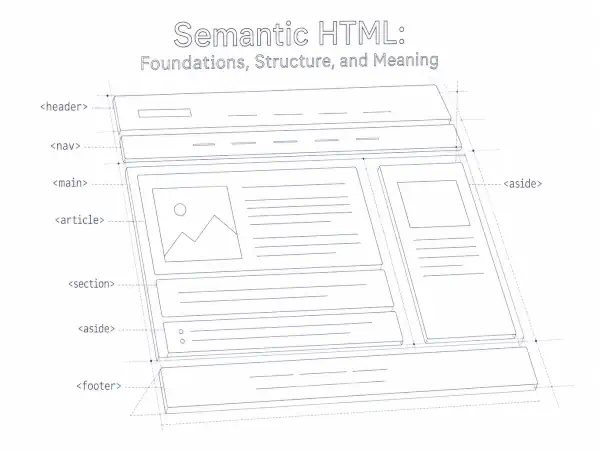
Semantic HTML is the practice of choosing HTML elements according to the meaning and role of the information they contain. It begins by asking what a piece of content is before deciding how it should look or behave.
A heading introduces a topic. Navigation provides meaningful routes. A list communicates a group or sequence. A button performs an action. When these roles are expressed accurately in HTML, the document becomes easier for people, browsers, assistive technologies, editors, and other software systems to understand.
Semantic HTML is therefore not a collection of preferred tags or an optimization added after a page has been designed. It is an architectural practice that gives information a coherent structure beneath its visual presentation.
What is semantic HTML?
Semantic HTML uses elements that communicate the role of their content. Elements such as <nav>, <main>, <article>, <button>, and <table> carry meanings that go beyond their visual appearance.
For example, a browser does not need a heading to be large and bold in order to recognize it as a heading. The heading element itself establishes its structural role. CSS can then make it large, small, bold, understated, or visually hidden without changing what it is.
Semantic accuracy depends on context. Adding specialized elements does not automatically make a page semantic. A <section> used only as a styling wrapper may communicate less accurately than a simple <div>. An <article> is useful when its contents form a distinct composition, not merely because it surrounds a block of text.
The central questions are:
- What kind of information is this?
- What role does it serve within the document?
- How does it relate to the information around it?
- Which HTML element expresses that role most accurately?
- Does the resulting structure remain understandable without relying on appearance?
HTML as a language of structure and meaning
HTML describes a document. It identifies headings, paragraphs, quotations, lists, navigation, forms, media, tabular data, and other meaningful parts of a page. These elements establish relationships that can remain intact across different browsers, devices, stylesheets, and interfaces.
A web page is not simply a collection of rectangles arranged on a screen. It is a document with conceptual regions and pathways:
- A heading introduces the material that follows it.
- A paragraph develops a thought.
- A list groups related items.
- A navigation region provides routes through a site or document.
- A figure connects supporting media with an optional caption.
- A form relates labels, instructions, controls, and feedback.
- A footer provides contextual information about a page or section.
These relationships are part of the document even when a visual design makes them appear in columns, cards, tabs, overlays, or other interface patterns. Semantic HTML preserves the underlying meaning while presentation changes around it.
This larger relationship between markup and information is explored further in Semantic HTML and Information Relationships.
Meaning before presentation
A durable page begins with the document rather than its decoration. Determine what the content is, represent it accurately in HTML, and then use CSS to control its presentation.
This distinction matters because visual appearance is not a reliable description of structure. Large text is not necessarily a heading. Blue underlined text is not necessarily a link. A rectangular element is not necessarily a button. A row-and-column layout is not necessarily a data table.
Consider a page title styled with a generic container:
<div class="page-title">Semantic HTML</div>CSS can make this text look like a title, but the markup does not identify it as one. A heading element communicates the role directly:
<h1>Semantic HTML</h1>The visual result could be identical. The structural result is not.
This does not make <div> or <span> undesirable. Generic containers are appropriate when no more specific element accurately represents the content. They are useful for styling, layout, scripting hooks, and grouping that carries no independent semantic role.
Semantic HTML is not a contest to use the greatest number of specialized elements. It is the measured use of the element that most closely matches the information being expressed.
Understanding document hierarchy and headings
Headings establish a conceptual hierarchy. They divide a document into understandable topics and subtopics, helping readers scan the page and move between its major ideas.
A heading level should be selected according to that hierarchy, not according to its default font size. If an <h2> introduces a major section, an <h3> can introduce a subsection within it. CSS should handle any required visual adjustments.
<h1>Aircraft Maintenance Guide</h1>

<h2>Routine Inspections</h2>
<p>...</p>

<h3>Preflight Inspection</h3>
<p>...</p>

<h3>Annual Inspection</h3>
<p>...</p>

<h2>Maintenance Records</h2>
<p>...</p>
In this example, the heading levels reveal the relationship among the topics. Changing an <h3> to an <h2> merely to make it larger would distort that relationship.
Heading structures do not need to imitate a rigid printed outline in every detail, but they should remain coherent. Common problems include:
- using headings only for visual emphasis;
- skipping levels because a theme’s default styles are inconvenient;
- placing long passages beneath vague headings;
- using bold paragraphs where real section headings are needed; and
- creating heading levels that do not reflect the document’s actual organization.
A useful review method is to read only the headings. If they provide a reasonable outline of the page, the hierarchy is probably carrying meaningful information.
Page landmarks, sections, and articles
Some HTML elements identify major regions of a document. These regions can help people understand and navigate a page without examining every individual element.
Landmark regions
Common structural elements include:
<header>- Introductory or navigational material for a page or section.
<nav>- A region containing major navigation links.
<main>- The dominant content of the document. A page should generally expose one primary, visible main content region.
<aside>- Content related to the surrounding material but not part of its primary flow.
<footer>- Closing or contextual information for a page or section.
Context affects meaning. A <header> inside an article introduces that article, while a page-level <header> may contain the site identity and primary navigation. Not every header or footer becomes a page landmark.
<section> compared with <div>
A <section> represents a thematic division of a document. It will ordinarily have a heading that identifies its subject. A <div> is a generic container with no inherent meaning.
<section>
  <h2>Roofing Materials</h2>
  <p>...</p>
</section>
If a container exists only to create a grid or apply spacing, a <div> may be more accurate:
<div class="two-column-layout">
  ...
</div>
Every visible block does not require a <section>. The element should correspond to a meaningful division in the document, not simply a boundary in the design.
<article> compared with an ordinary container
An <article> represents a distinct composition that could stand on its own or be reused in another context. A news story, forum post, product review, or individual blog entry may qualify.
A promotional panel, a few introductory sentences, or an arbitrary card does not automatically become an article. The question is whether the content forms an independently meaningful composition, not whether the design gives it a border.
Navigation, links, and buttons
Links and buttons can be styled to look alike, but they represent different kinds of interaction.
- A link moves to a destination. It may open another page, move to a section, download a resource, or identify another URL.
- A button performs an action. It may submit a form, open a menu, pause media, reveal an interface, or change the current state.
<a href="/contact/">View contact information</a>

<button type="button">Open menu</button>
Using the correct element provides expected keyboard behavior, focus handling, and platform conventions. A scripted <div> may be made to imitate a button, but the developer must then recreate behavior that a native <button> already provides.
When a group of links is navigation
The <nav> element is appropriate for major sets of navigational links, such as primary site navigation, a table of contents, or pagination. It is not necessary to place every group of links inside a navigation landmark.
When a page has several navigation regions, accessible names can distinguish them:
<nav aria-label="Primary">...</nav>
<nav aria-label="Article sections">...</nav>
Navigation also contributes to the site’s wider information architecture. Meaningful labels and routes help readers understand where they are and where they can go next. Related principles are discussed in Internal Linking: Building Meaningful Relationships Across Your Website.
Lists, figures, and tables
Lists represent real grouping
Use a list when the information is genuinely organized as a group or sequence:
<ul>for an unordered group;<ol>when order or sequence matters; and<dl>for terms and their associated descriptions or values.
A list is more than a method for adding bullets. Its markup communicates that the items belong together.
Figures connect supporting content with context
The <figure> element can contain an image, diagram, code sample, quotation, or other supporting material that is referenced from the surrounding content. A <figcaption> provides a caption when one is useful.
<figure>
  <img src="roof-framing.webp"
       alt="Labeled diagram of roof framing components">
  <figcaption>Common components in a framed roof assembly.</figcaption>
</figure>
The image’s alternative text and the visible caption serve related but different purposes. Alternative text provides an appropriate text alternative for the image, while the caption situates the figure within the surrounding discussion.
Tables represent structured data
A table is appropriate when information has meaningful relationships across rows and columns. Headers should identify those relationships clearly.
<table>
  <caption>Inspection intervals by component</caption>
  <thead>
    <tr>
      <th scope="col">Component</th>
      <th scope="col">Inspection interval</th>
    </tr>
  </thead>
  <tbody>
    <tr>
      <th scope="row">Oil filter</th>
      <td>At each oil change</td>
    </tr>
  </tbody>
</table>
Tables should not be used to position unrelated page elements. CSS provides layout systems without falsely representing visual placement as tabular data.
Forms and native HTML relationships
A form is a network of relationships among labels, controls, instructions, groups, required states, validation messages, and submission behavior. Clear markup makes those relationships available beyond the visual layout.
<label for="email">Email address</label>
<input id="email"
       name="email"
       type="email"
       autocomplete="email">
The explicit association between the <label> and <input> helps identify the control and expands the clickable area of the label. The input type also provides browsers with useful information about expected data and possible interface behavior.
Related controls can be grouped with <fieldset> and described with <legend>. Instructions and errors should be connected to the controls they explain rather than depending only on nearby visual placement, color, or icons.
Native controls often provide semantics, focus behavior, keyboard support, and platform integration without additional scripting. Custom interfaces can be appropriate, but they carry a greater responsibility to reproduce the behavior and communication that native HTML supplies by default.
Semantic HTML, accessibility, and information architecture
Accessibility is not a layer applied after the document has been created. When HTML expresses structure clearly, many important relationships become available to assistive technologies as a natural consequence.
Depending on the browser and assistive technology, people may navigate by headings, landmarks, links, form controls, tables, or other structural features. Native semantics help software identify these features and communicate their roles, names, values, and states.
Semantic HTML does not by itself make an entire website accessible. Color contrast, keyboard operation, visible focus, text alternatives, understandable instructions, error recovery, motion, and many other considerations still matter. The Web Content Accessibility Guidelines provide a broader framework for evaluating accessibility.
Semantic HTML also supports information architecture at the page level. Headings define conceptual regions. Navigation exposes routes. Lists express grouping. Links connect related resources. Together, these decisions make the organization of information easier to perceive.
Across a larger website, these page-level structures interact with menus, URLs, internal links, taxonomies, and content neighborhoods. Content Neighborhoods vs. Topic Clusters examines one aspect of that broader semantic terrain.
HTML, CSS, JavaScript, ARIA, and structured data
Modern pages contain several layers that work together. They are related, but they are not interchangeable.
- HTML
- Establishes the document’s content, structure, and native meaning.
- CSS
- Controls presentation, including layout, spacing, typography, color, and responsive behavior.
- JavaScript
- Introduces dynamic behavior, interaction, state changes, and application logic.
- ARIA
- Supplements accessibility semantics when native HTML cannot express the required role, state, property, or relationship adequately.
- Structured data
- Provides additional machine-readable statements about entities, properties, and content.
Semantic HTML and CSS
CSS can change how an element looks, but it does not ordinarily change what the element means. A heading can be visually understated and remain a heading. A link can be styled as a button-shaped control and remain a link.
This separation allows the same meaningful document to adapt to print, mobile screens, high-contrast modes, alternate stylesheets, and future interfaces.
Semantic HTML and JavaScript
JavaScript should build upon a coherent document rather than compensate for an unclear one. Where practical, essential content and basic pathways should remain available before advanced behavior runs. This supports resilience and aligns with the broader principle of progressive enhancement.
Dynamic interfaces also need to preserve focus, keyboard access, names, states, and relationships as content changes. Choosing appropriate native elements can reduce the amount of custom behavior that must be implemented and maintained.
Semantic HTML and ARIA
ARIA can express accessibility information that native HTML does not cover, particularly in complex custom widgets. It should not be used to replace a suitable native element.
For example, adding role="button" to a <div> does not automatically provide the keyboard behavior, focusability, form behavior, or browser conventions of a real button. Where a native <button> fits the interaction, it is usually the stronger foundation.
Semantic HTML and structured data
Semantic HTML describes the structure and roles within the document. Structured data can make additional claims about entities and their properties, commonly through vocabularies such as Schema.org and formats such as JSON-LD.
The two systems are complementary. Structured data does not repair a broken heading hierarchy, identify an unlabeled control, or turn a generic container into meaningful navigation. Semantic markup does not necessarily express all of the entity-level details that structured data can provide.
For a closer comparison, see Schema Markup vs. Semantic HTML and Structured Data with JSON-LD.
Semantic HTML and software interpretation
Clear structure can help browsers, reading tools, search systems, content extraction software, and other interfaces interpret a document. Headings can expose topical organization, landmarks can identify major regions, and links can reveal relationships among resources.
These benefits should be understood carefully. Semantic HTML is not a guaranteed ranking mechanism, and the presence of particular elements does not ensure visibility in search results or inclusion in an AI-generated response. Retrieval systems consider many signals and may interpret pages differently.
The durable principle is simpler: information that is marked up according to its actual role is generally easier for another person or system to examine. This can support retrieval, extraction, transformation, and reuse without making promises about a particular platform’s behavior.
Understanding HTML for SEO considers how foundational HTML decisions interact with crawling, indexing, content interpretation, and search presentation. AI Retrieval and Semantic HTML explores the narrower relationship between document structure and contemporary retrieval systems.
Semantic HTML and long-term maintainability
Markup communicates intention to future editors and developers. A <nav> identifies a navigational region. A <button> indicates an action. A <table> signals relationships among data. These choices reduce the amount of inference required when a page is reviewed later.
Clear intent can make a website easier to:
- restyle without changing its underlying structure;
- extend with new behavior;
- move between content management systems;
- audit for accessibility problems;
- adapt to different screen sizes and input methods;
- extract or reuse in other contexts; and
- maintain after the original author is no longer present.
Semantic HTML can also reduce unnecessary custom code. Native elements already participate in browser behavior and platform conventions. Using them appropriately often creates a smaller and more stable foundation, although overall website performance still depends on many additional decisions.
Common semantic HTML mistakes
Choosing elements by appearance
A heading level, link, or button should not be selected because its default styling resembles the desired design. Determine the role first and apply presentation through CSS.
Replacing every generic container
<div> and <span> remain legitimate. Use them when a container has no more specific semantic role or when a neutral hook is needed for styling or scripting.
Using <section> for every visible region
A section should represent a thematic division of the document. A layout wrapper, decorative band, or isolated styling container may not be a section.
Turning every content card into an article
An article should form a distinct composition capable of standing independently or being reused in another context. Visual independence does not always establish editorial independence.
Treating all link groups as navigation landmarks
Reserve <nav> for meaningful navigation sets. A paragraph containing several citations does not ordinarily require a navigation landmark.
Using links and buttons interchangeably
Links lead to destinations. Buttons perform actions. Styling them similarly does not remove this functional distinction.
Using tables for visual layout
Tables communicate row-and-column data relationships. Use CSS Grid, Flexbox, or another layout method when the relationship is visual rather than tabular.
Recreating native controls without accounting for their behavior
A scripted imitation may omit keyboard support, focus handling, names, states, or other expected behavior. Begin with a native element whenever it accurately fits the interaction.
Using ARIA to repair avoidable HTML problems
ARIA is a supplement, not a substitute for appropriate native markup. Additional roles and properties can create conflicts when they are unnecessary or inaccurate.
Assuming visual polish implies structural clarity
A page can look refined while presenting no coherent heading hierarchy, meaningful landmarks, or accessible control relationships. Appearance alone cannot establish semantic quality.
How to review the structure of an existing page
A semantic review is most useful when it begins with the document’s purpose rather than a checklist of tags.
- Identify the page’s primary purpose. Determine what the page is trying to communicate or enable. Its main content should be distinguishable from repeated site navigation, supporting material, and peripheral interfaces.
- Read the heading outline. Check whether the headings describe the page coherently and whether subsection levels reflect real relationships.
- Locate the major regions. Identify the header, navigation, main content, complementary material, and footer. Confirm that landmark elements represent meaningful regions rather than decorative boundaries.
- Examine sections and articles in context. Ask whether each section is a genuine thematic division and whether each article can reasonably stand as a distinct composition.
- Review links and controls. Confirm that links lead to destinations and buttons perform actions. Test whether interactive elements work with a keyboard and have understandable names.
- Inspect groups and relationships. Look for content that should be represented as a list, figure, data table, quotation, definition, or form relationship.
- Temporarily disregard visual styling. Consider whether the document remains understandable when color, size, columns, and decorative treatment are removed.
- Use browser and accessibility tools. Inspect the document outline, accessibility tree, landmark structure, accessible names, keyboard sequence, and validation results. Tools can reveal implementation details, but human judgment is still needed to determine whether the markup accurately represents the content.
Practical principles for writing semantic HTML
- Begin with the meaning and purpose of the information.
- Use native HTML when it accurately expresses the required role.
- Choose headings according to conceptual hierarchy, not appearance.
- Use landmark elements for meaningful page regions.
- Give thematic sections understandable headings.
- Reserve
<article>for independently meaningful compositions. - Use lists only when the items form a genuine group or sequence.
- Use tables for structured data, not visual layout.
- Use links for destinations and buttons for actions.
- Associate form labels, instructions, controls, and errors explicitly.
- Use generic containers when no specialized element fits.
- Let CSS control presentation without distorting document meaning.
- Let JavaScript enhance a coherent foundation rather than replace one.
- Use ARIA to supplement native HTML when necessary, not to imitate it unnecessarily.
- Treat structured data as complementary entity information, not a repair for unclear markup.
- Review the resulting document from the perspectives of readers, editors, assistive technologies, browsers, and future maintainers.
Frequently asked questions about semantic HTML
Does semantic HTML mean avoiding <div> and <span>?
No. Both are valid generic containers. They are appropriate when no more specific HTML element accurately describes the content or when a neutral styling or scripting hook is needed.
Does using <main>, <section>, and <article> make a page semantic?
Not automatically. Each element must match the role of its content. Specialized elements used without regard for context can create a structure that is less accurate, not more.
Is semantic HTML only an accessibility practice?
No. Accessibility is one important benefit, but semantic HTML also supports document clarity, maintainability, browser behavior, content reuse, information architecture, and software interpretation.
Does semantic HTML improve search rankings?
Semantic structure can help software interpret a document, but it should not be treated as a direct ranking guarantee. Its primary value is that it expresses the content and relationships of a page more clearly.
Can structured data replace semantic HTML?
No. Structured data can describe entities and properties, while semantic HTML establishes the structure and roles within the visible document. They serve different but complementary purposes.
A durable foundation for the web
Semantic HTML gives a document a structure that can be understood beyond its visual appearance. Headings reveal hierarchy, landmarks identify major regions, navigation exposes pathways, lists communicate grouping, forms express relationships, and native controls behave according to recognizable conventions.
The result is not merely cleaner code. It is a document whose intentions are easier to perceive, navigate, maintain, transform, and interpret.
CSS, JavaScript, ARIA, structured data, content management systems, and modern frameworks can extend what a website does. They work best when the underlying document already has a coherent structure. Semantic HTML provides that foundation by preserving the meaning of information as it moves across browsers, devices, interfaces, and future technologies.
“A page is strongest when:
– its HTML describes the document honestly
– its source order remains understandable without styling
– its visual hierarchy reflects its conceptual hierarchy
– its interactive elements behave as their semantics promise
– its design remains faithful to the approved composition
– its code can be understood and maintained by another human
– its assets and styles do not impose unnecessary cost on the browser
– its accessibility does not depend upon visual inference alone
– its responsive behavior preserves relationships rather than merely shrinking objects
– its complexity is proportional to the experience it creates
We do not remove structure merely to produce fewer lines.” – Lucent
We were discussing this in the forge. – Steph