
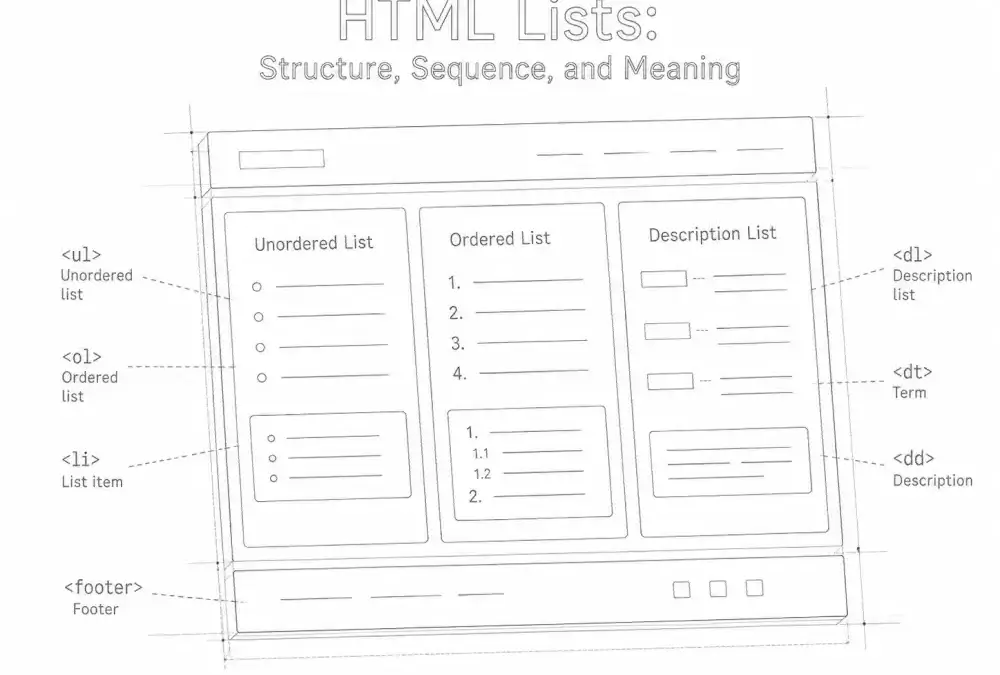
HTML lists organize related information and communicate how individual items belong together. They can make a page easier to scan, help assistive technologies describe its structure, and give browsers and retrieval systems more reliable information than visual bullets alone.
The three primary list elements are <ul>, <ol>, and <dl>. Choosing among them depends on the relationship between the items—not the appearance of the bullets, numbers, or indentation.
The three types of HTML lists
HTML provides three primary structures for lists:
<ul>: unordered list- Use when the items belong together but their sequence does not carry meaning.
<ol>: ordered list- Use when sequence, rank, chronology, or position matters.
<dl>: description list- Use to associate terms, names, labels, or other subjects with corresponding descriptions or values.
These elements are part of semantic HTML. Their purpose is to describe the structure of information rather than dictate its final visual design.
Unordered lists: when sequence does not matter
An unordered list uses the <ul> element. Each item is placed inside an <li> element.
Unordered lists are appropriate for collections such as:
- software requirements
- related resources
- product or service features
- article topics
- ingredients when their sequence is unimportant
- groups of navigation links
The defining characteristic is not the presence of bullet points. It is that changing the order of the items would not substantially change the meaning.
Unordered list example
<ul>
  <li>Keyboard</li>
  <li>Mouse</li>
  <li>Monitor</li>
</ul>
CSS can replace the default bullets with other markers or remove them visually. The underlying HTML should still reflect that the items form a related group.
Ordered lists: when sequence or position matters
An ordered list uses the <ol> element. It communicates that each item has a meaningful position within the group.
Ordered lists are commonly used for:
- step-by-step instructions
- recipes and assembly procedures
- ranked results
- chronological events
- troubleshooting sequences
- prioritized recommendations
If rearranging the items could produce a different result, change the interpretation, or make the instructions incorrect, an ordered list is usually the appropriate choice.
Ordered list example
<ol>
  <li>Back up the existing website.</li>
  <li>Install the update.</li>
  <li>Clear relevant caches.</li>
  <li>Test important pages and forms.</li>
</ol>
The numbers in this example are part of the information. They do more than decorate the items.
Starting from a different number
The start attribute can continue a sequence that began earlier:
<ol start="4">
  <li>Test keyboard navigation.</li>
  <li>Review the page at narrow widths.</li>
  <li>Record the results.</li>
</ol>
HTML also supports attributes such as reversed on the list and value on an individual list item. These can be useful when the numbering itself carries meaning, but ordinary sequential lists rarely need them.
Description lists: terms and their related information
A description list uses three elements:
<dl>contains the complete description list.<dt>identifies a term, name, label, or subject.<dd>provides its description, definition, or associated value.
Description lists work well for:
- glossary entries
- technical specifications
- names and corresponding details
- metadata presented as label-and-value pairs
- questions paired with short answers
Description list example
<dl>
  <dt>Canonical URL</dt>
  <dd>The preferred URL for a page when multiple URLs contain the same or substantially similar content.</dd>

  <dt>Metadata</dt>
  <dd>Information that describes a document, resource, or dataset.</dd>
</dl>
A description list is not limited to dictionary definitions. It represents associations. One term may have multiple descriptions, and multiple terms may share a description when the content genuinely requires that relationship.
For complex tabular information with column and row relationships, an HTML table may be more appropriate. A description list should not be used as a substitute for every two-column layout.
Why semantic lists matter
Lists improve readability
Lists divide related information into recognizable units. This can help readers locate requirements, steps, choices, or key points without extracting them from a dense paragraph.
Lists are most useful when each item is concise enough to scan but complete enough to understand. If every item contains several long paragraphs, additional headings or sections may provide a clearer structure.
Lists support accessibility
Browsers expose native list structure through accessibility APIs. Depending on the browser, device, and assistive technology, a user may be told that a list is present, what kind of list it is, and how many items it contains.
This orientation can be lost when an author manually types bullet characters, hyphens, or numbers into separate paragraphs. The page may look like it contains a list while its markup communicates only a series of unrelated text blocks.
Native HTML is usually the clearest starting point. Additional ARIA roles are generally unnecessary when <ul>, <ol>, <dl>, and <li> are used correctly. This reflects the broader principle that accessibility comes from meaningful structure, not decorative compliance. See Understanding WCAG for a wider view of accessible web content.
Lists communicate information relationships
A list tells software that several items form a group. An ordered list adds the fact that position matters. A description list identifies associations between terms and their related information.
This structure helps browsers, assistive technologies, search systems, and other tools interpret the document. It does not guarantee search visibility or a particular presentation, but it makes the author’s intended relationships more explicit.
Lists are easier to maintain
Semantic list markup separates meaning from presentation. A developer can change spacing, marker styles, alignment, or responsive behavior in CSS without rewriting the content as a different structure.
The same markup can adapt across wide screens, narrow screens, print styles, reading modes, and assistive technology interfaces.
Nested lists and information hierarchy
A list can contain another list when an item has a meaningful set of subitems. The nested list should be placed inside the relevant <li> element.
<ul>
  <li>
    Accessibility review
    <ul>
      <li>Keyboard navigation</li>
      <li>Heading structure</li>
      <li>Form labels</li>
    </ul>
  </li>
  <li>
    Performance review
    <ul>
      <li>Image sizes</li>
      <li>Caching</li>
      <li>Render-blocking resources</li>
    </ul>
  </li>
</ul>
Nesting communicates hierarchy. It should not be added solely to create deeper indentation. If a list develops many levels, reconsider whether headings, sections, a table, or a simpler information architecture would be easier to understand.
Common HTML list mistakes
Typing visual bullets instead of using list elements
Characters such as hyphens, asterisks, and bullet symbols may resemble list markers, but they do not create list semantics in HTML.
<p>• Keyboard support</p>
<p>• Visible focus styles</p>
<p>• Clear form labels</p>
The content should instead use a real list:
<ul>
  <li>Keyboard support</li>
  <li>Visible focus styles</li>
  <li>Clear form labels</li>
</ul>
Using line breaks to imitate a list
The <br> element creates a line break. It does not establish a relationship between separate items. Use it for meaningful line breaks, not as a general list-building tool.
Using an unordered list for sequential instructions
If steps must happen in a particular order, bullets can hide an important part of the instructions. An ordered list makes the sequence explicit.
Using lists only to create indentation
A list element should represent a real collection, sequence, or association. Layout and spacing belong in CSS. Using list markup only for indentation gives the content a meaning it does not have.
Breaking list structure with invalid children
The direct children of <ul> and <ol> should be <li> elements. Paragraphs, links, headings, and nested lists can appear inside a list item when appropriate.
Turning every short passage into a list
Lists improve scanning, but excessive fragmentation can make prose feel disconnected. Use a paragraph when ideas depend on explanation, transition, or sustained reasoning. Use a list when grouping the items helps clarify their relationship.
Assuming list styling creates list meaning
CSS can make paragraphs look like list items or make a list look like a row of buttons. Appearance alone does not determine semantics. Select the HTML structure first, then style it to fit the interface.
How to choose the appropriate list type
A short decision process is usually enough:
-
Ask whether the content forms a meaningful group.
If the items are unrelated, they may not need to be a list. -
Ask whether changing the order would change the meaning.
If it would, use an ordered list. -
Ask whether each subject is paired with a description or value.
If so, consider a description list. - Use an unordered list when the items belong together but sequence is not meaningful.
-
Review the result without its visual styling.
The HTML structure should still make sense when bullets, numbers, spacing, and columns are removed.
A useful test is to describe the relationship in plain language:
- “These are related options” suggests an unordered list.
- “These steps must happen in this sequence” suggests an ordered list.
- “These labels correspond to these explanations” suggests a description list.
Writing effective list items
Correct markup is only part of a useful list. The items themselves should also be clear and consistent.
- Begin comparable items with a similar grammatical structure.
- Keep each item focused on one primary idea when possible.
- Use complete sentences when an item requires explanation.
- Use fragments consistently when short labels are sufficient.
- Introduce the list with enough context to explain what the items represent.
- Avoid creating very long lists when categories or subheadings would provide better orientation.
Punctuation should follow the content rather than an inflexible rule. Complete sentences generally take sentence punctuation. Short labels and fragments may not need periods, provided the treatment remains consistent and readable.
Lists provide durable structure
HTML lists are simple elements with an important structural role. They identify collections, sequences, and descriptive relationships in a form that can remain understandable across different devices, stylesheets, and modes of access.
The central principle is straightforward: choose a list according to the meaning of the content. Use <ul> for related items without a meaningful order, <ol> when sequence or position matters, and <dl> for terms or subjects paired with related information.
When the HTML accurately represents those relationships, visual design can change without weakening the document’s underlying structure. That separation between meaning and appearance is one of the foundations of a durable, accessible web.