

JSON-LD is a machine-readable format used to describe the meaning, entities, and relationships present on a web page. It gives search engines and other automated retrieval systems explicit context without changing the page’s visible presentation.
Structured data is not a ranking shortcut, and it cannot replace accurate content or a well-organized website. Its value is architectural: it helps machines interpret information that people may already understand from the page’s words, headings, links, and visual organization.
Understanding structured data
Structured data is information expressed through a consistent vocabulary and syntax so that software can identify what something is and how it relates to other things.
A person reading a page may recognize a name as the author, a date as the publication date, or a street address as the location of a business. An automated system may need those relationships stated more explicitly. Structured data can identify those values as properties of an article, person, organization, product, job, or another defined entity.
This creates an additional communication layer:
- The visible page communicates with readers.
- Semantic HTML communicates document structure to browsers, assistive technologies, and automated systems.
- JSON-LD provides explicit machine-readable descriptions of entities and relationships.
These layers should agree with one another. Structured data is most reliable when it reinforces the same meaning already expressed by the visible content and underlying document structure.
What is JSON-LD?
JSON-LD stands for JavaScript Object Notation for Linked Data. It is a standardized method for expressing linked, structured information using JSON syntax.
On a web page, JSON-LD is usually placed inside a script element with the media type application/ld+json. The browser does not display this data block as page content or execute it as JavaScript. JSON-LD uses JSON syntax, but the script element’s media type identifies this block as data. Compatible search engines, crawlers, and other data processors can read it. JSON-LD is also used outside HTML pages, as described in the W3C JSON-LD specification.
A JSON-LD object commonly uses:
@context- Identifies the vocabulary used to interpret the terms in the object. Schema.org markup generally uses
https://schema.org. @type- Identifies the kind of entity being described, such as
Article,Person, orOrganization. @id- Identifies the entity being described. For linked web publishing, a deliberately maintained absolute URL, sometimes with a fragment, is a practical choice. The keyword does not itself make an identifier stable; that depends on how the publisher maintains it.
- Properties
- Describe the entity through values such as its name, URL, author, publication date, address, or relationship to another entity.
JSON-LD is a W3C standard, while Schema.org supplies a widely used vocabulary for describing web content. The format and the vocabulary work together, but they are not the same thing.
Why JSON-LD is widely used
Structured data can also be expressed through formats such as Microdata and RDFa. JSON-LD is widely used in search implementations because it keeps the structured description separate from the page’s presentation markup. Google recommends it in most cases, while also supporting Microdata and RDFa.
This separation provides several practical advantages:
- Structured information can be reviewed without tracing attributes across many HTML elements.
- Developers can update the data layer without restructuring visible page components.
- Related entities can be represented together using a graph.
- Server-side templates, content management systems, and data sources can generate markup consistently.
- Search platforms commonly document and support JSON-LD for eligible search features.
JSON-LD should not become disconnected from the page it describes. Separation of implementation is useful; separation of meaning is not. If the visible content changes, the structured data may also need to change.
JSON-LD and semantic HTML serve different purposes
JSON-LD complements semantic HTML rather than replacing it.
HTML elements such as <article>, <nav>, <main>, headings, lists, tables, and form labels establish the document’s meaningful structure. This structure helps people navigate a page and supports browsers, search engines, and assistive technologies.
JSON-LD adds explicit statements about the entities represented by that document. For example, HTML can establish that a page contains an article, while JSON-LD can identify the article’s headline, author, publisher, publication date, entity identifier, and relationship to an organization.
Structured data does not repair inaccessible or poorly organized HTML. A page still needs:
- A logical heading hierarchy
- Meaningful link text
- Appropriate labels and alternative text
- Keyboard-accessible controls
- Readable content and navigation
- Semantic elements used according to their purpose
For a broader accessibility foundation, see:
Understanding Schema.org
Schema.org is a shared vocabulary for describing entities and their properties. It contains types for creative works, organizations, people, places, products, events, services, reviews, datasets, and many other forms of information.
A type establishes the general category of an entity. Properties provide details about it. An Article, for example, may have a headline, author, datePublished, dateModified, and publisher.
Schema.org is broader than the structured data requirements published by individual search engines. A property can be valid according to the Schema.org vocabulary without being used by a particular search feature. Conversely, eligibility for a search feature may depend on additional platform-specific requirements.
This distinction is important:
- Schema validity asks whether the vocabulary and syntax are used correctly.
- Search feature eligibility asks whether the page satisfies the current requirements of a particular search platform.
- Search feature appearance remains a decision made by the search system and is not guaranteed.
URLMD’s guide to SEO and structured data provides additional context on how markup communicates what a page means.
A basic JSON-LD example
The following example describes an article and connects it to its author and publisher. The values are illustrative and should be replaced with accurate information supported by the corresponding page. It is a teaching example, not a universal checklist for every consumer or search feature.
<script type="application/ld+json">
{
  "@context": "https://schema.org",
  "@type": "Article",
  "@id": "https://example.com/guides/structured-data/#article",
  "url": "https://example.com/guides/structured-data/",
  "headline": "A Practical Guide to Structured Data",
  "datePublished": "2026-07-19",
  "dateModified": "2026-07-19",
  "author": {
    "@type": "Person",
    "@id": "https://example.com/authors/jordan-lee/#person",
    "name": "Jordan Lee",
    "url": "https://example.com/authors/jordan-lee/"
  },
  "publisher": {
    "@type": "Organization",
    "@id": "https://example.com/#organization",
    "name": "Example Publishing",
    "url": "https://example.com/"
  }
}
</script>
This code makes several claims:
- The primary entity is an article.
- The article has a stable identifier and URL.
- It has a particular headline and publication history.
- A person authored it.
- An organization published it.
Every claim should be supported by the page or by clearly connected site information. If the page does not identify the author, for example, adding an author only to the JSON-LD creates an unnecessary inconsistency.
Describing entities and relationships
One of JSON-LD’s most useful characteristics is its ability to describe relationships rather than isolated labels.
An article may be written by a person, published by an organization, discuss a particular subject, and belong to a larger website. A local organization may have a name, location, telephone number, service area, and official URL. A product may be connected to a brand and an offer.
Reusing an @id tells a JSON-LD processor that the descriptions concern the same node. Give different entities different identifiers, and reuse the identifier consistently when the entity really is the same. A shared name alone is not equivalent to a shared identifier, and repeating an identifier does not verify the description’s accuracy.
For more complex pages, an @graph can describe several connected entities in one JSON-LD block. This can be useful when a page represents an article, its author, its publisher, and the website containing it. The relationships should remain understandable and supported by the site’s actual content.
One identity across several descriptions
In the article example, https://example.com/authors/jordan-lee/#person identifies Jordan Lee, while the url property gives the author’s profile-page address. Likewise, https://example.com/#organization identifies Example Publishing, while https://example.com/ is its site URL. An entity’s identifier and its page address can be related without being interchangeable.
A second article by Jordan Lee can refer to those same Person and Organization identifiers. The article identifiers differ because the articles are different works; their author and publisher references agree because they refer to the same entities.
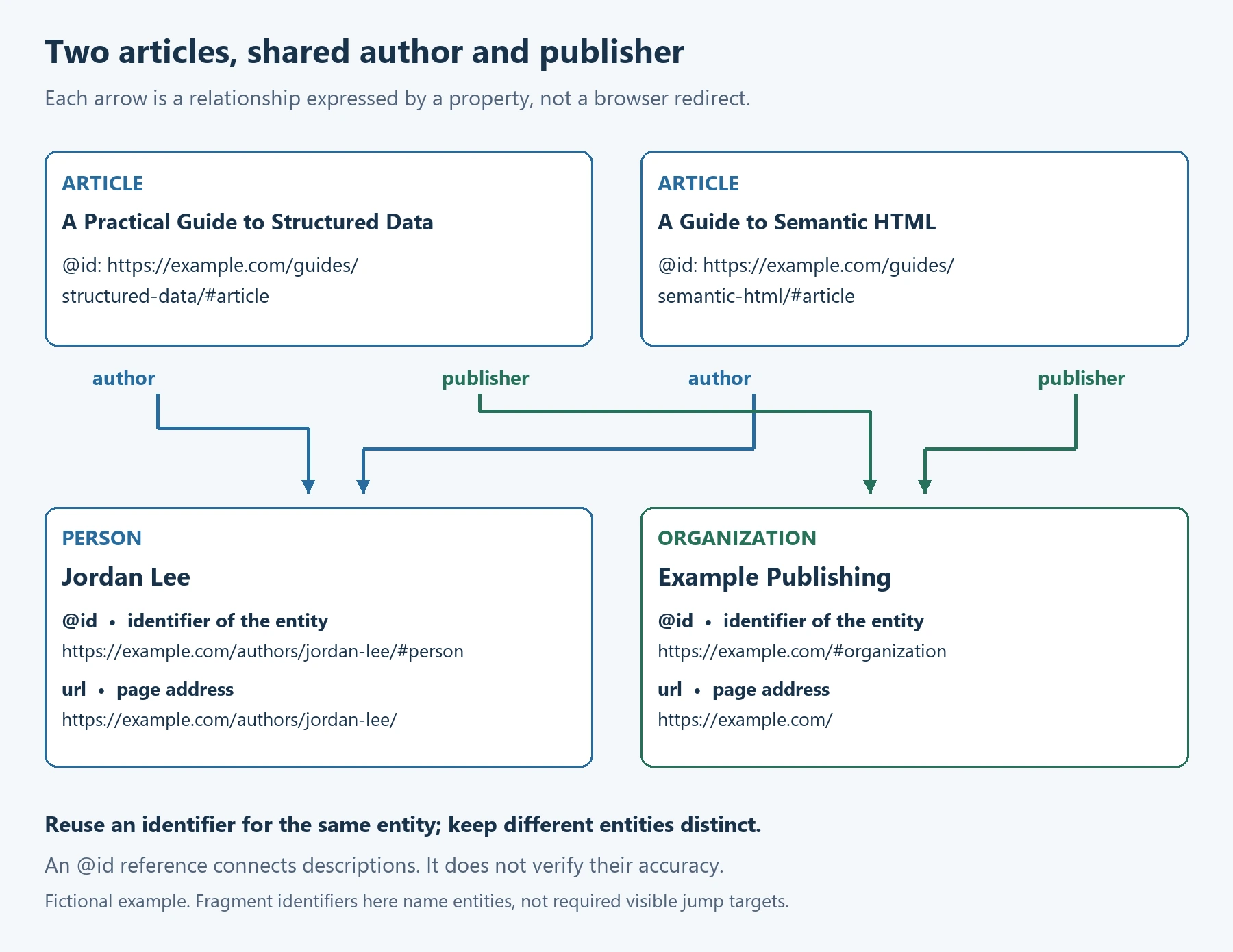
Inside either Article object, the references can be written as:
"author": { "@id": "https://example.com/authors/jordan-lee/#person" },
"publisher": { "@id": "https://example.com/#organization" }
This is a property fragment, not a complete JSON document. The referenced entities can be described in the same graph or in other data the consumer actually reads. An identifier is not a promise that a particular search engine will fetch another page and discover missing properties; include the information its feature documentation calls for.
The fragment suffixes #person, #organization, and #article name entities in this example. They need not correspond to visible HTML jump targets. An @id also does not set an HTTP redirect or declare the canonical URL selected by a search engine. Those controls have separate purposes. See the W3C explanation of node identifiers.
This entity-centered approach aligns with entity-based SEO: meaning emerges not only from words, but also from the identity, context, and relationships of the things those words describe.
How structured data helps search engines and AI systems
Search engines can interpret visible text and HTML without structured data. JSON-LD provides an additional source of explicit context that may reduce ambiguity and support more reliable entity recognition.
Depending on the page and implementation, structured data may help automated systems understand:
- The primary subject or content type of a page
- The relationship between an article and its author
- The identity of an organization represented by a website
- Dates, locations, prices, availability, and other defined properties
- Connections between related entities across multiple pages
AI retrieval systems may also use structured information when processing or connecting web content, although implementations vary considerably. JSON-LD should not be treated as a guarantee that an AI system will cite, summarize, or interpret a page in a particular way.
Its durable value is interoperability. A clear, standards-based data layer gives present and future systems a more explicit account of what the website represents.
Rich results are possible, not guaranteed
Some search engines use supported structured data to determine whether a page is eligible for enhanced search presentations, often called rich results. These presentations may include additional details beyond a standard title, URL, and description.
Valid markup does not guarantee that a rich result will appear. Search engines may consider:
- Whether the structured data type is supported
- Whether applicable required properties are present, and which relevant recommended properties are supplied
- Whether the markup matches the visible content
- Whether the page is accessible to the relevant crawler and satisfies applicable content and feature policies
- Search intent, device, location, and interface conditions
- Current search policies and feature availability
Required fields and recommendations play different roles: missing a required property can prevent eligibility, while a recommendation is not automatically a requirement. Requirements vary by feature. Google’s structured data guidelines also explain why passing a test does not guarantee display. Search features change over time, so a durable implementation should begin with accurate description rather than dependence on a particular visual result.
Common structured data types
The appropriate type depends on what the page actually represents. Common Schema.org types include:
- Article: Editorial, news, or informational content.
- Person: An identifiable individual, such as an author.
- Organization: A company, nonprofit, institution, or other organization.
- LocalBusiness: A business associated with a physical location or local service context.
- Product: A product being described, often in connection with a brand or offer.
- Event: An event with relevant dates, location, attendance mode, or organizer information.
- BreadcrumbList: The page’s position within a meaningful site hierarchy.
- WebSite: The website as an entity.
- WebPage: A particular page within a website.
- FAQPage: A page containing visible questions and answers, subject to current platform policies.
Use the most specific accurate type, but do not force a page into a category merely because that category may be associated with a search feature.
Common JSON-LD mistakes
Marking up information that is not on the page
Structured data should describe visible content or information clearly established through the page and its site context. Adding unsupported claims weakens trust and may violate search platform guidelines.
Using an inaccurate type
A general informational page should not be labeled as a product, event, or local business unless it genuinely represents that entity. Choose the type based on meaning, not hoped-for presentation.
Allowing visible content and markup to diverge
Prices, availability, dates, author names, addresses, and other changing values can become inconsistent when the page and JSON-LD use separate data sources. Where possible, generate both from the same maintained source.
Publishing invalid JSON
JSON requires exact syntax. Frequent errors include:
- Missing commas
- Trailing commas
- Unmatched braces or brackets
- Unescaped quotation marks
- Comments, which standard JSON does not support
A misspelled property name is a different kind of error: "datePublised" can be valid JSON syntax while failing to use the intended Schema.org term datePublished. A JSON parser alone will not catch that vocabulary mistake.
Confusing vocabulary validity with search eligibility
Markup can be valid Schema.org data while lacking properties required for a specific search feature. Validation should include both general vocabulary checks and any relevant platform documentation.
Creating duplicate or conflicting entities
Multiple plugins, themes, tag managers, and SEO tools can each generate their own markup. The result may be several organizations, authors, or articles with different names and identifiers. Review the complete rendered page rather than assuming each tool operates in isolation.
Using markup to compensate for weak architecture
JSON-LD cannot repair unclear navigation, thin content, broken links, inconsistent URLs, or an incoherent website hierarchy. Those issues belong to the broader work of technical SEO and information architecture.
Testing structured data
Structured data should be tested before publication and checked again after the page is publicly rendered. Testing the live or rendered version can reveal duplication, template errors, and conflicts that are not visible in the original code.
Useful testing resources include:
- Schema.org Validator for reviewing Schema.org vocabulary and structured data syntax.
- Google Rich Results Test for checking markup supported by Google’s rich result systems.
- Search platform webmaster tools for monitoring detected markup and implementation issues.
- General JSON validators for locating syntax errors.
A practical review should ask:
- Is the JSON syntactically valid?
- Does the vocabulary use appropriate Schema.org types and properties?
- Does every important claim match the visible page?
- Are URLs absolute, stable, and consistent with the site’s preferred URLs?
- Are dates, prices, addresses, and availability current?
- Are multiple tools generating conflicting entities?
- Does the page satisfy any relevant search platform requirements?
Warnings deserve review, but they do not always indicate invalid markup. Some tools report recommended properties that may not apply to every page. Errors should be understood in context rather than cleared mechanically.
Check the JSON-LD on a live Contact page
Open URLMD’s Contact page and find the visible breadcrumb. It reads Home → Contact. Open View Page Source and search for application/ld+json. Look for a script element with that type. If a page inserts markup with JavaScript, also check the document in the browser after it runs. A code sample displayed in an article is separate from the script served for machines to read.
What the page served
In the example checked for this article, the script parsed as JSON and contained the same two labels as the visible trail. It numbered them 2 and 3 and used # for the current page.
{
  "@context": "http://schema.org",
  "@type": "BreadcrumbList",
  "itemListElement": [
    {
      "@type": "ListItem",
      "position": 2,
      "item": {
        "@id": "https://urlmd.com",
        "name": "Home"
      }
    },
    {
      "@type": "ListItem",
      "position": 3,
      "item": {
        "@id": "#",
        "name": "Contact"
      }
    }
  ]
}
Proposed markup for the same trail
Start at position 1 and use the canonical Contact URL to identify the current page explicitly. Google’s breadcrumb documentation also allows the final item’s URL to be omitted. The proposal below is shown as example code.
{
  "@context": "https://schema.org",
  "@type": "BreadcrumbList",
  "itemListElement": [
    {
      "@type": "ListItem",
      "position": 1,
      "name": "Home",
      "item": "https://urlmd.com/"
    },
    {
      "@type": "ListItem",
      "position": 2,
      "name": "Contact",
      "item": "https://urlmd.com/contact/"
    }
  ]
}- Check the syntax. Parse the JSON so you know it can be read as written.
- Check the page and vocabulary. Compare the names, order, and URLs with the visible trail and the page’s canonical URL. Use the Schema Markup Validator to check the vocabulary.
- Check the search feature separately. If Google’s breadcrumb feature matters for the page, run the Rich Results Test against the public URL and interpret its findings under the breadcrumb requirements.
The HTML and JSON-LD comparison shows which relationships are expressed in the visible document and which are stated separately in structured data.
Lucent note. When a theme or plugin changes, I reopen the public URL and check what it serves. The draft can parse perfectly while the live template emits different values.
Maintaining accurate structured data
Structured data is part of the website’s maintained content, not a one-time technical addition.
It should be reviewed when:
- An organization changes its name, address, logo, or contact information
- An author profile moves or changes
- A page’s canonical URL changes
- An article is substantially revised
- A product’s price or availability changes
- An event is rescheduled, canceled, or moved online
- A theme, plugin, or content management system is replaced
- A search platform changes its documented requirements
Stable templates and shared data sources reduce maintenance errors. For example, an organization’s name, URL, and logo can be managed centrally and referenced consistently across the site.
Canonicalization also matters. The URLs used in JSON-LD should align with the website’s preferred URL structure rather than introducing alternate forms unnecessarily.
Structured data as part of information architecture
Information architecture determines how content, categories, entities, and relationships are organized across a website. Structured data makes portions of that architecture explicit to machines.
A coherent implementation may connect:
- Articles to authors
- Authors to profile pages
- Pages to the website containing them
- The website to its publishing organization
- Products to brands and offers
- Locations to the organizations operating there
- Breadcrumbs to the site’s navigational hierarchy
These relationships should also be supported by visible navigation, meaningful URLs, internal links, and consistent terminology. Website taxonomy provides one foundation for organizing this terrain over time.
Structured data also supports future optionality. A standards-based representation can remain useful even as search interfaces, browsers, AI systems, and publishing tools evolve. It does not guarantee future compatibility, but it provides clearer material for future systems to interpret.
Durable implementation principles
A reliable JSON-LD implementation can be guided by a small set of durable principles:
- Describe the page honestly. Markup should reflect content that readers can verify.
- Use specific types carefully. Choose the closest accurate type rather than the most attractive search feature.
- Preserve semantic HTML. Machine-readable data does not replace accessible document structure.
- Keep entities consistent. Use stable names, URLs, and identifiers across the site.
- Generate changing values from maintained sources. This reduces divergence between the page and its markup.
- Validate in context. Test syntax, vocabulary, rendered output, and relevant platform requirements.
- Maintain the data over time. Treat structured information as part of the content lifecycle.
- Do not depend on rich results. Search presentation is an external outcome, not an architectural foundation.
Frequently asked questions about JSON-LD
Does JSON-LD directly improve search rankings?
JSON-LD is not generally understood as a direct ranking shortcut. It can help search systems interpret entities and relationships, and supported markup may make a page eligible for certain search features. Rankings and search presentation depend on many additional factors.
Does JSON-LD replace semantic HTML?
No. Semantic HTML establishes the accessible and meaningful structure of the document. JSON-LD provides an additional machine-readable description. When structured data serves the page’s purpose, keep it consistent with the document; its presence is not a prerequisite for a clear, accessible page.
Where should JSON-LD be placed?
JSON-LD is placed in a <script type="application/ld+json"> element. It is commonly included in the document head or body. What matters most is that supported crawlers can access the rendered markup and that it accurately describes the page.
Does valid structured data guarantee a rich result?
No. Valid markup alone does not establish eligibility: the page must also satisfy the supported feature’s content and other requirements. Search engines decide whether and how eligible features appear. Eligibility requirements and search interfaces can also change.
Clearer meaning for an evolving web
JSON-LD provides a practical way to express structured meaning without changing how a page appears to readers. It can identify entities, clarify relationships, and give automated systems a more explicit account of what a page represents.
Its value is strongest when it remains connected to the rest of the website: accurate content, semantic HTML, accessible interfaces, stable URLs, thoughtful taxonomy, and coherent information architecture.
Structured data should not promise outcomes it cannot control. Used carefully, it becomes something quieter and more durable—a standards-based layer of communication that helps websites remain understandable, interoperable, and prepared for future forms of retrieval.
see mary’s original here: https://fine-digital-art.com/city-art-collection/attachment/6675/