
The following tools are not all “SEO tools” in the usual marketing sense. They are tools I use to understand how a website is being seen, loaded, parsed, indexed, and interpreted.
That distinction matters. Good SEO is not just about finding keywords or chasing rankings. It is about making a website easier for people, browsers, assistive devices, and search engines to understand.
Google Search Console
Google Search Console is one of the most important tools for anyone who owns or manages a website.
Search Console helps you understand how Google sees your site. It can show which pages are indexed, which search queries are bringing impressions and clicks, which pages may have technical issues, and whether Google is having trouble crawling or understanding parts of your site.
For a newer SEO, Search Console may look like a performance dashboard. For a more experienced SEO, it becomes more like a diagnostic surface. It helps answer questions like:
- Can Google crawl this page?
- Has Google indexed this page?
- Which queries does Google associate with this page?
- Are impressions rising or falling?
- Are clicks changing because of ranking, title, intent, or search layout?
- Are important pages being ignored?
- Are unimportant pages getting too much crawl attention?
I do not treat Search Console as a scoreboard. I treat it as a window into search behavior and site interpretation.
URL Inspection Tool
The URL Inspection Tool inside Search Console is useful when you want to look at one page closely.
This tool can show whether a specific URL is indexed, when it was last crawled, whether Google selected a different canonical URL, whether the page is eligible for certain search features, and whether there are crawl or indexing problems.
This is especially useful after publishing or editing a page. If a page is important, I want to know whether Google can actually access it, understand it, and place it into the index correctly.
A page can look fine in a browser and still have problems from Google’s point of view. The URL Inspection Tool helps reveal that gap.
PageSpeed Insights
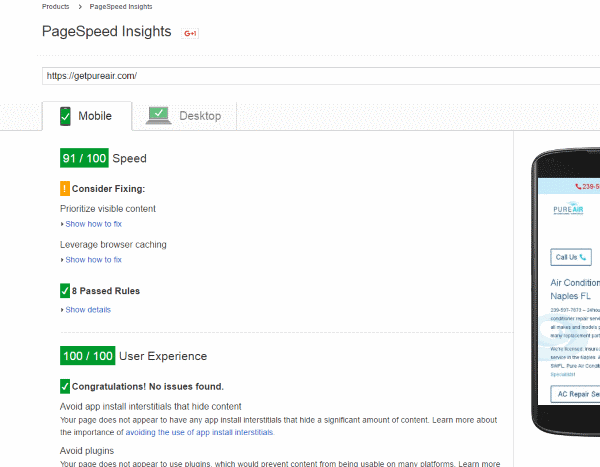
PageSpeed Insights is not just a speed test. It is a tool for seeing how a page behaves under performance pressure.
Page speed matters because users feel slow pages immediately. Slow pages create friction. They interrupt reading, browsing, clicking, filling out forms, and trusting the site.
PageSpeed Insights can help reveal issues with:
- Largest Contentful Paint
- Cumulative Layout Shift
- Interaction delays
- Image size and compression
- Render-blocking resources
- JavaScript and CSS weight
- Server response time
- Mobile performance
I do not believe every page needs to chase a perfect score for the sake of the number. But if a page is slow, unstable, or frustrating, that is not just a technical issue. It is a user issue.
Good performance is part of good accessibility, good design, and good SEO.
Lighthouse
Lighthouse is built into Chrome DevTools and can test performance, accessibility, best practices, and SEO basics.
I like Lighthouse because it gives a quick technical snapshot of a page. It is not a replacement for judgment, but it can quickly point to problems that deserve attention.
The accessibility section is especially useful for catching issues like missing labels, contrast problems, heading problems, and other structural concerns.
For newer users, Lighthouse can feel like a checklist. For experienced users, it becomes a way to ask better questions:
- Is this page easy to parse?
- Is the structure clean?
- Is the page too heavy?
- Are we creating unnecessary friction?
- Would this page work well for users on slower devices?
- Would this page make sense to assistive technology?
The goal is not to worship the report. The goal is to use the report to see the page more clearly.
Read: Lighthouse & Core Web Vitals – Interpretation Standards
Rich Results Test
The Rich Results Test checks whether a page may be eligible for certain Google rich results based on its structured data.
This is useful when working with schema markup for things like articles, products, places, videos, breadcrumbs, recipes, events, reviews, or other supported result types.
Structured data should not be treated like magic ranking dust. It is a way to clarify what is already present on the page.
If the page says one thing and the structured data says another thing, that is a problem. Schema should reinforce the page, not try to sneak a different meaning into it.
Use the Rich Results Test when you want to know whether Google can read your markup for Google-supported search features.
Schema Markup Validator
The old Google Structured Data Testing Tool is no longer the main tool I would point people toward. For broader schema validation, use the Schema Markup Validator.
The difference is important. The Rich Results Test focuses on Google rich result eligibility. The Schema Markup Validator is more about checking whether your structured data is valid according to Schema.org vocabulary.
In plain language:
- Rich Results Test: “Can Google use this markup for eligible rich results?”
- Schema Markup Validator: “Is this structured data written correctly?”
Both can be useful. They answer different questions.
Google Trends
Google Trends is useful for understanding how interest changes over time.
I do not use Trends as a simple keyword tool. I use it to look for changes in language, seasonality, regional differences, and emerging phrases.
Google Trends can help answer questions like:
- Is this phrase becoming more common?
- Is interest seasonal?
- Do users in different regions use different wording?
- Is one phrase replacing another phrase over time?
- Is this topic actually growing, or did it just spike briefly?
This is especially useful when writing evergreen content. You do not want to chase every temporary spike, but you also do not want to miss a real language shift.
Google Search Itself
One of the most useful SEO tools is still Google Search itself.
Search the phrase. Look at the result page. Look at what Google is choosing to show. Look at the page types, titles, snippets, local results, videos, images, discussions, shopping results, maps, and related searches.
The search results page can tell you a lot about intent.
For example, if you search a phrase and Google mostly shows how-to guides, that query may have informational intent. If Google mostly shows product pages, the intent may be commercial. If Google shows maps, local packs, and business profiles, local intent may be strong.
This does not mean copying what already ranks. It means understanding what kind of problem Google thinks the user is trying to solve.
Good SEO starts by respecting the searcher’s intent.
Google Business Profile
Google Business Profile is important for local businesses.
This is not a traditional website SEO tool, but it matters for local visibility. A business profile can affect how a company appears in Maps, local packs, branded searches, and nearby service searches.
For local SEO, make sure the profile is accurate, complete, and honest.
Important details include:
- Business name
- Address or service area
- Phone number
- Website URL
- Hours
- Categories
- Services
- Photos
- Reviews
Do not stuff the business name with keywords. Do not pretend to serve areas you do not really serve. Do not use the profile to create a fake version of the business.
Local SEO works best when the business information is clear, consistent, and real.
A Note About Deprecated Google SEO Tools
Some older Google tools have changed or been retired.
The old Mobile-Friendly Test is retired. Mobile usability is still important, but modern testing usually involves PageSpeed Insights, Lighthouse, Search Console, and real device checks.
The old Structured Data Testing Tool is also no longer the main structured data testing tool. Use the Rich Results Test for Google rich result eligibility and the Schema Markup Validator for broader schema validation.
This is one reason I do not like building an SEO process around one tool name. Tools change. The underlying questions remain.
- Can users access the page?
- Can search engines crawl it?
- Can the page be indexed?
- Can the structure be understood?
- Does the page load well?
- Does the content match the user’s intent?
- Is the page honest about what it offers?
Final Thought
These are not “SEO tools” exactly. They are ways to see different layers of a website.
Search Console shows how Google is interacting with the site. URL Inspection shows what is happening with a specific page. PageSpeed Insights and Lighthouse show performance and accessibility friction. Rich Results Test and Schema Markup Validator show whether structured data is clear and valid. Google Trends shows how language and interest change over time. Google Search itself shows what kind of result Google believes users need.
The tools are useful, but the mental model matters more than the tools.
Good SEO is not about forcing a page into a search result where it does not belong. Good SEO is about making a useful page easier to find, easier to understand, faster to load, and better aligned with the person searching for it.
That is why I still use these tools. Not because they magically make pages rank, but because they help reveal whether a website is clear, accessible, technically sound, and honest about what it is.
Updated from an older urlmd article originally published in 2017.
You’ll like: Understanding Core Web Vitals: Enhancing Your Website’s Performance and SEO
Feeling Curious about SEO? Ask questions related to the Google tools mentioned above.
Want to add a link to a great SEO tool here? Feel free but I will delete junk.
It’s hard to get my wordpress with the green speed.
It can take a lot of tinkering depending on your theme.