
Originally published 1/1/2015, rewritten 10/6/2026
A WordPress navigation menu helps people understand your website and find their way through it. Its links also give search engines paths to other pages and context about those destinations.
The useful SEO work is straightforward: choose clear link labels, organize destinations thoughtfully, and make sure the menu works for people using keyboards, touchscreens, and assistive technology. Adding keywords to hidden settings is not a substitute for those foundations.
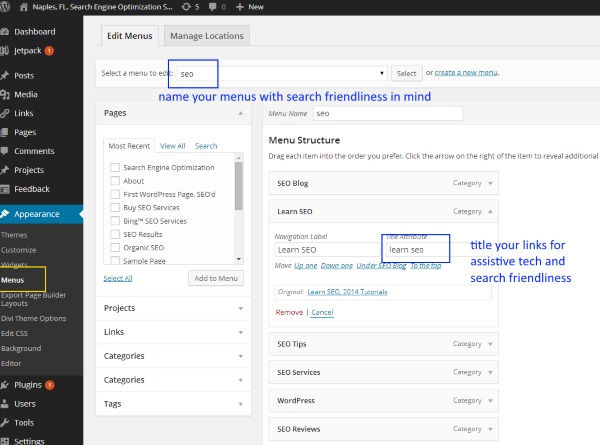
This updated guide corrects two recommendations from the original article: link title attributes are not a dependable SEO or accessibility improvement, and the administrative name of a WordPress menu is not a meaningful keyword-optimization opportunity.
Write Clear Menu Labels
The visible text of a menu link is its navigation label. It is also anchor text: the wording that helps readers and search engines understand the linked destination.
A useful label answers a small question before someone clicks: What will I find here?
- “Kitchen Remodeling” is clearer than “Transform Your Space” when the destination explains kitchen-remodeling services.
- “Aircraft Maintenance” is clearer than “What We Do” when visitors need to distinguish maintenance from other aviation services.
- “Contact” usually needs no embellishment. Familiar wording is useful.
Use the language your readers recognize. Relevant search terms often belong naturally in navigation, but a menu does not need to repeat every service, location, or keyword variation.
For example, “Kitchen Remodeling” may work well in the main navigation. “Affordable Kitchen Remodeling Contractors in Springfield” is usually better addressed through the destination page’s title and content, if that wording accurately describes the business.
The menu label does not have to match the page title word for word. A short “Accessibility” link can lead to a page with a longer, more descriptive heading. What matters is that the destination fulfills the expectation created by the link.
Understand Menu Names and Navigation Labels
WordPress uses several kinds of names around navigation. They serve different purposes:
- Administrative menu name: Helps an editor identify a menu, such as “Primary Navigation” or “Footer Resources.”
- Menu location: Identifies a placement provided by a theme, such as a header or footer location in a classic theme.
- Navigation label: The visible wording of an individual menu link.
- Navigation landmark label: Helps assistive-technology users distinguish navigation regions, such as “Primary” and “Footer.”
Depending on the theme or navigation system, an administrative name may influence generated identifiers or other markup. That does not make it a useful place to insert keywords. Choose names that help the people maintaining the website.
Likewise, an accessible navigation label should explain the region’s purpose, not carry an SEO phrase. Where a page has multiple navigation regions, clear labels can help people distinguish them. URLMD’s guide to HTML landmarks explains how these regions support navigation.
Know the Limits of Title Attributes
A link’s HTML title attribute can provide advisory information. Some desktop browsers display it as a small tooltip when a pointer rests over the link.
However, that tooltip is not reliably available to people using touchscreens or keyboards. Assistive technologies also handle title attributes differently depending on the element, browser, and settings.
Do not put essential information in a title attribute. It should not be required to understand a menu link, and it is not a dependable way to improve search visibility. Repeating the link label or adding keyword variations generally offers little practical value.
If a menu says “Services” but needs a tooltip reading “Residential Kitchen and Bathroom Remodeling” to make sense, consider improving the visible label or menu structure instead.
A link title attribute is not a page title
These are separate HTML features:
titleon a link: Optional advisory information attached to that element.- The page’s
<title>element: Document metadata used for the browser tab and considered by search engines when generating a search-result title.
For the second topic, see page titles and meta descriptions. Changing a menu link’s title attribute does not change the destination page’s title.
Find the Relevant WordPress Settings
The editing path depends on your theme, WordPress version, permissions, and any navigation tools your site uses.
Classic themes: Appearance → Menus
In a typical classic-theme setup, open Appearance → Menus, select the appropriate menu, and expand a menu item to edit its navigation label.
The Screen Options tab can expose additional fields, including Title Attribute and Link Target. Enabling one of these options makes the field available in the editor; it does not mean the setting needs to be used.
After editing, save the menu and check that it is assigned to the intended theme location.
Block themes: the Site Editor and Navigation block
With a block theme, navigation is generally managed through Appearance → Editor. Depending on the interface, you may select navigation directly or open the header or template part containing a Navigation block.
Select an individual link to edit its text and destination. Additional settings may appear in the block toolbar or sidebar. Save the relevant changes, then inspect the public-facing page.
Should a menu link open in a new tab?
Ordinary navigation links should generally open in the current tab. People can choose to open them elsewhere using their browser controls.
If there is a specific reason to force a new tab or window, use the link-target setting and give readers a clear warning. Do not rely on a hover tooltip to provide that warning. An external destination alone is not a reason to force a new tab.
Build Useful, Accessible Navigation
A main menu is a set of useful starting points, not an inventory of every page on the website.
Choose destinations based on the tasks visitors need to complete. Group related material beneath understandable categories, and use contextual links within pages to help people reach more detailed information.
For example, a remodeling website might link to a “Remodeling Services” overview, which then explains and links to kitchens, bathrooms, and additions. A smaller site might place those individual services directly in the menu. Neither structure is automatically better; the right choice depends on the content and the people using it.
This is part of information architecture: making relationships and routes through information understandable.
Use real links for destinations
A navigation link should normally be an HTML anchor with an href pointing to its destination. That supports ordinary browser behavior and gives crawlers a discoverable link.
A control that only opens or closes a submenu should generally be a button rather than a fake link. When a parent item must both lead to a page and expose a submenu, the implementation needs to make those actions distinct and usable.
Make dropdowns work without a mouse
Submenus should not depend on pointer hover alone. Check that visitors can reach the controls, open the submenu, follow its links, and close it using a keyboard. Focus should remain visible throughout.
Also test mobile navigation on an actual touchscreen where possible. A menu that looks tidy in the editor may behave differently once a theme’s styles and scripts are applied.
For a deeper review, see keyboard navigation best practices.
Review Your Menu After Changes
Once the changes are saved, check the published menu rather than relying only on the editing interface.
- Meaning: Can someone unfamiliar with the website predict where each link leads?
- Destinations: Does every link reach the intended page without an error or unnecessary redirect?
- Placement: Is the correct menu appearing in the header, footer, and mobile layout?
- Keyboard use: Can you reach and operate links and submenu controls with visible focus?
- Touch use: Can you open submenus and select links without relying on hover?
- Consistency: Do labels and destinations agree across desktop and mobile navigation?
- Maintenance: Have outdated destinations, duplicate entries, and unnecessary new-tab behavior been removed?
If your changes do not appear, check whether a site cache, hosting cache, or content delivery network is serving an older version.
WordPress menu SEO is less about filling optional fields and more about maintaining clear routes through the website. Useful labels, working links, thoughtful organization, and accessible controls help people reach the content—and give search systems a clearer structure to follow.
Really very beautiful written article about SEO. I was looking for SEO training in tutorials and found your website. Its really very interesting.
Thank you Heena, you need to add title attributes to the links in the main nav bar on your site 🙂