

Web standards quality assurance is the process of checking whether a website is built in a stable, accessible, crawlable, maintainable, and user-friendly way.
It is not just a visual review. A page can look fine in a browser and still have serious problems with structure, accessibility, performance, indexing, metadata, schema, or long-term maintainability.
Web standards quality assurance helps protect the parts of a website that users may never see directly but search engines, browsers, assistive technologies, and future developers depend on.
What Web Standards Quality Assurance Means
Web standards quality assurance, sometimes shortened to web standards QA, combines checks against applicable web standards with broader checks of product behavior, usability, and maintainability. State which requirement or expectation each check evaluates rather than treating every recommendation as the same kind of standard.
A simple definition is:
Web standards quality assurance is the process of checking whether a website follows accepted technical, accessibility, performance, visibility, and usability standards before and after publication.
Why it matters for website optimization: A site that is easier for browsers, users, assistive technologies, and search engines to understand is usually easier to maintain and improve over time.
Identify the Basis for Each Check
An HTML conformance requirement, a WCAG success criterion, a search engine’s implementation guidance, and a team’s performance target have different purposes and authority. Record the relevant specification or criterion, its version or level where applicable, and any project-specific acceptance conditions. Search recommendations are not automatically HTML requirements, and a team’s preferred score is not a universal compliance threshold.
Markup validation checks a defined set of rules; passing it is not a seal of overall quality. It does not establish usable task completion, factual accuracy, or accessibility conformance. See W3C’s explanation of validation and its limits.
Web standards QA asks questions such as:
- Can users access and understand the page?
- Can search engines crawl and interpret the page?
- Can assistive technologies navigate the page?
- Does the page load quickly enough to be usable?
- Does the HTML structure match the meaning of the content?
- Are metadata, canonicals, schema, and links working correctly?
- Can future developers maintain the page without unnecessary confusion?
This is why web standards QA is larger than proofreading and more durable than a launch checklist. It is a way of protecting the hidden structure of a website.
Why Web Standards QA Matters
Web standards QA matters because many website problems are not obvious from a quick visual review.
A page may appear finished while still having issues that affect users, search engines, accessibility tools, analytics, conversions, or future development work.
For example, a page might look correct but still have:
- No clear H1
- Duplicate title tags
- Incorrect or conflicting canonical declarations
- Images that are much larger than necessary
- Buttons that cannot be reached with a keyboard
- Form fields without proper labels
- Invalid structured data
- Broken internal links
- JavaScript errors
- Pages accidentally blocked from indexing
These issues may not all damage a website immediately. Some are small. Some are serious. Some only become visible later when traffic drops, accessibility problems are reported, search engines misinterpret a page, or developers have to clean up avoidable technical debt.
Good QA reduces preventable failure.
It does not guarantee that a website will rank, convert, or perform perfectly. But it helps make sure the foundation is not quietly working against the site.
QA protects users
Users should be able to read, navigate, search, compare, submit forms, click buttons, and understand what a page is offering. When standards are ignored, users often feel the problem before the team sees it in a report.
QA protects search visibility
Search engines depend on crawlable pages, clear structure, useful content, internal links, canonical signals, metadata, and accessible resources. If those pieces are inconsistent, website visibility performance can become harder to diagnose.
QA protects future work
A website is rarely finished forever. Pages are edited. Templates are reused. Designs change. Content grows. Development teams rotate. A standards-based site is easier to maintain because its structure is more predictable.
The Main Layers of Web Standards QA
Web standards QA works best when it is layered. No single test catches everything. Automated tools are useful, but human review still matters.
A practical QA process usually includes visual QA, technical QA, accessibility QA, visibility QA, content QA, and performance QA.
Visual QA
Visual QA checks what users can see on the page.
This includes:
- Layout
- Spacing
- Typography
- Image display
- Button visibility
- Header and footer consistency
- Mobile and desktop behavior
- Responsive layout changes at different screen sizes
Visual QA is important, but it should not be the only kind of QA. A visually polished page can still fail structurally.
Technical QA
Technical QA checks whether the page is functioning correctly beneath the surface.
This may include:
- HTML validity
- CSS behavior
- JavaScript errors
- Console warnings
- Status codes
- Redirect behavior
- Canonical tags
- Robots directives
- XML sitemap inclusion
- Internal link behavior
Technical QA is especially important when templates, CMS settings, plugins, JavaScript frameworks, or redirects are involved.
Accessibility QA
Accessibility QA checks whether people using different devices, input methods, and assistive technologies can use the website.
This may include:
- Heading order
- Keyboard navigation
- Visible focus states
- Image alt text
- Form labels
- ARIA usage
- Color contrast
- Error messages
- Screen reader clarity
Accessibility should be evaluated early and throughout development. Automated checks can identify some issues, but no tool alone establishes accessibility conformance. Combine them with knowledgeable manual evaluation and, where possible, involvement of people with disabilities. See WAI’s evaluation overview.
Test complete tasks and state changes. For a form, check keyboard entry, activation, missing or invalid input, error identification, correction, loading feedback, success, failure, and recovery. Follow focus after dialogs open or close and after content changes; reaching a control with Tab does not establish that it can be used successfully. Include zoom and narrow-screen behavior, not only a default desktop view.
Visibility QA
A website visibility QA workflow checks whether search engines can crawl, understand, and evaluate the page.
This may include:
- Title tag
- Meta description
- H1 and heading hierarchy
- Indexability
- Canonical URL
- Internal links
- Structured data
- Image filenames and alt text
- Content duplication
- Page speed and rendering behavior
Website visibility QA is not about keywords, it’s about making sure the page sends consistent structural signals.
Content QA
Content QA checks whether the page communicates clearly and accurately.
This may include:
- Readability
- Grammar
- Accuracy
- Heading clarity
- Logical flow
- Duplicate sections
- Outdated claims
- Thin or unhelpful content
- Over-optimized wording
A technically correct page can still fail if the content is confusing, vague, outdated, or written only for search engines.
Performance QA
Performance QA checks whether the page loads and responds quickly enough for real users.
This may include:
- Image size
- Font loading
- JavaScript weight
- CSS delivery
- Largest Contentful Paint
- Cumulative Layout Shift
- Interaction responsiveness
- Server response time
Performance QA should distinguish controlled lab diagnosis from evidence across real visits. Record test conditions, reproduce relevant interactions, and check the report’s scope and time window. A good Lighthouse score does not establish good field Core Web Vitals or accessible task completion. See lab and field data.
Common Web Standards QA Problems
Many web standards problems repeat across websites because teams often review pages visually but do not always review them structurally.
Common issues include:
- Pages published without unique metadata
- Multiple H1s used for styling instead of structure
- Heading levels skipped for visual reasons
- Oversized image resources delivered for their display needs, even when useful larger originals are retained separately
- Missing width and height attributes on images
- Buttons built as non-semantic elements
- Links that do not clearly describe their destination
- Forms without accessible labels
- Broken skip links or missing focus states
- Schema copied from another page and not updated
- Canonical tags pointing to the wrong URL
- Pages blocked from indexing by mistake
- Old redirects creating unnecessary chains
- Mobile layouts breaking at specific screen widths
- Important content hidden behind fragile JavaScript behavior
The pattern behind many of these issues is simple: the surface looks finished, but the structure is incomplete.
That distinction matters. Web quality is not only what a page looks like. It is also how the page behaves, how it is interpreted, and how reliably it can be maintained.
Web Standards QA Checklist
A QA checklist should be adapted to the website, CMS, team, and type of page being reviewed. A large ecommerce site, a local service business, a publisher, and a SaaS platform may all need different checks.
Still, a basic web standards QA checklist can include the following.
Page structure
- The page has one clear primary topic.
- The H1 accurately describes the page.
- Headings follow a logical order.
- Sections are organized in a way users can scan.
- Navigation and internal links are understandable.
Metadata and optimization basics
- The title tag is unique and accurate.
- The meta description is useful and not duplicated.
- Any canonical declaration expresses the intended equivalent page; distinguish that preference from the search engine’s selected canonical.
- The page is indexable if it is meant to appear in search.
- The page is included in the XML sitemap if appropriate.
- Internal links point to the final preferred URLs.
Accessibility basics
- Images have appropriate alt text when needed.
- Decorative images are handled correctly.
- Forms have labels.
- Buttons and links can be reached and activated by keyboard, and focus remains understandable through task and state changes.
- Focus states are visible.
- Color contrast is readable.
- Interactive elements are understandable without relying only on color or position.
Technical checks
- The page returns the correct status code.
- Redirects are intentional and not excessive.
- There are no major browser console errors.
- CSS and JavaScript do not block important content unnecessarily.
- Structured data passes the relevant checks and accurately represents visible content; validity alone does not establish claim accuracy or guarantee a rich result.
- Open Graph and social sharing tags are correct if used.
Performance checks
- Delivered images are compressed and appropriately sized for layout and display density; useful originals can remain separate.
- Fonts are not unnecessarily heavy.
- Layout shifts are minimized.
- The main content loads quickly.
- Third-party scripts are reviewed for performance impact.
Content checks
- The page answers the searcher’s or user’s main need clearly.
- The content is accurate and current.
- The introduction does not hide the main point.
- Examples, definitions, or explanations are added where helpful.
- The page avoids keyword stuffing.
- The content is useful beyond repeating what already appears in the search results.
Web Standards QA as a Workflow
Web standards QA works best when it is part of the workflow instead of a last-minute task.
If standards are only checked at the end, problems are more expensive to fix. A heading structure problem may require content edits. A template issue may affect hundreds of pages. A performance issue may require design, development, and content changes.
A better workflow usually looks like this:
- Define requirements before building. Identify applicable standards and project acceptance conditions for structure, accessibility, visibility, performance, and maintainability.
- Build with standards in mind. Use semantic HTML, accessible components, optimized media, and consistent templates.
- Review on staging. Test the page before it is public.
- Verify before launch. Check metadata, links, indexability, schema, mobile behavior, accessibility basics, and performance.
- Check after launch. Verify the deployed revision’s intended behavior. Production can differ from staging because of cache state, access settings, configuration, consent choices, integrations, or third-party services.
- Monitor over time. Recheck important pages after redesigns, plugin changes, CMS updates, migrations, and content edits.
This approach turns QA into a shared habit instead of an emergency cleanup process.
Tie Findings to Identifiable Work
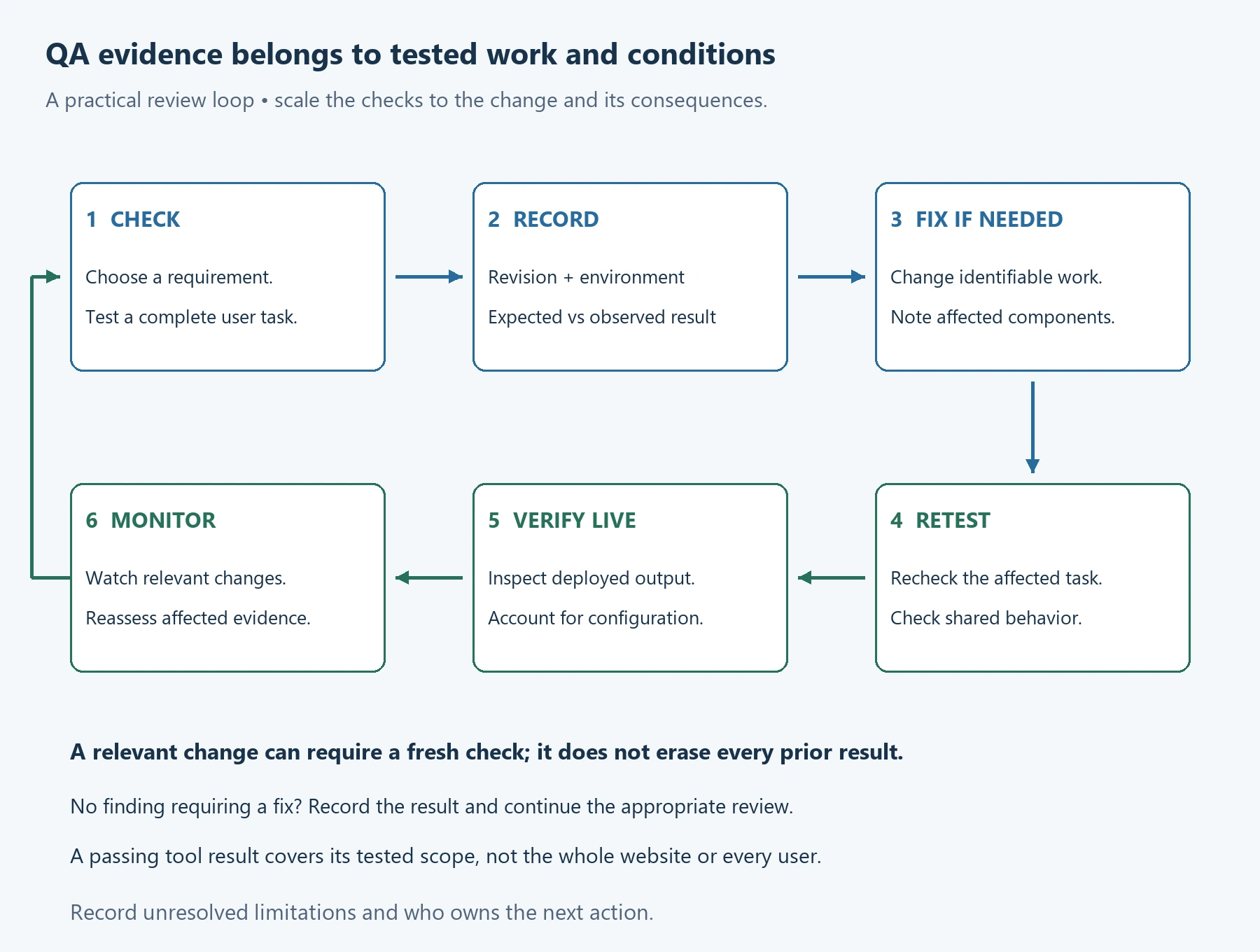
A useful finding records the page or template revision, environment, browser and relevant device conditions, reproduction steps, expected behavior, observed behavior, and evidence. Include the requirement being assessed and the extent of the review. “Passed” should not float free of what was tested or be treated as approval of every future revision.
For example: “Contact template revision 12, staging, Firefox, keyboard: submit an empty required email field. Expected: a clear error associated with the field and an understandable route to correction. Observed: a generic error above the form with no indication of the affected field.” After the fix, record the new revision and retest both the failing task and relevant shared form components. This is a fictional finding, not a report about this website.
Retesting should follow the scope of the change. A shared component update can affect several templates; a wording correction does not automatically require repeating every unrelated test. Keep unresolved issues and review limitations visible, identify an owner, and distinguish tested behavior from accepted residual risk. Where review leads to approval, bind that approval to the work and intended action.
Who owns web standards QA?
Web standards QA is shared work.
Different people may own different layers:
- Developers usually own code structure, templates, rendering, redirects, and performance implementation.
- Designers usually own layout, visual hierarchy, responsive behavior, and interface clarity.
- SEO specialists usually own crawlability, metadata, indexability, structured data, internal linking, and search intent alignment.
- Content teams usually own accuracy, clarity, readability, headings, and page usefulness.
- Accessibility reviewers may help test assistive technology behavior, keyboard use, focus order, and inclusive interaction patterns.
- Project owners usually make sure the page is actually ready to launch.
The exact ownership depends on the organization. One person may perform several roles on a small site; the important points are explicit responsibility, realistic review scope, and access to needed expertise. QA should be built into the work rather than left as an unowned task at the end.
Web Standards QA Is About Structural Trust
Web standards quality assurance is not about chasing perfect scores in every tool. Tools are useful, but they are not the whole standard.
A page can pass one automated test and still be confusing. A page can look attractive and still be inaccessible. A page can rank for a while and still be hard to maintain. A page can load in one browser and still fail in another context.
Here, structural trust means justified confidence in the behavior actually examined, within the recorded scope. It is not proof that every claim is true, every user can complete every task, or future changes will remain safe.
Can the page be understood?
Can it be used?
Can it be crawled?
Can it be maintained?
Can it survive future edits without collapsing into hidden problems?
That is the real value of web standards QA. It helps websites become more durable.
FAQ About Web Standards Quality Assurance
What is web standards quality assurance?
Web standards quality assurance is the process of reviewing a website to make sure it follows important technical, accessibility, SEO, performance, and usability standards.
Is web standards QA the same as website testing?
The terms overlap. Website testing can include functional, accessibility, performance, and standards checks. This article uses web standards QA for the ongoing practice of defining relevant requirements, checking behavior, recording findings, and verifying changes—not to claim that it is inherently broader than website testing.
Why does web standards QA matter for optimization?
It matters because search engines depend on crawlable pages, clear structure, accurate metadata, canonical signals, internal links, performance, and useful content. Weak standards can make SEO problems harder to diagnose and fix.
Can a page look fine and still fail QA?
Yes. A page can look correct visually while still having broken headings, missing alt text, invalid schema, poor performance, incorrect canonicals, inaccessible forms, or indexing problems.
What tools can help with web standards QA?
Useful tools may include browser developer tools, Lighthouse, PageSpeed Insights, HTML validators, schema validators, accessibility checkers, crawl tools, Google Search Console, Bing Webmaster Tools, and manual keyboard testing.
Do automated QA tools replace manual review?
No. Automated tools are helpful, but they do not replace experienced human review. Some issues require judgment, context, and real user thinking.
When should web standards QA happen?
Web standards QA should happen before development, during staging, before launch, after launch, and during major updates. It works best as an ongoing workflow rather than a final checklist.